


Our review
 Analysis by Lookingapps
I see the Walgreens app as most useful when one household has several small errands to manage at once: picking up a prescription, checking a shopping deal, and arranging a photo order without juggling separate tools. That convenience has a catch, though. It brings personal health tasks and everyday shopping into one account, so it works best when each person understands whose account is open and who is responsible for following through.
One app for errands that overlap
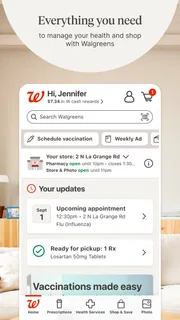
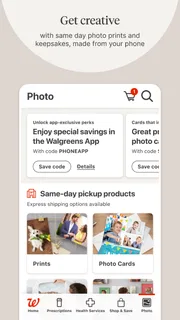
Walgreens is a free shopping app from Walgreens Co, and its mix of pharmacy and retail features is what distinguishes it from a standard store app. I would reach for it when I already expect to visit Walgreens and want to handle more than one task before going: review a prescription-related need, look for coupons, or sort out a photo purchase alongside ordinary shopping.
The app has a 4.6 average from around 1.6 million ratings, with over 10 million installs. Those figures suggest it has a substantial user base, but they don’t tell me whether it will fit a particular household’s routines. The more useful question is whether Walgreens is a regular destination for you. If it is, bringing these errands together can save some switching around; if it isn’t, the app may add another account and another place to check without much payoff.
A realistic shared-household errand
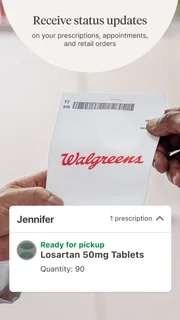
Imagine a parent is already planning a store visit, while another adult notices that a prescription needs attention and someone else wants to print photos. A single app can make that set of tasks easier to organize before leaving. I’d still treat them as separate responsibilities: the person handling the prescription should check the relevant details, while the person making the photo order should confirm the intended selection and pickup arrangement.
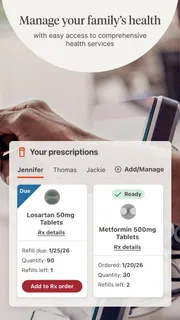
That division matters because convenience can blur ownership. An app that combines shopping and pharmacy tasks doesn’t automatically make a household account or shared task board. I wouldn’t assume that one person can safely manage every family member’s health needs just because the phone is passed around. The practical benefit is having several Walgreens-related tasks available in one place, not having a built-in system for assigning them.
Set up the account with clear boundaries
For shared-device use, I recommend deciding who signs in before using the app for anything personal. A phone kept in a common area can make it easy for another household member to open an active session, so avoid treating the device itself as proof that the right account is being used. Before starting a prescription task, check the account context and the information on screen rather than relying on memory.
This is especially important if a household member also uses the app for coupons, purchases, or photos. Those activities may feel casual, but they sit alongside more sensitive pharmacy tasks. Keeping personal shopping and prescription responsibilities distinct is a sensible habit even when one person helps another with the phone. If several people need access, each should understand which account they are using and what actions they are taking.
More articles

Instagram Makes Everyday Moments Worth Sharing
A rare social app that can be a photo diary, a neighborhood window, and a lively conversation in the same session—though its best moments still require a little restraint.
I’d also separate “helping someone navigate” from “making decisions for them.” A relative can assist with finding the right part of the app or preparing for a store visit, while the person whose prescription or purchase is involved checks the details. That small pause is more useful than assuming every task can be safely completed on behalf of someone else.
Coordinate the trip, not just the taps
The strongest household workflow is to use the app before the errand, then confirm what still needs attention when everyone is together. One person can check a shopping need, another can verify a photo order, and the person responsible for a prescription can handle that task directly. Before leaving, I’d make a short mental or written list of what each person expects to pick up. The app can bring the activities together, but people still need to communicate about who is doing what.
A useful non-obvious habit is to avoid doing everything in one rushed session. Pharmacy-related actions deserve a careful check, while coupon browsing and photo selection can wait until there’s time to review them. Splitting those steps reduces the chance of mixing up an account or overlooking a detail while trying to finish several errands at once. It also makes the app feel less like a jumble of unrelated services.
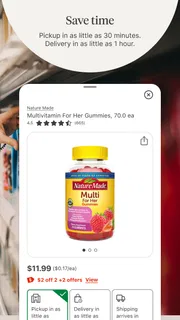
For photos, I’d treat the order as its own task rather than assuming it is merely another shopping item. Confirm the images and the intended recipient before moving on. For coupons, check the offer while planning the purchase instead of expecting every deal to apply automatically. The app gathers these tools under one roof, but the user still needs to verify the choices and understand what is relevant to the planned visit.
Age, trust, and who should use it
The listed content rating is Everyone, and the app is suitable as a general retail tool in that sense. That rating doesn’t mean a child should manage an adult’s account or make decisions about prescriptions. For younger users, I’d keep use limited to simple shopping or photo tasks with an adult nearby, and keep account ownership and health-related actions with a responsible adult.
For an older relative who is comfortable with a smartphone, the app may be helpful when someone can sit beside them and let them make the important choices. I’d be cautious about taking over their account or completing health tasks without their involvement. Clear consent and a quick review of the screen are better safeguards than assuming a shared phone makes every action appropriate.
Trust also depends on what you want from an app. If you mainly want to shop across many retailers, a general shopping service may be more convenient. If your priority is keeping pharmacy activity separate from retail browsing, a dedicated pharmacy option may suit you better. I’d choose Walgreens when its pharmacy and store services are already part of my routine, not simply because combining categories sounds convenient.
What feels convenient—and what can get in the way
The main strength is practical consolidation: pharmacy tasks, coupons, photo services, and shopping are available within a Walgreens-focused experience. That is a real advantage for someone who wants to prepare for one store visit without opening several unrelated apps. The trade-off is that a broad app can take attention away from the task at hand. If you only need one function, finding it among several kinds of activity may feel like extra navigation rather than a shortcut.
I also wouldn’t use a coupon as the sole reason to choose a product or make a trip. Deals are most useful when they match something you already planned to buy. Likewise, a photo workflow is worthwhile when Walgreens is a convenient destination for that order; people who prefer another photo service may be better off staying with the option they already know. The app is most convincing when it supports an existing Walgreens errand, rather than trying to replace every shopping or pharmacy tool in a person’s life.
Version 117.1 is the current version, and the app requires OS 10 or later. It was released on June 3, 2010, so it has been around for a long time, though age alone is no guarantee that every screen or workflow will feel equally straightforward. I’d judge it by whether the current version runs comfortably on your device and whether the features you actually need are easy for you to locate.
When another option is the better fit
If your household doesn’t shop at Walgreens, installing the app just to collect coupons or manage occasional errands may not be worth maintaining another login. A retailer-neutral shopping app is more sensible for comparing options across stores. If you want a clean, dedicated way to handle pharmacy needs, an app focused on that service may feel less cluttered. And if family coordination is the main goal, a shared calendar or task list is a better tool for assigning responsibilities; I wouldn’t expect this app to provide household-management features.
That distinction helps set realistic expectations. Walgreens can support a coordinated trip because different errands are available in the same place, but the coordination itself still happens between people. I’d use it as a convenient companion to a household routine, not as the routine’s organizer or as a substitute for checking important information with the person concerned.
My household verdict
Overall, I’d recommend Walgreens to people who already rely on Walgreens and want shopping, coupons, photos, and pharmacy-related tasks close together. It is especially handy when an errand can cover several needs, provided each person keeps clear track of their own account and responsibilities. The free price makes it easy to try, but the best reason to keep it is regular use of the services it brings together.
I’d skip it if Walgreens is not part of your usual routine, if you prefer to keep pharmacy tasks in a separate app, or if you expect the app to coordinate a family on its own. For a shared phone, I’d make account boundaries a habit and keep sensitive tasks with the person they concern. Used that way, Walgreens is a practical household convenience rather than a one-stop solution for every errand.
Pros
- Prescription refills can be requested from the app.
- The store locator helps find nearby Walgreens locations.
- Digital coupons make eligible savings easy to browse.
- Photo ordering lets you print pictures from your phone.
- The app supports same-day pickup for many items.
Cons
- Some features may require a Walgreens account.
- Prescription services depend on pharmacy availability.
- Digital coupon terms can be easy to overlook.
- Product availability may vary by store.
- Some orders may require a minimum purchase for delivery.


