



Our review
 Analysis by Lookingapps
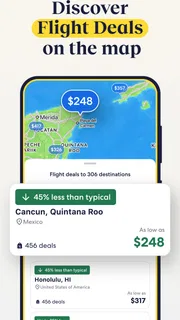
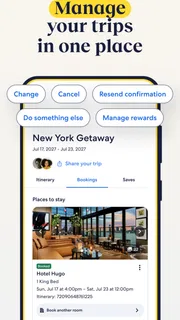
I’d describe Expedia as most useful when a trip has several moving parts and I want to compare them in one place. It is a free travel app from Expedia, built around planning and booking rather than serving as a detailed destination guide. I like the convenience of keeping flight, hotel, car, and activity searches together, but I would not treat a bundled result as automatically the best deal. The real value is having a clearer starting point for a trip, then checking the details that matter before committing.
Where the all-in-one approach earns its place
Expedia sits in the travel and local category, but its strongest identity is as a trip-booking workspace. Instead of beginning with separate apps for accommodation, flights, transport, and things to do, I can use one familiar place to explore those needs together. That is especially helpful when I am still shaping a trip: a change in dates or destination can affect the rest of the plan, and having the main searches close at hand makes comparison less fragmented.
The app’s core appeal is not that it removes every decision. It is that it reduces the effort of getting from “we should go somewhere” to a shortlist worth considering. For a straightforward getaway, I can think through where to stay and how to get there without constantly switching between unrelated services. For a more complex itinerary, the same setup can help me see whether a destination makes practical sense before I spend time researching every detail independently.
Packages are the clearest example of that approach. Bundling parts of a trip can be convenient, and the app presents that as a way to save. I would still compare the total against booking the components separately, particularly if I have flexible dates or a preferred hotel. The useful question is not simply whether a package looks tidy, but whether its included choices fit my plans and whether the combined cost works for me.
That distinction matters because travel decisions are personal. A cheaper room far from the places I want to visit may be poor value once transport and time are considered. A flight time that looks acceptable on its own may make a short trip feel rushed. I use Expedia as a comparison and planning tool, not as a substitute for checking location, timing, and the terms of each booking.
A practical workflow for planning without overcommitting
My preferred way to use an app like this is to begin with the fixed points: the destination, approximate travel dates, and any non-negotiable needs. I then look at the main travel components before narrowing down accommodation. That order helps prevent a tempting hotel option from anchoring the whole plan before I know whether the transport arrangements suit me.
For example, imagine I am arranging a short city break with another person. I would first compare travel options for the dates we can actually go, then look for accommodation that makes the intended activities easy to reach. Only after that would I consider whether adding a car or booking activities as part of the same planning session makes sense. That sequence is a small but useful safeguard against choosing each item in isolation.
More articles

Instagram Makes Everyday Moments Worth Sharing
A rare social app that can be a photo diary, a neighborhood window, and a lively conversation in the same session—though its best moments still require a little restraint.
The strongest reason to use Expedia is the ability to plan across trip components without turning the first hour of research into a parade of separate apps. That advantage is practical rather than magical: I still need to read what I am booking, but I can establish a coherent outline more quickly.
There is also value in keeping the search process focused. When I am comparing a few possible versions of a trip, I can work through the same broad categories instead of rebuilding my search from scratch in different places. That makes it easier to notice trade-offs, such as whether a lower accommodation cost is worth a less convenient location or whether an activity fits the time available.
Where comparison still needs human judgement
The main limitation of an all-in-one travel app is also part of its appeal: a broad selection can create the impression that the first suitable result is the obvious choice. It is not. Search results and package suggestions are starting points, and I would inspect the booking details rather than assume that two options are directly comparable. Room conditions, travel times, cancellation terms, and what an activity includes can change the practical value of an offer.
Packages deserve particular care. A combined booking may simplify planning, but it can also make it harder to judge each component at a glance. Before choosing one, I would check what is included, whether the dates and schedules line up, and whether the accommodation suits the purpose of the trip. If I already know exactly which hotel or flight I want, booking each piece separately may give me a better fit or make the comparison clearer.
Expedia also is not the right answer for every kind of travel research. If my priority is deep local knowledge, neighborhood recommendations, or a highly specialized itinerary, I would pair it with destination-focused research rather than expect a booking app to do everything. Likewise, a traveler who has a strong preference for a particular airline, lodging provider, or specialist service may be better served by checking that provider directly alongside the app.
For last-minute plans, I would be especially careful not to let speed replace verification. It can be tempting to choose the first combination that appears workable, but travel details have consequences: a mismatched schedule or unsuitable room can turn a convenient booking into an avoidable hassle. I would pause long enough to review the exact dates, locations, and conditions before confirming.
Who is likely to get the most from it
I think Expedia is a good fit for people who want one broad place to begin arranging an ordinary leisure trip, especially when they need more than just a hotel. It suits travelers who are still comparing destinations or combinations and appreciate being able to consider accommodation, flights, cars, and activities within the same planning routine. It can also help someone who is coordinating a simple trip for two or a family and wants to keep the basic choices organized.
It is less compelling for someone who already has every component chosen and simply wants the most specialized booking experience for one service. A traveler who values a particular airline’s own tools, has a favorite hotel chain, or needs an unusually tailored itinerary may prefer to make the final booking elsewhere after using Expedia to orient their search. That is not a knock on the app; it is a reminder that breadth and specialization solve different problems.
Expedia is free to download and is rated for Everyone, which makes it approachable for a wide range of travelers. Its average rating is 4.8 from around 1.7 million ratings, and it has more than 50 million installs. Those figures indicate that it is widely used, though popularity alone cannot tell me whether a particular booking will suit my trip. I would weigh the app’s convenience against the details of the options in front of me.
The app was released in 2011, and its current version is 2026.42.0. It requires operating system version 10 or later. I would check that requirement before planning around it on an older device, but for a compatible phone the main question is whether its broad booking approach matches how I like to travel. Expedia is developed by Expedia, a name closely associated with arranging trips, and that focus is reflected in the way the app brings several travel needs together.
Small decisions that make the app more useful
One helpful habit is to compare the complete trip rather than judging each search result by its headline appeal. I would keep the same travel dates in mind while considering transport and lodging, then ask how much time and effort each option adds on the ground. A cheaper room can be a poor choice if it makes the activities I care about inconvenient; a bundled option can be sensible if its components genuinely align.
Another useful approach is to separate exploration from commitment. I can use the app to sketch out a trip and identify possibilities without assuming I need to book immediately. Once I have a short list, I can scrutinize the conditions and compare alternatives. This is especially worthwhile when the trip involves several travelers, because one person’s preferred schedule or accommodation style may not work for everyone.
I would also decide in advance which parts of the trip are flexible. If dates are fixed but the hotel is not, I would focus my comparison there. If accommodation is already settled, there is less reason to let a package dictate the rest of the plan. Treating flexibility as a limited resource helps me avoid being drawn toward a combined choice that is convenient on paper but awkward in practice.
For activities, I would check how an option fits into the day rather than treating it as a standalone purchase. A good-looking activity can take more time than expected or sit awkwardly between travel plans. Even without overcomplicating a relaxed holiday, checking the schedule and location can prevent the itinerary from becoming a list of bookings with no breathing room.
A clear verdict for trip planners
My verdict is that Expedia is a useful, broad-purpose travel companion when convenience and cross-category comparison matter more than a narrowly specialized booking experience. It gives me a sensible place to begin planning a trip that may involve several kinds of reservations, and its package-oriented approach can be appealing when the pieces fit together. I would recommend it to a friend who wants to explore options efficiently, provided they are willing to inspect the details rather than book on autopilot.
I would not recommend relying on it alone for every travel decision. People with strict provider preferences, unusual itinerary needs, or a desire for local guidance should use it as one part of their research and compare with more focused alternatives. Even for an uncomplicated break, I would check locations, schedules, and conditions before confirming anything.
In short, Expedia works best as a flexible planning hub, not as a promise that every bundle is the right deal. If I were helping a friend plan a trip from a blank page, I would suggest starting here to get the main pieces into view, then making the final choices carefully. That balance—using the convenience without surrendering judgement—is what makes the app worthwhile.
Pros
- Compare hotel prices and options in one place
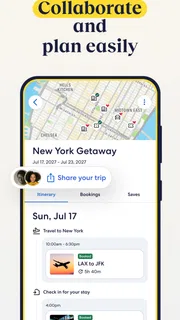
- Save trip details for quick access offline
- Earn rewards through eligible bookings
- Manage flights and hotel reservations in the app
- Find rental cars alongside other travel options
Cons
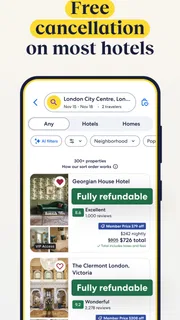
- Some bookings may have separate cancellation rules
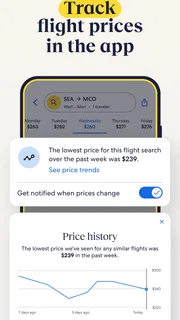
- Prices can change before you complete a booking
- Customer support response times may vary
- Not every airline or hotel is available
- Refunds may take time to appear after cancellation


