

Our review
 Analysis by Lookingapps
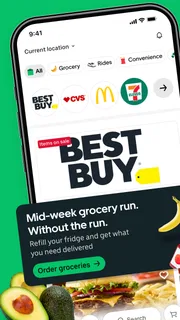
I find Uber Eats most useful when I want to turn “What should I eat?” into a manageable decision rather than a long search across menus. It brings restaurant ordering and grocery or essentials shopping into one app, and it can also connect users to an Uber ride. That breadth is convenient, though the experience still depends on what is available nearby and on the details of each order. I’d recommend it as a flexible option for busy days, not as a guarantee that every meal will be cheaper or quicker than the alternatives.
Making an order without turning it into a project
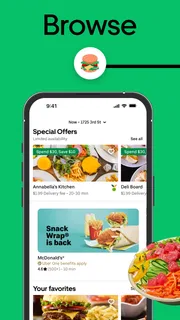
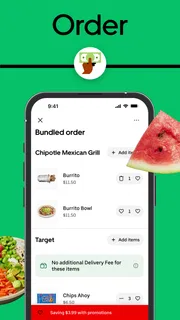
My basic routine is to enter the app with a specific need in mind: a meal for one, dinner for a group, or a few groceries I’ve run out of. I browse the relevant options, compare menus or items, and check the order carefully before submitting it. That last step matters. A restaurant menu can make similar dishes look easy to confuse, while grocery selections may require a closer look at sizes and quantities.
For a restaurant order, I’d start by narrowing the choice to food I actually want, then compare the menu and the final checkout details rather than choosing on the first appealing photo. Delivery apps can make browsing feel effortless, but extra items and small add-ons accumulate quickly. I try to decide on the main meal first and treat sides or drinks as deliberate choices, not automatic additions.
Groceries are a different kind of task. I use the app more like a short replenishment run than a full weekly shop: the essentials I need soon, or a few items that would otherwise interrupt the evening. Before checking out, I review each item and quantity. That simple habit helps avoid the familiar problem of ordering a convenient substitute for something I meant to buy in a particular size or form.
A realistic example is getting home late and realizing I’m missing ingredients for dinner. I can compare a prepared meal with the cost and effort of ordering a handful of groceries, then pick whichever better suits the situation. If I’m tired and need dinner now, restaurant delivery may win. If I already have most of what I need, groceries may make more sense. The benefit is having both kinds of errand in the same place; the trade-off is that the app can’t make the choice for me.
The useful trick is to decide what job the order should do before browsing. “Feed everyone quickly” and “restock breakfast basics” call for different searches. Starting with a clear purpose helps me avoid scrolling through restaurants when I need groceries, or building a grocery basket when a ready-to-eat meal is the practical answer.
Check the details that affect the real decision
I’d pay attention to the information shown for the particular restaurant or item and to the complete checkout screen. Availability can vary by location, and a familiar option may not be presented the same way every time. I wouldn’t assume that a dish, grocery item, or delivery arrangement will be identical across orders. Reading the current details is more useful than relying on memory from a previous visit.
More articles

Instagram Makes Everyday Moments Worth Sharing
A rare social app that can be a photo diary, a neighborhood window, and a lively conversation in the same session—though its best moments still require a little restraint.
It is also worth reviewing the destination and order contents before placing anything. This is especially helpful when ordering while distracted, switching between dinner and household essentials, or arranging food for someone else. A quick final scan is less frustrating than discovering that the basket reflects an earlier plan.
I treat the app’s payment and account choices as practical settings to inspect rather than something to rush through once and forget. Keep the information you use for orders current, and confirm the selected options when checking out. I wouldn’t assume a setting applies to every future order without checking the screen in front of me; a careful confirmation is a small effort that can prevent avoidable mix-ups.
For anyone who is mindful of spending, I recommend deciding on a comfortable total before browsing and checking the full amount before confirming. The menu price alone is not the whole decision. If the final total no longer feels worthwhile, it is perfectly reasonable to choose a simpler meal, collect food another way where that is practical, or use a grocery run instead. Convenience has value, but it should be weighed against what the order actually costs you.
Build repeatable habits, not imaginary shortcuts
The best way I’ve found to make repeat orders less of a chore is to remember what worked and use that knowledge deliberately. If a meal suited a particular evening, I can return to that choice when the same need comes up rather than browse every option again. For groceries, keeping a mental list of recurring basics makes it easier to distinguish a useful top-up from an impulse basket.
I also separate browsing from ordering when I have time. Looking over options before I’m hungry or in a rush makes it easier to compare dishes calmly and notice what I’d actually choose. When I do need food quickly, I can go straight to a familiar type of meal instead of treating the entire catalogue as a fresh decision. This is a personal workflow, not a hidden app function, but it makes the service feel more efficient.
For a household order, I’d settle the group’s choices before building the basket. That avoids a string of last-minute changes and reduces the chance of ordering overlapping items. If people have different preferences, checking the final basket together is a sensible step. The app can bring options together, but coordination still depends on the people placing the order.
There is a useful distinction between repeatable and identical. A restaurant I liked once may not fit a different occasion, and a grocery list that worked last week may include things I no longer need. I use past experience to narrow the field, not to skip the current menu and checkout review. That balance saves time without assuming every order is interchangeable.
Where it fits among the alternatives
Compared with ordering directly from a restaurant, a delivery marketplace can be more convenient when I want to look across participating places in one app. Direct ordering may be the better fit when I already know exactly where I want to buy from or prefer that restaurant’s own process. I wouldn’t choose between them on convenience alone: I’d compare the available menu, the total, and the arrangement that makes sense for that particular order.
For groceries, Uber Eats is most appealing to me when the need is immediate and limited. A planned supermarket trip or a dedicated grocery service may be a better match for a large weekly shop, where I want to compare a broader range and organize a substantial list. A neighborhood shop can also be the simpler choice if it is nearby and I have time to go. The app’s strength is combining food and essentials in a convenient ordering flow, not replacing every way of shopping.
Its connection with ride requests adds another kind of convenience for someone who already uses Uber services, but I see food ordering and rides as separate decisions. Having them associated with the same company does not make a meal order inherently better. Uber Technologies, Inc. develops the app, and I’d judge it primarily on whether its available food and grocery choices meet my needs in the moment.
That makes the app particularly suited to people who value choice and want one familiar place to check for restaurant meals or everyday essentials. It may be less compelling for someone who shops only in person, always orders directly from one restaurant, or is unwilling to pay for the convenience of delivery. If cost or a very specific shopping range is the priority, comparing with local alternatives is the more sensible move.
What to expect from the experience
The biggest limitation is that a broad catalogue can also mean more decisions. When I have no idea what I want, scrolling can take longer than making something at home or visiting a shop. Availability and suitability depend on the choices presented for the order, so I wouldn’t treat a previous experience as a promise about the next one. A short list of dependable options is more helpful than expecting the app to solve indecision.
There is also a difference between convenience and control. A delivery order removes a trip, but it does not remove the need to check what is being ordered, whether the basket is complete, or whether the final total feels right. Grocery orders in particular benefit from careful quantity checks. For restaurant meals, I review the selected dishes and any choices shown during ordering. These small checks are useful precisely because a fast checkout can make it easy to overlook details.
People who prefer to inspect produce, choose every substitute in person, or make spontaneous changes while shopping may be happier at a physical store. Likewise, if I’m already close to a restaurant and collecting an order is easy, delivery may not be the best use of the app. The right choice depends on whether avoiding the trip matters more than having direct control over the errand.
It is a free app rated for Everyone, and its scale is reflected in an average rating of 4.6 from around eight million ratings. It has been installed over 100 million times, which signals broad adoption, but popularity doesn’t guarantee that it will suit every neighborhood or ordering style. I’d treat those figures as context, not as a substitute for checking whether the local selection works for me.
My verdict after weighing the trade-offs
I recommend Uber Eats to people who want a practical way to compare restaurant meals with grocery or essentials delivery and who are comfortable checking the details before paying. Its strongest everyday use is reducing friction: one place to explore a quick meal or handle a small restock when leaving home is inconvenient. The fact that it can also be used to request a ride makes it broader than a food-only tool, although food and grocery ordering are the reasons I’d open it most often.
I would not make it my automatic answer to every meal or shopping problem. If I’m planning a large grocery shop, I may prefer a supermarket-focused option. If I already know the restaurant, ordering directly could be more straightforward. If I care most about the lowest possible cost, I should compare the final total and consider pickup or an in-person trip rather than assume delivery is the best value.
For experienced users, the real improvement comes from a few dependable habits: start with a clear purpose, keep a short mental list of reliable choices, check quantities and menu selections, and review the complete order before confirming. None of that requires a secret feature, and it makes the app easier to use without pretending that every order is effortless.
Overall, Uber Eats earns a place on my phone as a flexible convenience app, not as a replacement for restaurants, supermarkets, or personal judgment. I’d keep it if I regularly switch between ordering a prepared meal and topping up essentials. If I rarely use delivery or prefer to manage each errand directly, I’d skip it. For the right routine, it can save a trip and simplify a decision; the smartest users still choose carefully and check the basket.
Pros
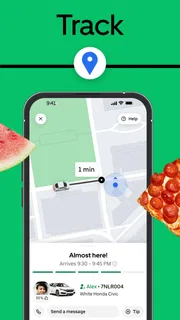
- Live order tracking shows your courier’s progress.
- Saved addresses make repeat orders quicker.
- Scheduled delivery helps plan meals ahead.
- The app supports contact-free delivery instructions.
- Order history makes it easy to reorder favorites.
Cons
- Delivery fees can make small orders expensive.
- Menu prices may differ from in-store prices.
- Busy periods can lead to longer delivery estimates.
- Some restaurants require a minimum order amount.
- Refunds for missing items may take time to resolve.


