

Our review
 Analysis by Lookingapps
I judge a car-shopping app less by how many listings it can show me than by whether it helps me make a calmer decision. CarGurus: Used & New Cars is built for people weighing vehicles, sellers, financing, or a sale of their own, and that makes it more useful as a research companion than as a substitute for inspecting a car in person. I’d reach for it when I’m narrowing down choices or preparing to talk to a seller, while keeping my own notes and checking important details before committing.
Shopping with context, not just a long list
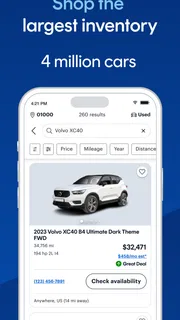
CarGurus is a free app in the auto-and-vehicles category, developed by CarGurus, Inc. Its focus is straightforward: help people shop for cars, consider financing, or sell. That breadth is practical because buying and selling often overlap. A shopper may need to compare a replacement vehicle with the value of the one they already own, while a seller may be trying to understand what alternatives buyers can see.
The app has a 4.8 average from around 247,000 ratings, with about 12,000 written reviews and over 10 million installs. Those figures suggest that it has reached a large audience, but popularity alone doesn’t tell me whether a particular listing is right for me. I’d treat it as a starting point for comparing options, then verify condition, history, paperwork, and the final terms directly with the seller.
What I find most useful in a car marketplace is the ability to turn a vague wish into a manageable shortlist. Instead of browsing every vehicle that catches my eye, I’d first decide what matters most: body style, budget, mileage, location, or a particular model. Then I’d compare a small number of plausible candidates side by side in my own notes. That simple discipline makes it easier to spot when a low asking price comes with a trade-off I’m not willing to accept.
How I’d use it for a real purchase
Imagine I need a dependable used car before my current one becomes unreliable. I’d use CarGurus to explore the local market, identify a few vehicles that fit my budget, and note the questions each listing raises. A car that looks attractive on screen might still be a poor choice if its condition, service record, or seller’s answers don’t hold up. The app can help organize the search; it can’t make that judgment for me.
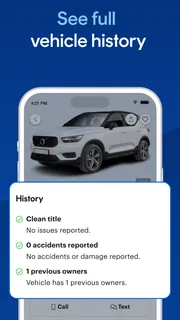
I’d also avoid treating the displayed asking price as the full cost of ownership. Before arranging a visit, I’d ask about the vehicle’s condition, available records, title status, and any fees or terms that affect the final amount. If financing is part of the plan, I’d compare the proposed payment and total obligation with other options rather than judging an offer by its monthly figure alone. That approach is especially useful when a convenient listing makes it tempting to rush.
A less obvious benefit of looking across listings is learning what compromises are common in the area. If the few cars within budget all have more mileage than I expected, that’s a signal to reconsider my age, distance, or feature requirements before becoming attached to one listing. Conversely, if I’m seeing similar vehicles at meaningfully different asking prices, I’d use that contrast to prepare specific, polite questions—not to assume that one seller must be wrong.
More articles

Instagram Makes Everyday Moments Worth Sharing
A rare social app that can be a photo diary, a neighborhood window, and a lively conversation in the same session—though its best moments still require a little restraint.
Where it fits among car-shopping options
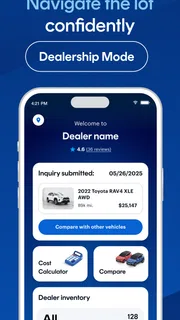
Compared with general classifieds, a dedicated car-shopping app keeps the search centered on vehicles rather than mixing cars with unrelated goods. Compared with visiting individual dealer inventories one at a time, a marketplace can make broader comparison more convenient. The trade-off is that a broad search experience may not provide the depth of a specialist inspection, a vehicle-history check, or direct discussion with a knowledgeable mechanic. I’d use those tools when the decision depends on facts that a listing alone cannot establish.
CarGurus may also be less suitable for someone who already knows the exact car they want and has a trusted local seller. In that case, a direct dealer conversation or an independent inspection may be more useful than another round of browsing. Likewise, shoppers who need a vehicle immediately should be careful not to mistake a large selection for guaranteed availability: I’d confirm that a car is still for sale before making a special trip.
What the version tells me—and what it doesn’t
The app’s current version is 5.63, and it was released on February 11, 2014. Those are useful points of reference for understanding that this is an established product with a long history, rather than a newly launched experiment. They do not, by themselves, reveal which features changed in a particular update or how the interface has evolved over time, so I wouldn’t infer a specific improvement from the version number alone.
That distinction matters for existing users. If the app works well for someone’s search, there’s no reason to assume that a new version has changed their saved habits or the way they evaluate cars. I’d check the current interface after updating and make sure any important search criteria are still set as intended. For a major purchase, keeping a separate shortlist is sensible regardless of the app: it gives me a stable record of candidates and questions even if I switch devices or change how I browse.
CarGurus supports devices running version 7.0 or later of its operating system. For someone using an older device, compatibility is a practical first check before planning a search around the app. The content rating is Everyone, and the app is free, so the basic decision to try it is relatively low commitment. I’d still consider whether I’m comfortable doing marketplace research on a phone; anyone who prefers to compare many details at once may find a larger screen and a written spreadsheet more convenient.
Useful habits that prevent avoidable mistakes
My first tip is to set the budget before looking at appealing vehicles. Browsing first can quietly shift expectations upward, especially when a car has the right appearance or equipment. I’d separate the amount I can spend from the features I’d like, and decide in advance which compromises are acceptable. That makes it easier to walk away when a listing is attractive but financially uncomfortable.
Second, I’d keep a short question list tailored to each candidate instead of sending the same generic message to every seller. For one vehicle, I might need clarification about its condition; for another, I might want to confirm whether the stated details and paperwork are available. Specific questions make a response more useful and help me compare sellers fairly. If answers are vague or inconsistent, I’d treat that as a reason to slow down rather than as a puzzle to solve through optimistic assumptions.
Third, I’d plan the inspection before arranging a purchase. A listing can help me decide which cars are worth seeing, but it cannot replace an in-person look or an independent professional opinion when I’m unsure. I’d confirm the vehicle’s identity and condition, review relevant records, and make sure the final paperwork matches what we discussed. This is where a marketplace app’s convenience has a firm limit: it can connect research to a potential transaction, but it cannot remove the need for due diligence.
Where the experience has limits
Any search app can encourage endless comparison. More options can make a buyer feel informed while delaying the harder work of choosing and checking a car. I’d set a reasonable stopping point: shortlist a handful of serious candidates, verify the strongest ones, and stop browsing once a clearly better option is no longer emerging. That helps avoid spending hours comparing minor differences that won’t matter after ownership begins.
There is also a difference between what a listing claims and what a buyer can verify. Descriptions and photos are useful for screening, but they are not a guarantee of mechanical condition or a complete account of a vehicle’s history. I would not rely on a favorable price impression as evidence that a car is a bargain. The right comparison includes condition, documentation, location, seller communication, and the cost of any work I may need to arrange.
For sellers, the same caution applies in reverse. A marketplace can help put a car in front of shoppers, but a seller still needs accurate details, clear communication, and a realistic approach to negotiation. Anyone expecting an app to handle every step of selling should be prepared for the work that happens outside the screen: answering questions, arranging viewings, and completing the transaction responsibly.
Who should try it, and what to watch
I’d recommend CarGurus to people who want one place to begin comparing new and used cars, especially if they are still deciding what fits their needs. It can be a useful companion for a first-time buyer who wants to understand the local choices, or for an experienced shopper who wants to build a shortlist before visiting sellers. It is less compelling for someone who needs expert mechanical advice, expects a listing to guarantee a car’s quality, or already has a more direct route to the exact vehicle they want.
As the product develops, I’d watch for changes that make comparison and follow-up clearer without encouraging buyers to mistake convenience for certainty. For now, the version number gives a current reference point, not a promise about future features. I’d also pay attention to whether the app remains comfortable on my device and whether its current workflow suits the way I search; those are better reasons to keep using it than assumptions about what an update might add.
Overall, CarGurus: Used & New Cars is a sensible place to start a vehicle search, with enough range to support shopping, financing exploration, and selling in one app. My recommendation comes with a clear condition: use it to find and compare possibilities, not to skip verification. If I keep a disciplined budget, ask targeted questions, and inspect a promising car before deciding, the app can make a complicated search feel more organized without pretending that buying a car is risk-free.
Pros
- Compare listings from multiple dealerships in one place.
- Price analysis helps identify cars listed below market value.
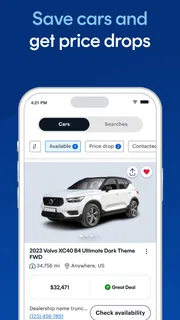
- Saved searches make it easier to track new listings.
- Seller contact options are available directly from listings.
- Filters help narrow results by price mileage and vehicle type.
Cons
- Listing details can vary in accuracy between sellers.
- Some listings may no longer be available when contacted.
- Prices and fees can change before a purchase is finalized.
- The app depends on location data for nearby search results.
- Contacting sellers may lead to follow-up calls or messages.


