




Our review
 Analysis by Lookingapps
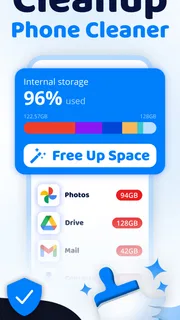
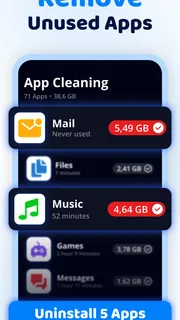
I think of Cleanup: Phone Storage Cleaner as a practical maintenance tool for people who want a clearer view of crowded phone storage, rather than a cure-all for a sluggish device. Its focus is straightforward: finding unwanted files, spotting duplicate photos, and helping manage memory and storage. That makes it most useful when you already know your phone is getting cluttered and want a dedicated place to review what might be safe to remove.
A focused cleaner for everyday storage problems
Deep Flow Apps publishes this free Tools app, which has an Everyone age rating. The current release is version 1.4.7, and its broad appeal is reflected in an average rating of 4.4 from around 379,000 ratings, with over 10 million installs. Those figures suggest a widely used utility, but I would still judge it by the choices it presents on your own device: a cleaner is only helpful when it makes it easy to understand what it wants to remove.
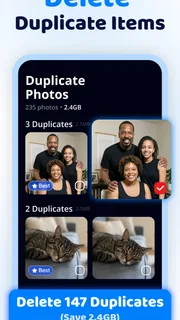
The central appeal is that Cleanup brings several familiar housekeeping jobs together. Instead of manually searching through a camera roll for repeated shots and then separately checking storage, you can use one app as a starting point for both. I like that scope for routine tidying, especially for anyone who takes plenty of photos and rarely revisits old files. The important distinction is that the app can help you identify candidates; you remain responsible for deciding what is genuinely disposable.
That distinction matters more than a dramatic promise to free space. A duplicate-looking image may be a second copy you do not need, but it could also be a different crop, edit, or version you intentionally kept. Before accepting a cleanup suggestion, I would pause over anything personal or hard to replace. A few extra seconds of review are worth it when the alternative is losing a photo you meant to keep.
Where it fits in a phone-cleanup routine
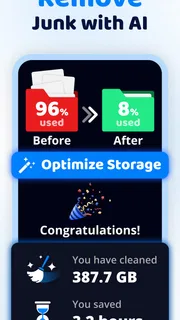
I would use Cleanup when storage is becoming inconvenient, not as a daily ritual. For example, imagine you are about to record a family event and your phone warns that space is tight. You could review duplicate photos first, then look through other suggested junk, keeping anything you recognise as important. Afterward, check the phone’s own storage screen to see whether the cleanup actually addressed the pressure you were feeling. This simple before-and-after check keeps the app’s suggestions connected to a real need.
A useful workflow is to start with the least emotionally risky material. Review obvious repeated images or files you already know you no longer need, then move to less familiar items only if you still need room. I would avoid selecting a large batch just because it looks efficient. Sorting in smaller passes makes it easier to catch mistakes and to learn which kinds of suggestions are useful on your device.
The app’s memory and storage language can also be easy to misread. Clearing storage can create room for more photos or downloads; it does not automatically mean the phone has gained lasting speed or that every performance issue has been solved. If your real problem is a battery that drains quickly, a broken app, or an older device struggling with demanding tasks, a storage cleaner may not address the cause. I see Cleanup as a tool for managing clutter, not a substitute for diagnosing every phone problem.
More articles

Instagram Makes Everyday Moments Worth Sharing
A rare social app that can be a photo diary, a neighborhood window, and a lively conversation in the same session—though its best moments still require a little restraint.
What the current version tells me
Version 1.4.7 gives readers a concrete picture of the app’s present release, while its November 21, 2025 release date places that version in a recent product timeline. Those facts are useful for identifying what you are considering now, but they do not, by themselves, show which features changed between releases or how much a particular update improved the experience. I would not infer a complete redesign or a new capability from a version number alone.
For existing users, the sensible approach is to treat the installed app as the authority on the options currently available. If you already rely on Cleanup, review what it proposes before confirming any deletion, especially after updating or returning to the app after a long break. The version information helps distinguish the current release from an older install; the practical test is whether the present interface still makes its cleanup choices clear to you.
More broadly, the product’s evolution is something I would judge through observable changes rather than assumptions. A newer version can be a reason to check the app again, but it is not proof that every friction point has disappeared. When you update, take a moment to look over the current screens and settings, then decide whether the workflow suits the way you manage photos and files. That is a better basis for trust than expecting a version label to guarantee a particular improvement.
How it compares with built-in storage tools
Most phones already provide some way to inspect storage, remove files, or manage photos. Those built-in tools are often the better first stop if you want a basic storage breakdown or prefer not to add another utility. Cleanup’s stronger case is convenience: it brings duplicate-photo cleanup and junk removal into a purpose-built app, which may feel more approachable than moving between separate system menus.
The trade-off is that a dedicated cleaner adds another decision layer. You need to understand its suggestions and make sure they match your intentions. If you are comfortable sorting photos manually and only need to delete a few large videos, the phone’s own file and gallery tools may be quicker. If you repeatedly accumulate similar photos and want one place to begin reviewing clutter, Cleanup is a more natural fit.
I would also distinguish this app from a backup service. Cleaning and organizing are not the same as preserving a copy somewhere safe. If a photo matters, make sure you have kept it in the place you intend before removing another version. This is especially important when you are freeing space in a hurry: urgency makes it tempting to approve suggestions without checking whether the files are backed up or still needed.
Costs, patience, and sensible expectations
Cleanup is free to install, with in-app purchases ranging from $6.99 to $39.99 per item. I would begin with the free experience and decide whether its actual cleanup workflow is useful before spending anything. The listed range is broad enough that it is worth reading the purchase screen carefully and checking what an individual offer includes, rather than assuming every tool or option is covered by the same payment.
There is also a small but important cost in attention. A cleaner cannot know which personal images have sentimental value, which files are needed for work, or whether two similar-looking photos serve different purposes. That is why I would not treat a one-tap approach as automatically safer or better. The most dependable result comes from pairing the app’s sorting help with your own review.
For a first cleanup, I recommend making a short pass rather than trying to empty the phone in one sitting. Remove only items you recognise, then check available space and decide whether another pass is worthwhile. This reduces the chance of deleting something important and helps reveal whether the main space problem is actually duplicated pictures, other junk, or something you should handle through a different tool.
Who I would recommend it to—and who should pass
I would recommend Cleanup to someone whose camera roll has become difficult to manage, who wants a focused way to review duplicates, or who prefers a dedicated cleaner over hunting through multiple menus. It is also a reasonable option for a family member who needs a simple starting point for a storage tidy-up, provided they are comfortable checking each proposed deletion rather than approving everything blindly.
I would skip it if your phone has plenty of room, you rarely save photos, or you already have a system that keeps storage under control. I would also choose built-in tools instead if you want only a basic storage overview, or a dedicated backup solution if your main concern is protecting files. Cleanup is most convincing when the problem is accumulated clutter; it is less compelling when you expect it to improve unrelated performance issues or replace careful file management.
What I would keep an eye on
When deciding whether to keep using it, I would watch for three practical things: whether its suggestions are easy to verify, whether the cleanup saves meaningful effort compared with your phone’s own tools, and whether the paid options offer something you personally need. These are more useful questions than simply counting how many items the app can flag. A shorter, understandable review is better than a larger cleanup list that leaves you unsure what is safe.
I would also pay attention to how often you need the app. If one careful session solves the immediate problem, there is no reason to turn cleanup into a constant habit. If your photo library keeps growing and repeated duplicates are the main burden, a recurring review may make sense. In either case, the decision should follow your storage needs rather than pressure to clear every last item.
My overall take is that Cleanup: Phone Storage Cleaner is a useful, focused option for people who want help reviewing phone clutter, especially duplicate photos. Its value depends on a cautious workflow: inspect suggestions, protect important files, and use the phone’s own storage view to judge the result. I would try it when cleanup has become a real chore, but I would not expect it to replace backups, solve every speed problem, or make deletion decisions on my behalf.
Pros
- Quickly identifies large files that may be taking up space.
- Duplicate photo detection can help reduce gallery clutter.
- Offers a simple way to review files before removing them.
- Useful for spotting similar photos in a busy camera roll.
- Can make storage cleanup easier for less technical users.
Cons
- Results may require careful review to avoid deleting wanted files.
- Photo analysis can take time on large libraries.
- Some cleanup features may require a paid plan.
- Storage estimates may differ from the device settings.
- Cleaner apps cannot increase the phone's physical storage.


