


Our review
 Analysis by Lookingapps
When I order pizza on a phone, the useful part is not just choosing toppings; it is knowing whether the order went through and what is happening next. That makes connectivity central to the experience of Domino’s Pizza USA. I find it most helpful when I have a reliable connection and want to place an order directly with Domino’s, then check its progress without repeatedly calling the store. If I mainly want to compare every nearby restaurant or browse a wide range of cuisines, a general delivery service may suit me better.
Ordering works best when the connection stays steady
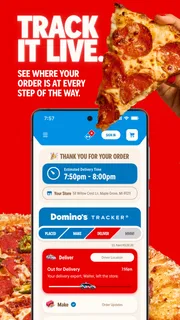
This is a free Food & Drink app from Domino's Pizza LLC, designed around ordering from the chain rather than acting as a general restaurant directory. The key advantage is a focused path from choosing Domino’s food to following the order. The app’s progress-tracking feature is especially useful after checkout: it gives the order a place to follow rather than leaving me to wonder whether it is still being prepared or is moving toward delivery.
That flow depends on the app being able to communicate with the service. A strong connection makes browsing, submitting an order, and checking progress feel like parts of one process. With a weak or unstable connection, those moments can become less reassuring: a screen may take longer to update, and it is harder to tell whether a tap has completed an action. My practical advice is to finish the order while connected to dependable Wi-Fi or mobile data, rather than waiting until I am already moving through a poor-signal area.
The most important moment to treat carefully is the final submission. If the app appears to pause after I place an order, I would avoid tapping the order button repeatedly. First, I would check whether the order appears in the app or whether its progress is visible; duplicate attempts are a worse outcome than taking a moment to confirm what happened. This is a general safe workflow for a network-based checkout, not a promise that every delay resolves in the same way.
What the tracker changes after checkout
Domino’s Tracker® is the feature that gives this app a stronger reason to stay open after ordering. It turns the period between checkout and receiving food into something I can monitor. That is handy when coordinating dinner with family, deciding when to set the table, or timing a short trip to meet a delivery. It does not remove the uncertainty that comes with a busy kitchen or a delivery in progress, but it can make the wait feel more legible than an order confirmation alone.
I would still treat a tracker as a progress aid, not a precise promise about the minute food will arrive. Network delays can also affect how current any status appears. If timing matters—for example, when I need to leave home soon—I would check the order before making plans around it and allow some flexibility. The app is most useful when I want a clearer sense of the order’s stage, not when I need an exact arrival guarantee.
It also helps to separate two questions: whether the order was submitted and whether its status has refreshed. A slow update does not automatically mean the order failed. Checking the order screen once, giving it a little time, and then deciding whether to seek help is more sensible than repeatedly refreshing or placing another order in a hurry.
More articles

Instagram Makes Everyday Moments Worth Sharing
A rare social app that can be a photo diary, a neighborhood window, and a lively conversation in the same session—though its best moments still require a little restraint.
Useful on the move, with a little preparation
The app fits everyday mobile situations well. I can picture using it on the commute home to arrange dinner, then checking the order once I am settled. It can also be practical when a group has already settled on Domino’s and one person is handling the order from a phone. In both cases, the benefit is having the chain’s ordering and progress information together rather than switching between a browser, a phone call, and a separate tracking screen.
There is a trade-off when ordering while walking, riding as a passenger, or moving between buildings: changing signal can interrupt the smoothness of browsing and checkout. I would make the choices and review the order when I can give the screen my attention, then use the tracker later if needed. That reduces the chance of misreading a selection or submitting before I have checked the important details.
For a family order, I recommend agreeing on the meal before opening the checkout flow. That is not a hidden app feature; it is a way to make the app’s focused ordering experience work better. When several people are calling out changes at once, a mobile checkout can become fiddly, and a shaky connection only adds friction. Settling the choices first makes the actual order easier to review and less likely to require corrections.
The app is available at no charge, and its age rating is Everyone. It has a 4.6 average from around 2.4 million ratings, with over 10 million installs. Those figures suggest it is a widely used option, but they do not tell me whether it will be convenient at a particular store or on a particular connection; that depends on the local ordering experience and the phone’s network at the time.
When something stalls, check before starting over
Connection trouble can be confusing because checkout and status updates happen at different points. If a screen stops responding after I submit, I would first look for a confirmation or an order already listed in the app. If I can see the order, I would wait for its progress to update rather than submit again. If I cannot establish whether the order went through, I would use the app’s available support or contact the store before attempting a second checkout. The goal is to resolve uncertainty without accidentally creating duplicate orders.
If the app itself is behaving oddly, basic recovery steps are worth trying in order: check whether the phone has a working connection, switch between Wi-Fi and mobile data if both are available, and reopen the app. I would avoid assuming that reinstalling it is the first fix, particularly while an order may still be active. A local display problem and an order-service problem are not necessarily the same thing, so confirming the order matters more than repeatedly restarting the app.
The current version is 13.11.3, and the minimum operating-system requirement is version 9. Keeping the app and phone software compatible is a sensible first step if installation or basic use is a problem. Still, an up-to-date app cannot compensate for a dead zone or an interrupted connection. If the signal is the issue, waiting until coverage improves is often more useful than repeating the same action.
One practical point is to keep the order details accessible while troubleshooting. If the app has already confirmed the purchase, avoid clearing app information or making changes that could make it harder to check the order. I would also take a moment to verify the selected items and destination before checkout, since correcting an order after it has entered the process may be less straightforward than catching a mistake on the review screen.
How it compares with other ways to order
Compared with a general delivery app, Domino’s own app is the more direct choice when I already know I want Domino’s. Its focus means I am not sorting through unrelated restaurants before reaching the menu, and the integrated progress tracking makes sense for someone who wants to follow that chain’s order in the same place. In contrast, a multi-restaurant service is better when I am still deciding what to eat, comparing local options, or hoping to combine choices from different businesses.
A phone call can be preferable when I need to explain an unusual request, resolve a confusing order, or ask a question before committing. The app is better for a straightforward order I can review visually. A browser-based option may be more comfortable for someone who prefers a larger screen, while the phone app is convenient when I want to order from wherever I am. Neither method can make a weak network disappear, so the best choice depends partly on whether the current connection is good enough for an online checkout.
The app’s narrow focus is both its strength and its limit. I would recommend it to regular Domino’s customers, people coordinating a familiar meal, and anyone who values checking progress after placing an order. I would skip it if I do not want Domino’s, need a broad comparison of local restaurants, or have a connection too unreliable to feel confident submitting an order. In those situations, another restaurant or a more suitable ordering method is the better fit.
A sensible approach to mobile data
Because browsing and tracking rely on communication with the service, it is reasonable to consider when I want the app active on mobile data. I can make my selections when I have a stable connection and check the tracker later when I want an update, rather than leaving the app open simply out of habit. I would not assume that any particular screen works without a connection; if I need to place or confirm an order, I plan around having internet access.
For someone managing a limited data allowance, the simplest approach is to use Wi-Fi for the order when convenient and switch to mobile data only when needed. I would also avoid repeatedly refreshing status just to see whether anything has changed. Checking at useful moments—after submitting and again when the timing affects what I do next—keeps the experience purposeful without turning the phone into a constant monitoring tool.
Privacy and data settings are worth reviewing in the phone’s own controls, especially if I prefer to limit background activity. I would not make assumptions about what the app collects or how its services operate based only on the ordering experience. The practical point is narrower: connection quality affects how smoothly I can browse, place, and follow an order, while my device settings help me decide when the app can use mobile connectivity.
My connectivity verdict
For me, Domino’s Pizza USA is at its best when I want a familiar Domino’s order and a convenient way to keep an eye on its progress. Its strongest use case is not discovering every possible dinner option; it is handling a direct order with less back-and-forth once I have decided what I want. The Tracker® adds real value during the wait, especially when I am coordinating plans around the food.
The experience is naturally tied to a working connection, so I would not rely on it as a way to place an order in a dead zone or treat a delayed status as proof that something has gone wrong. Check for confirmation before trying again, keep a little flexibility around timing, and use a phone call or another ordering route when the app cannot answer an important question. With those expectations, the app is a practical choice for straightforward Domino’s orders, rather than a replacement for every restaurant-ordering option.
Domino’s Pizza LLC first released the app on February 21, 2012, and the current version reflects an established mobile ordering product rather than a one-purpose tracker. I would install it if I order from Domino’s often enough to value the direct checkout and order updates. If I only need to compare restaurants or have unreliable internet where I plan to order, I would choose a different route instead.
Pros
- Order from a broad selection of pizzas and sides.
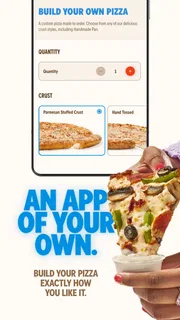
- Customize toppings and crust options before checkout.
- Save favorite orders for faster repeat purchases.
- Track an order as it moves through preparation and delivery.
- Choose delivery or carryout when available at your location.
Cons
- Menu options and prices can vary by location.
- Delivery availability depends on your address and local store hours.
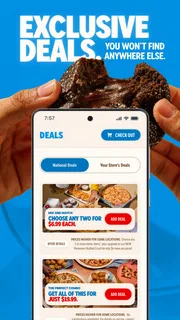
- Promotional deals may require specific items or order conditions.
- Delivery fees and other charges can increase the total.
- Some orders may take longer during busy periods.


