






Our review
 Analysis by Lookingapps
I reach for Pinterest when I have a vague idea and need to turn it into something I can actually plan. It is less like a conventional social feed and more like a visual notebook: I browse images, save the useful ones, and sort them into collections I can revisit later. That makes it appealing for everything from figuring out what to cook to gathering references for a room refresh. It is also easy to lose time in the endless stream of suggestions, so whether it suits you depends on how you like to find and organize inspiration.
Choose it for collecting ideas, not just following people
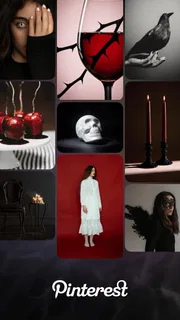
Pinterest is a free lifestyle app from Pinterest, and its central strength is the way it connects discovery with personal organization. Instead of asking me to keep up with a fixed set of accounts, it gives me a visual starting point: search for a topic, browse related images, then save anything worth returning to. The result feels closer to a collection of idea boards than a standard social timeline.
That distinction matters when choosing among lifestyle apps. If I want conversation and updates from friends, a social network built around posts and comments is probably a better fit. If I want step-by-step instructions first, a dedicated recipe, home-planning, or craft app may get me to the answer faster. Pinterest sits between those options: it is strongest when I am still deciding what I like, comparing possibilities, or collecting references before taking action.
The app is rated Teen, which is worth keeping in mind if you are choosing it for a younger user or sharing a device. Pinterest has an average rating of 4.2 from around 12 million ratings, and more than 1 billion installs. Those figures suggest broad appeal, but they do not tell me whether its discovery style will match your habits. The more useful question is whether you enjoy browsing visual ideas and are willing to organize the good ones yourself.
Start with a question you can refine
Search works best when I begin with a practical prompt rather than a broad mood. “Small entryway storage” gives me a more useful set of references than simply searching for “home.” Once I see a promising direction, I can adjust the wording, compare variations, and save a handful of examples instead of trying to remember everything from a long browsing session. This small change makes the app feel like a tool rather than a time-filling feed.
I also try to decide what a board is for before adding much to it. A board called “Weeknight meals” is easier to use than one that mixes recipes, kitchen décor, and holiday baking. For a project, separating broad inspiration from near-term options helps too: one collection can hold the general look I like, while another contains ideas I might realistically try. That structure is especially useful later, when an attractive image is no longer enough and I need to find the specific idea again.
Where the visual notebook wins
The strongest use case is gathering references across a project that takes more than one sitting. Imagine planning a bedroom refresh after work: I can browse color combinations, save lighting ideas, collect storage examples, and return to the same board when I am ready to compare them. That is more convenient than scattering screenshots through a camera roll, where they lose their original context and become difficult to search.
More articles

Instagram Makes Everyday Moments Worth Sharing
A rare social app that can be a photo diary, a neighborhood window, and a lively conversation in the same session—though its best moments still require a little restraint.
Boards also make Pinterest useful for interests that do not fit neatly into one shopping or planning category. I might keep one collection for lunches to try, another for garden layouts, and a third for a craft project. The app lets me explore those topics in one place without pretending they are all part of the same activity. In my experience, this flexibility is more valuable than using it as a public showcase: private, practical collecting can be the whole point.
A less obvious benefit is that saving an idea creates a lightweight decision history. When I return to a board, I can see not only the option I liked but also the other directions I considered. That is handy when tastes shift or a project becomes more concrete. Rather than asking “What was that look I saw?”, I can compare the saved choices and work out what consistently appeals to me.
There is a trade-off, though: an image can inspire without giving enough information to act on. A beautiful room photo may not explain its dimensions, materials, or source clearly. I treat saved posts as starting points, not guaranteed instructions or verified product recommendations. For recipes and do-it-yourself projects, I check whether the linked or accompanying details are complete before relying on them. Pinterest helps me discover possibilities; it does not automatically validate them.
When another kind of app is the better choice
If I already know exactly what I want to buy, a retailer’s catalog or a focused comparison service is usually more direct. Pinterest is better for narrowing taste than confirming current availability, specifications, or the best price. Likewise, if I need a dependable sequence of cooking steps, a recipe app organized around tested instructions may be more efficient than browsing an image-led collection.
For sharing everyday moments with friends, a conventional social app often makes more sense. Pinterest’s organizing logic is built around ideas and collections, not the give-and-take of a close-knit conversation. And if I am trying to finish a tightly defined task quickly, its recommendations can become a detour: each attractive result may lead to another search rather than a decision. In those situations, I set a specific goal before opening it or choose a more task-focused alternative.
It also cannot replace a proper project-management system when a plan needs deadlines, budgets, responsibilities, or detailed notes. I can use boards to gather visual references, but I would keep measurements, costs, and work schedules somewhere designed for that information. The practical division is simple: Pinterest for “what might this look like?”, a more structured tool for “who is doing what, and when?”
Make discovery useful instead of endless
My most reliable habit is to browse with a stopping point. I search for one question, save only ideas that meet a real need, then review the board before continuing. This prevents a common problem: a collection that grows quickly but never helps me choose. If I have saved several versions of the same idea, I remove the weaker ones and keep the examples that explain what I actually want.
Another useful approach is to treat boards as working folders, not permanent archives. When a project is finished, I can leave the collection as a record, repurpose it, or clean it up so future searches stay manageable. The app becomes more valuable when I return to saved ideas and make a decision; collecting hundreds of images without revisiting them turns its biggest strength into clutter.
Recommendations can be helpful when I want to explore a topic, but they can also pull me away from my original purpose. I use search when I need control and the home feed when I have time to wander. That distinction gives me a simple way to choose between focused research and casual inspiration. If the feed starts feeling repetitive or overly distracting, narrowing the task and relying more on targeted searches is a better response than expecting every suggestion to be relevant.
Think about the real cost of switching
Trying Pinterest is low-commitment because the app is free, but moving an established collection of ideas is a different matter. If your references already live in saved posts, browser bookmarks, or another visual organizer, rebuilding boards can take effort. I would not transfer everything at once. Start with one active project, save only what you still need, and see whether the board format improves how you make decisions.
There are in-app purchases priced from about $5.88 to $329.41 per item. I would treat those as optional rather than a reason to install the app: the basic appeal is discovering and organizing ideas, and you can decide whether any paid item is relevant to how you use it. The developer is Pinterest, and the app has been available since August 14, 2012, so it is a long-established option rather than a new concept to learn from scratch.
Switching away is just as personal. If you mainly use Pinterest to collect a few references, keeping a small number of boards may be enough even if another app handles the actual project. If you have built a large archive, first consider which collections still serve a purpose. The value is not in preserving every saved image; it is in being able to find the handful that help you choose or act.
My recommendation
I recommend Pinterest to people who enjoy visual research and want one flexible place to collect ideas across different parts of life. It is especially good when your goal is not settled yet: you want to compare styles, build a shortlist, or return to inspiration over several days. For a casual planner, hobbyist, home improver, or someone who often thinks in pictures, the board-based approach can be genuinely useful.
I would skip it—or pair it with a more focused tool—if you dislike browsing, need authoritative instructions, or want a fast route to a specific purchase. Its discovery loop can inspire, but it can also distract; its images can clarify a preference, but they do not always supply the practical details needed to carry it out. Used with a clear question and tidy boards, it is a capable visual notebook. Used without a purpose, it can become a very attractive pile of things I may never do.
Pros
- Visual boards make it easy to organize ideas by topic.
- The home feed adapts to interests you choose.
- Pins link back to sources for recipes and projects.
- Secret boards let you save ideas privately.
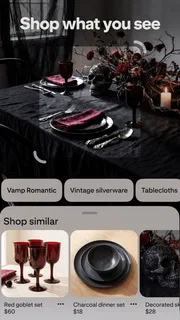
- Image search can help find visually similar content.
Cons
- Some pins lead to outdated or unavailable pages.
- Sponsored pins can appear among regular recommendations.
- The feed may repeat similar ideas over time.
- Downloading images may be restricted by their source.
- A Pinterest account is required to save and organize pins.


