





Our review
 Analysis by Lookingapps
When I’m looking for a place, the hardest part often isn’t finding listings; it’s keeping a clear head while comparing homes, rent, location, and the details that matter in daily life. Zillow is a real-estate app from Zillow Group that brings home searches and rental browsing into one place. I find it most useful as a way to explore and narrow options, rather than as a substitute for checking a property carefully or speaking with the people handling it.
What it feels like to search on a phone
The basic appeal is speed of decision-making, not a promise that every screen or listing will load instantly. A phone is handy for checking what is available while commuting, walking through a neighborhood, or talking over options with someone else. I can move from a broad search to a more focused one without having to switch between separate home-sale and rental apps.
That convenience matters most when I already know what I need. I would start with a rough location and a realistic budget, then refine the search as I learn what the area offers. Starting with too many narrow preferences can hide useful possibilities; beginning broadly and adjusting after seeing the market gives a better sense of trade-offs.
Zillow is free to use, and its scale is reflected in an average rating of 4.8 from around 1.7 million ratings. It has more than 50 million installs, which makes it a familiar option for people comparing homes and rentals. Those figures tell me it is widely used, but they do not guarantee that a particular listing is current or that every search will feel equally smooth on every phone.
Where the app fits in a real search
For a renter, the useful workflow is to compare several areas before deciding where to contact someone. A listing that looks appealing in isolation may be less practical once I consider the commute, nearby streets, or the compromises required to stay within budget. I would save or keep track of promising options in whatever way the app makes available in my version, and revisit them together rather than treating each result as a separate decision.
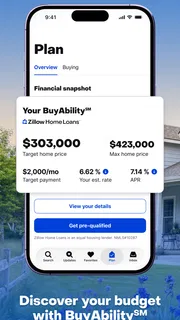
For a buyer, I’d use the app to get oriented: what kinds of homes appear in a target area, how far the budget seems to stretch, and which locations deserve a closer look. It can help turn a vague wish for “more space” or “closer to work” into a manageable list of places to investigate. The app is a starting point for discovery, not a final judgment about a home’s condition, value, or suitability.
A practical tip is to search with a little flexibility around location before tightening the boundary. If the first results feel disappointing, the issue may be that the chosen area is too small, not that there are no suitable homes. I’d compare nearby neighborhoods and then decide whether the extra distance is worth the difference in space or price. That approach makes the app more useful as a planning tool than as a simple stream of attractive photos.
More articles

Instagram Makes Everyday Moments Worth Sharing
A rare social app that can be a photo diary, a neighborhood window, and a lively conversation in the same session—though its best moments still require a little restraint.
Busy sessions and the value of a steady workflow
Heavy use tends to happen when I’m comparing a batch of possibilities: opening multiple listings, checking the map or location context, and switching between sale and rental searches. That is also when the experience can feel less effortless. A phone has limited screen space, and repeatedly moving between results and details makes it easy to lose track of why one home seemed better than another.
I’d avoid trying to make the whole decision in one long session. Instead, I’d divide the task into passes: first establish the areas and rough budget, then inspect a shortlist, then return to the strongest candidates with specific questions. This keeps casual browsing from turning into a blur of similar photos and descriptions. It is a simple habit, but it helps compensate for the fact that a mobile listing view cannot show the full context of a property visit.
When I’m out and about, I also wouldn’t rely on a single quick glance to settle an important question. A listing can be useful for deciding whether to follow up, but details should be checked directly before arranging plans or making commitments. If the app feels slow during a dense browsing session, narrowing the search and reopening only the most relevant candidates is more practical than repeatedly loading every result.
Reliability means checking the listing, not just the app
Zillow has been around since 2010, and its current Android version is 2026.80.1.135653. That history and ongoing versioning suggest an established product, but they are not a guarantee that every listing is perfectly up to date or that the app will behave identically on every device. My sensible approach is to treat it as a useful search interface and verify important details with the listing contact.
The most important reliability distinction is between the app working and the information being ready to act on. A page can open correctly while a property has changed status or while a detail needs clarification. Before traveling to a viewing, I’d confirm that the home is still available and check any details that would affect the decision. That extra step is worthwhile whether I am renting or buying.
For a smoother search, I’d keep my criteria organized outside the moment-to-moment browsing: write down the features I cannot compromise on and the ones I can trade away. For example, a shorter commute may matter more than a particular room arrangement, while a renter might prioritize move-in timing over a minor amenity. This prevents a polished listing from distracting me from the practical requirements that decide whether a home works.
Who will get the most from it
I’d recommend Zillow to someone who wants one familiar place to explore both homes for sale and rentals, especially when they are still comparing neighborhoods or figuring out what their budget can realistically buy or rent. It suits people who like to browse in short bursts and gradually build a shortlist. Zillow is also useful for casual discovery: checking what an area looks like before a move, or seeing whether a change in location might open up better options.
It may be less suitable for someone who wants a highly controlled, specialist workflow or who expects an app to make the decision for them. If you already have a specific property in mind, contacting the responsible agent, landlord, or property manager directly may be the quicker route. And if you need detailed professional guidance on financing, inspections, lease terms, or local rules, a search app cannot replace that expertise.
Compared with using separate apps for renting and buying, the practical benefit here is having both kinds of search under the Zillow name. That can be convenient when your plans are unsettled, such as weighing a rental while deciding whether to buy. On the other hand, a local specialist service or direct contact may be more useful when your search is focused on one building, one agent, or a narrow local market. I’d choose the tool based on the job: broad exploration in Zillow, direct follow-up when the shortlist gets serious.
Device fit and everyday expectations
The app is rated for Everyone and requires Android 10 or later. That makes the operating-system requirement clear for Android users, though a compatible version of Android does not by itself tell me how much storage, battery, or memory a particular browsing session will use. I would expect the experience to depend on the phone, connection, and how many listing details I open, so I would not judge performance from one slow moment alone.
On a smaller screen, comparing several homes is inherently harder than doing it on a larger display. I’d use the phone for discovery and quick checks, then review the shortlist more deliberately when I can concentrate. If scrolling, returning to results, or switching searches becomes frustrating, taking a break and restarting with fewer filters can be a better recovery than continuing to tap through a crowded search.
For someone with an older device or an unstable connection, the sensible expectation is modest: use the app for focused searches rather than assuming every image-heavy browsing session will feel instant. I would also keep the search terms and essential questions in mind so that a temporary interruption does not derail the task. That is ordinary good practice for a mobile property search, not a special workaround.
My performance verdict
As a house-and-home app, Zillow earns its place on my phone through breadth and convenience. The strongest use case is getting an overview, comparing possibilities, and deciding which properties deserve a closer look. Its free access lowers the barrier to trying it, while the large user base makes it an obvious option to consider when beginning a search.
I would not call it a complete home-buying or renting solution. Listing information still needs checking, a phone screen is not ideal for serious side-by-side evaluation, and the app cannot replace direct conversations or professional advice. Those are meaningful limits, but they do not erase its value as a first stop. I’d use it to turn a broad search into a shortlist, verify the candidates before acting, and move to direct contact when a place looks genuinely promising.
If you want to explore homes and rentals without committing to a paid app, Zillow is a sensible option. Its best performance is practical rather than flashy: it helps me make progress in small windows of time, provided I keep expectations realistic and confirm the details that matter. For broad browsing and early comparison, I’d recommend it; for final decisions, I’d pair it with careful checks and real conversations.
Pros
- Saved searches help you track new listings in preferred areas.
- Map browsing makes it easy to compare nearby homes.
- Mortgage tools provide useful estimates for planning a purchase.
- Rental listings include details that help narrow down options.
- Price history can offer context when evaluating a property.
Cons
- Listing details and photos may be out of date.
- Some homes shown may already be under contract or unavailable.
- Home value estimates can differ from a professional appraisal.
- Contacting agents may lead to follow-up calls or messages.
- Availability and features can vary by location.


