



Our review
 Analysis by Lookingapps
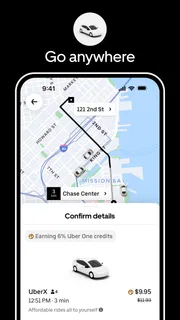
The first time I use Uber, the appeal is easy to understand: I can arrange a ride from my phone instead of standing outside hoping a taxi passes. That convenience matters most when I’m carrying bags, running late, or heading somewhere unfamiliar. The app is free, and its basic purpose is simple enough to grasp quickly: set a destination, review the ride options shown, and request a pickup.
But a useful travel app has to earn a place beyond that first convenient trip. I judge Uber less by the novelty of requesting a car on a screen and more by whether it remains practical for ordinary routines. It is a maps-and-navigation app built around arranging rides, and it is developed by Uber Technologies, Inc. Its appeal is strongest when I need a car without wanting to manage the trip by phone or find a taxi in person.
Why the first few rides feel convenient
Getting started is generally straightforward: the app asks where I want to go, then presents available choices for the trip. That flow is helpful when I already know my destination but do not know the local streets or taxi situation. For airport travel, a planned evening out, or a journey with luggage, having the ride request and trip details in one place can reduce the amount of coordination I have to do.
A realistic example is leaving a train station in an unfamiliar city after dark. Rather than trying to explain a street corner to a driver over the phone, I can use the app to arrange a pickup and follow the trip in the app. That does not remove every uncertainty: I still need to check that I’m at the right pickup point and getting into the right car. But it gives the journey a clearer starting point than an improvised search for transport.
The experience is not the same as simply opening a navigation map. A map helps me choose a route or understand the area; Uber is for arranging a ride with a driver. That distinction makes it more useful when I cannot or do not want to drive, but less useful when I mainly need walking directions, public-transit planning, or a clear view of every way to get somewhere. For those needs, a dedicated maps app or local transit service may be a better first stop.
The scale of the service is part of its everyday appeal: it has over a billion installs and an average rating of 4.7 from around 20 million ratings. Those figures suggest that many people find a ride-booking app useful, but they do not guarantee that a car will be available where or when I need one. Local coverage and conditions matter more to an individual trip than popularity does.
Making a request work smoothly
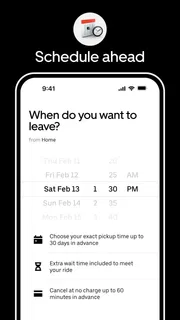
One practical habit is to check the pickup location before confirming a ride, especially at airports, stations, large buildings, or busy event venues. A pin placed near the wrong entrance can create avoidable confusion even if the destination is correct. I find it sensible to compare the map with the physical surroundings and move to a clear, accessible meeting point when that is allowed and practical.
More articles

Instagram Makes Everyday Moments Worth Sharing
A rare social app that can be a photo diary, a neighborhood window, and a lively conversation in the same session—though its best moments still require a little restraint.
It also helps to think about the full journey before requesting. If I have luggage, need extra time to reach the curb, or am traveling with someone who moves more slowly, I should not treat the displayed pickup estimate as a reason to rush unsafely. The app can make arranging a car easier, but it cannot make a crowded pickup zone less hectic or guarantee that a driver can stop exactly where I’m standing.
When traveling somewhere unfamiliar, I would keep the destination details clear and watch for changes in the trip rather than assuming the first screen answers every question. A little attention at the beginning can prevent the most common friction: waiting at the wrong place, overlooking the selected ride, or discovering too late that the trip does not fit my needs. This is a modest workflow, but it is more useful than tapping through quickly and hoping the pickup sorts itself out.
What remains useful after the novelty
Over time, the lasting value comes from repeated situations rather than from the act of booking itself. I can see a role for Uber when I have an early airport departure, when public transport is inconvenient for the route, or when I need a ride home after an evening out. In those moments, the app can be a practical option to check without having to find a taxi stand first.
It is less compelling as an automatic answer to every short trip. If buses or trains are frequent, walking is comfortable, or I already have a reliable local taxi option, opening a rideshare app may add a step rather than save one. For regular commuting, the best choice depends on the route and the local alternatives; I would compare convenience and the displayed trip details each time rather than assume one service is always preferable.
That is the main difference between a useful habit and an expensive or inconvenient reflex. Uber can be worth keeping because it gives me a familiar way to request a ride in situations where arranging one would otherwise take effort. It does not follow that every journey should be booked through it. I get the most value when I use it selectively, as one tool among walking, transit, and local taxi services.
The app’s broad reach can make it feel like a dependable default, yet an individual city or neighborhood may offer a different experience from another. I would not plan an important journey around an assumption that a ride will always be immediately available. For a time-sensitive trip, I’d leave a buffer and consider a backup such as public transport or a local cab service. That is not a weakness unique to this app; it is a sensible way to use any on-demand ride option.
The upkeep is light, but attention still matters
Uber is not the kind of app that asks me to learn a complicated system before I can use it. Once I understand the request flow, routine use is familiar. The maintenance burden is therefore less about ongoing setup and more about keeping my travel choices sensible: checking the pickup point, reading the trip options, and not treating an app estimate as a promise that every part of the journey will be effortless.
Like any travel app, it also needs a working phone and a usable connection at the moment I want to arrange a ride. If I’m traveling, I prefer not to wait until I’m standing in a poor-signal area to work out what to do. I can think through the pickup location and destination in advance, and keep a backup plan for places where app-based booking may be inconvenient. That small bit of preparation matters more than repeatedly checking the app when I have no trip in mind.
Uber is free to download, but that does not make every ride free; the ride itself is a separate purchase. I would review the options and trip details shown before requesting rather than treating the app’s no-cost download as a promise about what travel will cost. This is especially important when I am comparing a ride with a train, bus, or taxi, since the right choice depends on the journey and what matters most to me.
There is also a useful distinction between installing the app and needing it all the time. With an Everyone age rating, it is broadly suitable for a general audience, but a younger person should still make travel decisions with appropriate care and support. The app can help arrange transport; it does not replace common-sense checks about the pickup, the destination, and whether the planned ride is suitable.
Where repeated use can become tiring
The biggest source of fatigue is expecting an on-demand service to remove all uncertainty. A request still depends on local availability, a workable pickup, and the conditions around the trip. When those factors are awkward, the app may feel like another layer to manage rather than a shortcut. At a crowded venue, for example, identifying a precise meeting point can take more thought than simply walking to a nearby taxi rank.
Another trade-off is that rideshare is not inherently better than public transport or a traditional cab. Transit may be the more sensible choice for a familiar route with good service; a taxi stand may be simpler when I am already beside one. Uber’s advantage is that I can request a ride through the app, not that it should replace every other way of getting around. I would skip it when a simpler option is already close at hand or when I specifically need route planning rather than a car.
People who rarely need car rides may also find that the app does not deserve a prominent place on their phone. If most of my journeys are walkable or served well by transit, occasional convenience might not justify making it my default. On the other hand, someone who travels between airports, unfamiliar neighborhoods, or late-night destinations may value having it ready even if they only use it periodically. The pattern of my own trips matters more than the app’s overall popularity.
The app has been available since October 28, 2010, and its sustained scale points to a long-running role in everyday transport. That history does not make every ride frictionless, but it helps explain why many travelers recognize the service. With around 438,000 written reviews, there is also a large body of public feedback; I would still treat other riders’ experiences as context rather than a guarantee about my own city or journey.
Who should keep it, and who can pass
I would keep Uber installed if I regularly need a car for airport journeys, occasional late trips, or routes where arranging a ride in advance through a familiar app is more convenient than searching on the street. It is also a reasonable option for visitors who want one recognizable way to request transport while learning a new area. The strongest case is not constant use; it is having a practical fallback when walking or transit is not the right fit.
I would not recommend relying on it as a substitute for all local travel planning. If I need detailed public-transport directions, dependable service on a route with a good bus connection, or a ride in a place where the app is not a convenient pickup option, I would use a more suitable alternative. I would also avoid assuming that a familiar interface means every city handles pickups in the same way.
My long-term verdict is that Uber earns space when its specific convenience matches a recurring need. It is easy to understand, free to install, and useful for arranging rides without turning every trip into a phone call or a hunt for a cab. Yet its value depends on where I am going and what other transport is available. I recommend it as a handy option, not as an unquestioned default: check the trip, choose the pickup carefully, and use transit or a local taxi when that better fits the journey.
Pros
- Upfront fare estimates help you compare ride options before booking.
- Live location sharing lets trusted contacts follow your trip.
- Multiple vehicle categories suit different group sizes and budgets.
- In-app trip details make it easy to review your driver's route.
- Cashless payment reduces the need to carry money.
Cons
- Prices can rise sharply during periods of high demand.
- Ride availability varies by location and time of day.
- Cancellations may lead to fees in some situations.
- Driver quality and vehicle condition can vary.
- The app requires location access for key ride features.


