
Our review
 Analysis by Lookingapps
My view of Toyota is shaped by one practical question: does a phone app make owning and using a Toyota easier, or just add another screen to check? It is most worthwhile when your vehicle is a recent-enough Toyota and you want a convenient connection to the brand’s own services. It is less compelling if you mainly need a general-purpose driving tool that works the same way with any car.
This is a free Auto & Vehicles app from Toyota Motor North America, Inc., with a 4.7 average from around 188,000 ratings. It has passed five million installs, carries an Everyone age rating, and its current version is 3.6.0. Those figures suggest a widely used product, but the real question is whether it fits your vehicle and your daily routine.
When the connection matters
The Toyota app currently supports 2010 or newer vehicles, with a newer-vehicle threshold in Hawaii: 2018 or newer. That makes eligibility the first thing I would check before building a routine around it. If your Toyota falls outside the applicable range, the app may not be the right route for managing your ownership experience, however appealing the idea sounds.
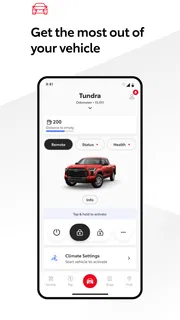
Connectivity is central to what an owner-facing app can do. In practical terms, I would treat it as a companion for moments when I want to interact with Toyota-related services from my phone, rather than as a replacement for the car’s controls or a universal dashboard for every vehicle. The value is in having a dedicated place for those interactions; the trade-off is that the usefulness depends on your vehicle being supported and on the relevant app services being available to you.
A useful habit is to check the app before you need it. Set it up while you have time, confirm that your vehicle is eligible, and learn where the functions you care about live. That way, you are not trying to work out an unfamiliar interface in a parking lot or while already rushing. I would also avoid assuming that every Toyota model or ownership situation exposes the same options: the age threshold tells you whether a vehicle is within the stated support range, not that every experience will be identical.
What it is like to use away from home
The strongest case for a manufacturer’s own app is convenience across ordinary transitions: leaving home, arriving at work, or handling a quick ownership task while away from the vehicle. A dedicated Toyota app can be easier to orient yourself in than a collection of unrelated tools because it is specifically tied to the brand. But that focus also limits its reach. It is not a natural choice for someone who wants one app to serve cars from several manufacturers.
Picture a familiar scenario: you are heading out, realize you want to check something connected with your Toyota, and reach for your phone rather than walking back to the car or searching through a general motoring app. That is the kind of small interruption this app is meant to make simpler. I would use it as a convenient first stop, while keeping the vehicle’s own interface and other established ownership channels in mind for anything time-sensitive or essential.
More articles

Instagram Makes Everyday Moments Worth Sharing
A rare social app that can be a photo diary, a neighborhood window, and a lively conversation in the same session—though its best moments still require a little restraint.
For people who move between buildings, parking areas, and the car throughout the day, the phone-based format is a natural fit. The app is also easier to justify if you already think of your phone as the place to organize vehicle-related tasks. If you prefer to handle everything inside the car, or rarely interact with digital ownership services, installing it may not change much about your routine.
What to do when an interaction stalls
Any connected service can feel unreliable when the phone, network, account, vehicle, or service does not line up at the moment you need it. I would not make an app the sole plan for an urgent task. If something does not load or respond, first pause and check the basics: is the phone connected, are you signed into the intended account, and are you using a vehicle that fits the support requirements? A quick retry after checking those points is more sensible than repeatedly tapping the same control.
It also helps to separate a temporary connection problem from a vehicle-compatibility issue. If the app has never worked for a particular Toyota, confirm eligibility before assuming that a reinstall or repeated sign-in will solve it. Conversely, if it has worked before and suddenly does not, checking the connection and reopening the app is a reasonable first recovery step. For a task that cannot wait, use the vehicle’s normal controls or another established Toyota support channel instead of depending on a phone interaction to succeed immediately.
This is a small but important change in expectations: I see the app as a convenience layer, not as the only way to operate or care for a car. That distinction matters most when you are in a hurry, dealing with a weak signal, or trying to use a feature in an unfamiliar place. Keeping a non-app fallback in mind makes the app more useful, not less, because you can rely on it where it helps without treating it as indispensable.
Using it without wasting attention or data
If you are conscious of mobile data, use the app deliberately rather than opening it repeatedly just to see what might be available. Check the specific item you need, then leave the app when you are done. I would also avoid depending on a connection-intensive interaction in a place where service is unreliable; doing a quick setup or learning the navigation at home is less frustrating than discovering the workflow under pressure.
It is worth reviewing the app’s available settings and your phone’s own controls after installation, especially if you prefer to limit background activity or notifications. I would not assume that every setting is necessary for your use case. Keep only the access and alerts that support tasks you actually perform, and revisit the choices if the app becomes noisy or consumes attention without adding value. This is a practical way to keep a vehicle companion from becoming another source of needless interruptions.
There is also a privacy-minded trade-off whenever a car owner uses a connected brand app: convenience comes from linking the phone experience to the vehicle and the owner’s account. Before relying on it, read the in-app explanations and choose settings you are comfortable with. I would rather spend a minute understanding those choices than grant broad access reflexively, particularly if my use is limited to occasional checks.
How it compares with other car apps
Compared with a general navigation or fuel-tracking app, Toyota’s offering has a narrower purpose: it is for Toyota owners, not every driver. That specialization is a strength when you want a brand-specific place to start, but it is not a substitute for navigation, independent maintenance records, or tools that work across multiple makes. If your priority is planning routes or tracking costs for a mixed household fleet, a neutral automotive app may be a better fit.
Compared with relying only on the vehicle’s built-in controls or conventional owner resources, the phone app adds a more portable point of access. That can be handy when you are away from the car, but it introduces the usual dependencies of a mobile service: a compatible vehicle, an account-based setup, and a working connection for connected interactions. I would choose between these options based on the job, not assume one should replace the others.
The app is a sensible match for a Toyota owner who likes handling small vehicle-related tasks from a phone and whose car meets the applicable age requirement. It is a weaker match for someone with an older unsupported vehicle, a non-Toyota car, or a strong preference to avoid connected services. Hawaii owners should pay particular attention to the later eligibility threshold before investing time in setup.
Who will get the most from it
I would recommend giving it a try if you own an eligible Toyota, want a brand-specific mobile companion, and are comfortable with connected services. Since it is free, trying it is a low-cost way to see whether its available functions fit your habits. Still, free does not mean effortless: setup and eligibility matter, and an app you never open offers no practical benefit.
For someone considering a used Toyota, I would check the model year and local eligibility before treating the app as part of the ownership package. For a family with more than one vehicle brand, I would keep Toyota’s app for the Toyota and use a separate general tool for shared needs. And if you only want directions or routine driving assistance, your existing navigation app may already do that job better without adding another account to manage.
Ultimately, Toyota makes the most sense when connectivity solves a real, recurring inconvenience rather than merely sounding modern. I like the focused approach, but I would not promise myself that every interaction will be available everywhere or at every moment. Check compatibility first, learn the app when you are not rushed, and keep ordinary vehicle controls as your fallback. With those expectations, it can be a useful companion for eligible Toyota owners; without them, it is easy to install and then forget.
Pros
- Official Toyota app provides convenient access to vehicle information.
- Owners can view maintenance schedules and service history.
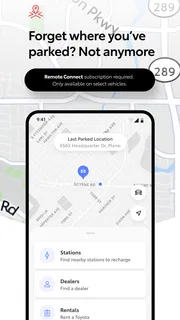
- The app can help locate nearby Toyota dealerships.
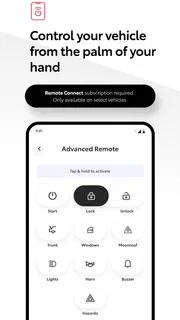
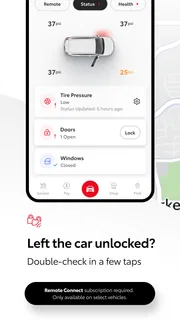
- Remote features are available for compatible vehicles.
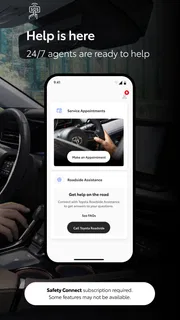
- Toyota offers support resources through the app.
Cons
- Some features require a compatible vehicle and subscription.
- Remote commands may not be available on every model.
- App features can vary by country and vehicle year.
- A Toyota account is needed to access many tools.
- Some users may find the interface difficult to navigate.


