



Our review
 Analysis by Lookingapps
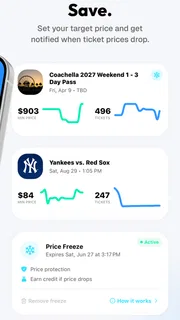
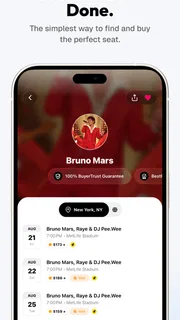
I’d treat TickPick as a useful place to start when I’m planning a concert, game, or theater night—not as a promise that every ticket will be the cheapest or the right seat for me. It is a free events app from TickPick LLC, and its central appeal is helping me look for tickets while also spotting events worth considering. That combination makes it more practical than an app I open only after I already know exactly what I want to attend.
The distinction I keep in mind is simple: downloading the app costs nothing, but that does not make the tickets free. Ticket prices depend on the event and the seats available, so I would compare the final terms for the particular ticket before deciding. The app is most valuable when it gives me another place to check and a clearer way to weigh the options, rather than when I assume that a low-looking price settles the decision by itself.
Free to browse, with ticket value to judge event by event
TickPick is listed as free, which removes the barrier to trying it as part of my event-planning routine. I can use it to explore concert, sports, and theater possibilities without paying just to install the app. The actual purchase is a separate decision: tickets are paid items, and the useful question is whether the seats and terms available for a particular outing fit my budget.
I wouldn’t confuse an app’s free access with a guarantee of savings. The promise of finding value is a reason to compare, not a fact about every listing. For a specific event, I’d check the seat location, the complete amount shown before committing, and any relevant purchase details. A ticket that looks attractive at first glance may not be the best choice if it places my group far apart or exceeds what I meant to spend.
That habit matters especially when several people are deciding together. Before searching, I’d agree on a firm per-person limit and whether we care more about being close, sitting together, or simply getting into the venue. Those priorities make the results easier to assess and reduce the temptation to stretch the budget because a particular event feels exciting.
What the app adds beyond a ticket search
The discovery angle is a meaningful part of the experience. If I have a free evening but no fixed plan, browsing upcoming events gives me a way to move from “we should go out” to a shortlist of real possibilities. That is a different use from searching a single artist or team on a ticketing service after the decision has already been made.
For example, if a friend suggests meeting up on a weekend, I could first look for events that suit our interests, then compare ticket options only for the few that fit our schedule and budget. This two-step approach is more useful than opening several event pages at random. It also helps keep discovery from turning into impulsive spending: I can decide whether the event itself is appealing before I get caught up in choosing seats.
More articles

Instagram Makes Everyday Moments Worth Sharing
A rare social app that can be a photo diary, a neighborhood window, and a lively conversation in the same session—though its best moments still require a little restraint.
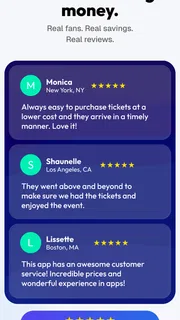
TickPick has an average rating of 4.8 from around 61,000 ratings, with about 7,400 written reviews. Those figures suggest that many users have taken the time to rate or discuss it, but I would still judge the app by whether it works for my event and my priorities. Ratings are a useful signal, not a substitute for checking the details of a particular purchase.
How I’d compare options without rushing
My first practical tip would be to compare like with like. I’d look at seats in a similar area rather than treating every available ticket as interchangeable. For a concert, sightline and distance from the stage may matter; for a game, I might care more about the side of the venue or the view across the field. A cheaper seat can be good value if I’m happy with the location, but not if the location undermines the reason I chose the event.
My second tip is to separate the event decision from the seat decision. I’d shortlist the event first, then consider whether there is a ticket that meets my needs at a price I’m comfortable with. This prevents a tempting listing from persuading me to attend something I wasn’t particularly interested in. It is also a useful way to compare TickPick with the venue’s own ticketing option or another resale marketplace: I’d compare the same event, similar seats, and the total terms rather than relying on a headline price.
My third tip is to plan for group seating early. If four friends want to sit together, the number of seats available in one block can matter more than a small difference in price. I’d check the seating arrangement before settling on a listing and be ready to adjust the plan—perhaps choosing a different section or another event—if the available options do not match the group’s needs. That is a more realistic way to use a ticket marketplace than assuming every listing can accommodate any party size.
Where the convenience has limits
TickPick cannot make a poorly matched event a good purchase. An event may be discoverable and a ticket may appear affordable, yet the timing, seat location, or group arrangement can still make it wrong for me. I’d rather pass than buy simply because I have already spent time browsing. The app helps with consideration; it does not remove the need to make a sensible choice.
Another trade-off is that comparing ticket marketplaces takes a little care. The same event can be presented through different services, and the most useful comparison is not just the number beside a seat. I’d check the final amount and purchase conditions shown at checkout, then compare those with the venue or another established option if I want reassurance. If I prefer buying directly from a venue and do not want to compare alternatives, that route may feel simpler, even if it gives me fewer places to browse.
Discovery can also create noise if I already have a narrow goal. Someone who knows the exact event, date, and seating area they want may find a broad browse less useful than going directly to the relevant ticket source. Likewise, if I only attend events when a particular artist or team is in town, the app’s wider selection is less important than a focused search and careful comparison of the specific listings.
The app is an events product, not a substitute for deciding whether the outing works in real life. I’d check that the date suits everyone, consider travel and other costs outside the ticket, and confirm the seat details before buying. That is particularly important for theater, where a seat’s position can shape the experience, and for a group outing, where one person’s bargain may not solve the problem of finding seats together.
Who is likely to get the most from it?
I’d recommend trying TickPick if I regularly weigh different live events against a budget, or if I like keeping a few options open before making weekend plans. Concertgoers, sports fans, and theater audiences can all use the same basic approach: find an event, compare suitable tickets, and decide whether the available option is worth the spend. The app’s usefulness grows when I’m willing to compare rather than treating the first result as a final answer.
It is also a sensible option for someone who wants a free app for event discovery and ticket browsing without committing to a purchase just to explore. TickPick has more than five million installs, and its content rating is Everyone. It was released on November 6, 2014, and the current version is 6.0.25; the listed minimum operating-system requirement is version 8.0. Those details make it easier to judge whether the app is suitable for a device, while the decision to buy still depends on the event and the ticket.
I would be less enthusiastic about it for a person who expects every ticket to beat every alternative, needs a very specific seat configuration, or wants a purchase with no comparison work. In those cases, I’d check the venue’s own ticketing channel or another marketplace alongside TickPick. That is not a rejection of the app; it is the sensible way to avoid treating any single source as the whole market.
My buy-or-skip verdict
For me, TickPick is worth a look when I’m open to concerts, sports, or theater and want one more way to explore events and compare tickets. Its strongest value is the combination of discovery and ticket shopping, supported by free access to the app itself. I would use it to build a shortlist, compare seats that genuinely meet my needs, and verify the final purchase details before spending money.
I’d skip relying on it as my only option if I already have a specific seat in mind, if a group must sit together, or if I’m unwilling to compare the final terms with other sources. The best approach is to use it as a practical starting point and let the event, seating, and total cost decide. If those line up, it can help turn an open-ended plan into a workable night out; if they do not, walking away is the better value.
My recommendation: try TickPick for browsing and comparison, but judge each ticket on its own merits. The app is free to access; the value of a purchase is something I’d confirm event by event.
Pros
- Shows the full price upfront with fees included.
- Offers a seat map to compare available sections.
- Includes tickets for sports concerts and theater.
- Provides mobile ticket delivery for many events.
- Lets users save favorite teams and venues.
Cons
- Ticket availability can change before checkout.
- Some listings may have limited seat details.
- Prices can rise for high-demand events.
- Refunds depend on the event and ticket terms.
- The app may require location access for nearby events.


