
Our review
 Analysis by Lookingapps
When I’m buying a ticket on my phone, I want more than a quick checkout: I want to know what I’m choosing, have time to review the purchase, and be able to find the ticket again when I need it. StubHub is built around buying tickets for live events, but how useful it feels depends on the event, the available choices, and how comfortable you are completing a purchase through a ticket marketplace.
Choosing a ticket with confidence
StubHub is an Events app from StubHub, the company behind the service. It is free to install, rated for Everyone, and has been available since 2011. Its current version is 106.9.7, and it requires Android 10 or later. The app has a 4.3 average from around 104,000 ratings, with more than 10 million installs. Those figures suggest that it is a well-established option, but they are not a substitute for checking the details of a particular ticket before buying.
In practice, I would treat the app as a place to explore and compare listings, not as a reason to rush. Event tickets can differ in location, view, quantity, and price, and a listing that looks attractive at first glance may not suit your plans. Before moving forward, I would check that the event, date, seat information, and number of tickets match what I actually want. That small pause is more useful than relying on the app’s familiarity or popularity.
The trust question matters because the purchase is consequential: you are spending money on access to a specific event. A polished mobile experience can make browsing feel easy, but the decision still rests on the listing and the terms shown during checkout. I recommend reading the details on the screen rather than assuming every ticket for the same event is interchangeable.
How I would use the app to compare options
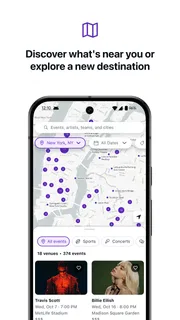
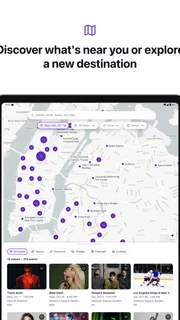
For a planned concert or game, I would start with the exact event and compare a few listings before deciding. Look beyond the headline price: seat location, ticket quantity, and any checkout details visible in the purchase flow can change what makes one option better than another. If I am going with someone else, I would confirm that the listing provides the number of tickets we need before investing time in checkout.
A practical trick is to decide your priorities first. If being together matters most, focus on listings that clearly address seating; if staying within a budget is the main concern, compare the full amounts presented before confirming. This prevents the common mistake of choosing based on one appealing detail and noticing a mismatch only later. I would also keep the event date in mind when browsing similar events, especially when an artist or team has several performances.
Compared with an event organizer’s own ticketing channel, a marketplace can be useful when you want to browse tickets offered for an event in one place. The trade-off is that you need to pay close attention to the individual listing rather than assuming the options are presented as a single uniform inventory. For a simple purchase where the organizer’s channel already has the exact seats and quantity I want, I might prefer that direct route. If I am comparing alternatives, StubHub is more compelling.
More articles

Instagram Makes Everyday Moments Worth Sharing
A rare social app that can be a photo diary, a neighborhood window, and a lively conversation in the same session—though its best moments still require a little restraint.
Where caution belongs in the purchase flow
Ticket buying is a data-sensitive activity because it involves an account and a payment decision. I would review what the app asks me to provide at each step and avoid entering information until I understand why it is needed for the action I am taking. I would not treat installation alone as proof of what permissions an app uses or how it handles information; those are questions to check in the app’s permission controls and the relevant privacy information available to me.
That distinction is important: I can make a careful choice without guessing about unseen practices. On my phone, I would check the app’s permissions in the operating system and grant only what makes sense for the task. If I am simply comparing event listings, I would question any permission request that does not seem necessary to that activity before allowing it. I would also review account and privacy choices presented in the app instead of assuming that every setting is enabled or disabled in a particular way.
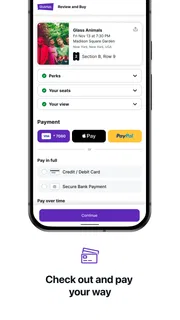
At checkout, my own rule is to slow down. Confirm the event and ticket details, review the amount displayed, and make sure the account and payment choice are correct before placing an order. If anything is unclear, I would stop and look for an explanation rather than relying on a guess. A few seconds of checking are especially worthwhile when buying several tickets or choosing among listings that look similar.
Everyday use, from planning to the venue
Imagine a friend messages me about a weekend event while I am commuting. I can use the app to look for the event, compare the available choices, and decide whether the options fit our plans. Instead of buying immediately, I would first confirm the date with my friend, agree on how many tickets we need, and set a comfortable spending limit. Then I could return to the listings with a clearer idea of what counts as a good choice.
That workflow is more reliable than browsing in a hurry and trying to coordinate details afterward. It also helps separate two decisions: whether we want to attend, and which listing we should buy. If the event is not urgent, I would compare options calmly. If the available listings do not fit the budget or seating needs, I would pause rather than treating the first result as the only possible answer.
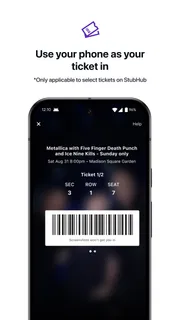
Before leaving for the venue, I would open the app while I still have a stable connection and check where the ticket is available within my account. I would not wait until I am at the entrance to discover that I have forgotten my login details or need to complete an account step. This is a general bit of preparation rather than a claim about a particular ticket-delivery method: the sensible approach is to verify access to your own purchase in advance.
Controls and choices should stay visible
My preference with any ticketing app is to keep control of the account and the purchase. Use an account you can access, protect its sign-in details, and review any settings or choices presented when you create or use it. If you share a device, take extra care before leaving an account signed in. These habits are useful here because a ticket is tied to a real event and a real purchase, not just something saved for later.
For data choices, I look for clear explanations and make decisions based on what is actually shown. I would not assume that a particular privacy toggle, deletion option, or permission is available without seeing it. If account management is important to you, inspect the controls in the app and the operating system before relying on the service. That is a more honest way to assess user agency than treating a feature as present just because other apps offer it.
There is also a practical limit to what a marketplace app can solve. It can help you browse and make a ticket purchase, but it cannot decide whether a seat is worth its cost for your group or whether the event’s timing works. Those choices remain yours. I find the app most helpful when I already know the event and use its listings to compare options; it is less useful if I expect the interface to make the decision for me.
Who will benefit, and who may prefer another route
I would recommend trying StubHub if you regularly compare tickets for live events on your phone and want a dedicated place to browse. Its scale—around 25,000 written reviews alongside its broader rating base—makes it a familiar option for many users, though individual experiences can vary. The app is free to install, but that should not be confused with the cost of a ticket: the purchase itself is a separate decision, and I would review the full amount shown before committing.
It may be a poor fit if you prefer to buy only through an event organizer, do not want to manage another account, or find marketplace listings hard to compare. Someone who has already found the exact ticket through a direct seller may gain little by adding another step. Likewise, if you are uncomfortable making a purchase until you have checked the account, permission, and privacy choices available on your device, take time to inspect those controls first rather than feeling pressured to proceed.
I would also avoid treating a high volume of users or a solid average rating as a guarantee that every listing will suit me. Those broad signals can help establish that an app is widely used, but they cannot answer whether a particular seat, price, or event arrangement is right. The useful habit is to assess each purchase on its own terms and keep a record of the event details you selected.
My cautious verdict
StubHub is a practical mobile option for looking through live-event ticket listings and comparing choices, especially when I have an event in mind but still need to weigh the available options. Its long-running presence and broad adoption make it easy to consider, while the actual value comes down to whether the listings fit your date, seating needs, and budget. I would use it as a comparison tool, then make the purchase only after checking the details carefully.
My recommendation is measured: install it if browsing event tickets in one place would help you, but keep your judgement in the driver’s seat. Review the listing and checkout information, check the account and permission choices that are actually visible to you, and prepare to access your ticket before travel. If you value a direct relationship with an event organizer more than marketplace comparison, use that route instead. For everyone else, StubHub can be useful as long as convenience never replaces a careful look at what you are buying.
Pros
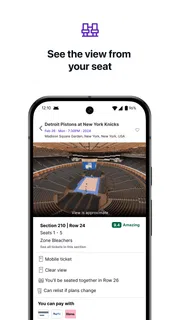
- Interactive seat maps help compare views before choosing a ticket.
- Price alerts make it easier to track changes for selected events.
- Mobile tickets can be accessed from the app at the venue.
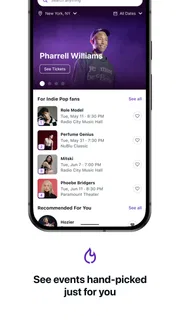
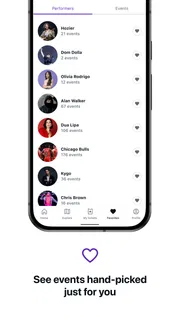
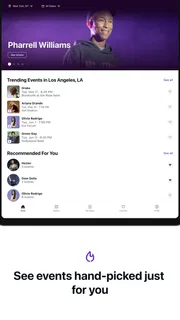
- Event recommendations help discover shows based on your interests.
- Order tracking keeps purchase details easy to find.
Cons
- Ticket prices can rise with service fees at checkout.
- Popular events may have limited ticket availability.
- Refunds depend on the event and the seller's terms.
- Some tickets may arrive close to the event date.
- Listings can vary in quality and seat detail.


