
Our review
 Analysis by Lookingapps
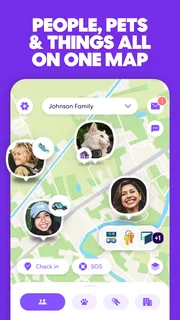
When my household is trying to coordinate a pickup, check that someone has arrived safely, or work out who is still on the way, a shared location can save a string of messages. Life360 is built around that kind of practical coordination: people share their locations, and the app brings safety-related tools such as crash alerts and driver reports into the same place. I find the idea most useful when everyone involved understands what is being shared and wants to use it. Without that agreement, constant location visibility can feel less like help and more like monitoring.
Useful when plans involve several people
Life360 is a free Lifestyle app from Life360, with optional in-app purchases ranging from $1.49 to $249.99 per item. It has a 4.8 average from around 2.5 million ratings, and more than 100 million installs. Those numbers suggest it is a familiar choice, but popularity does not make it right for every household: its value depends on whether the people in your circle actually want a shared safety and coordination tool.
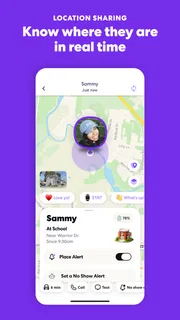
A realistic use is a family arranging a ride home after an evening activity. Instead of asking for repeated updates, the person waiting can check whether the driver is still travelling, while the driver can focus on the road rather than replying to messages. The same approach can help when an older relative is travelling alone or when several household members are moving between errands. It is most reassuring when a location check answers a specific question, not when it becomes a habit of watching the map all day.
The app’s combination of location sharing, crash alerts, and driver reports is more targeted than simply sending a map pin in a messaging app. A pin is handy for a one-off meetup, but it does not serve the same ongoing household purpose. Conversely, if all you need is to tell a friend where to meet, a temporary location share in a messaging app is usually simpler and involves less ongoing visibility.
Agree on the circle before relying on it
Before anyone treats Life360 as a household safety net, I would talk through who is joining and what the group is for. A useful agreement might be as simple as “check this when we are coordinating a pickup” rather than “keep track of everyone.” That distinction helps prevent a convenience feature from turning into an expectation that each person must explain every stop or delay.
There is also a practical account boundary to consider. A shared phone or tablet can blur whose location and account activity people are seeing. I would avoid treating a household device as a neutral family screen unless the people using it have deliberately agreed on how the app is set up. Each person should understand which account is active and who can see the shared location. If that is unclear, resolve it before depending on the app in a time-sensitive situation.
For a shared-device household, it is worth deciding whether the device is for one person’s use or for a group’s. Switching between people informally can make location information harder to interpret, especially if someone assumes the displayed position belongs to the person who is currently holding the phone. A dedicated personal device gives a clearer picture of whose location is being shared; a communal device may be better left out of location sharing if ownership is ambiguous.
More articles

Instagram Makes Everyday Moments Worth Sharing
A rare social app that can be a photo diary, a neighborhood window, and a lively conversation in the same session—though its best moments still require a little restraint.
Make location checks serve a real plan
Location sharing works best when it complements ordinary communication rather than replacing it. If I am waiting for a pickup, I can use the map to understand whether the driver is still on the way, then send a message if the plan changes. The map does not explain why someone stopped or whether they need help, so it should not be treated as a substitute for asking directly. That is an important limit: a location can show movement, but it cannot tell the whole story behind it.
One helpful habit is to agree on a specific moment to check the app, such as before leaving for a pickup or after a late journey. That makes the information purposeful and can reduce unnecessary checking. It also gives everyone a clear expectation: the aim is to coordinate a plan or offer reassurance, not to account for every movement. If someone is uncomfortable with ongoing sharing, a one-off message or temporary location share may be a better fit for that occasion.
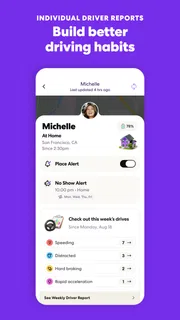
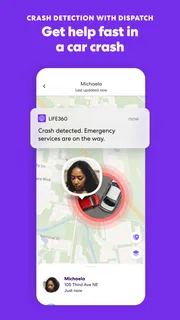
Life360’s safety tools also need realistic expectations. Crash alerts and driver reports may be useful context for a household, but I would not treat an app as a replacement for emergency services, direct contact, or careful driving. A driver report is not a complete account of someone’s abilities or character, and an alert should prompt sensible follow-up rather than an assumption that the app has explained everything. The safest use is as an additional source of information, not the only one.
Trust matters as much as age
The app is rated for Everyone, but that content rating does not settle whether a particular child or teen should use shared location. Age, maturity, household expectations, and the reason for sharing all matter. I would explain plainly what the app is for, who can see the location, and when it is reasonable to check it. A young person who understands the purpose is more likely to see it as a safety arrangement rather than a secret test of trust.
For adults, the same conversation is just as important. Partners, relatives, or housemates should not be added to a shared circle by assumption. Consent should be explicit, and people should feel able to say that a particular use makes them uncomfortable. If the household needs occasional coordination but not permanent visibility, a messaging app’s limited location-sharing option may preserve more privacy and be easier to agree on.
I would also avoid using location history or driver information as a shortcut for resolving disagreements. A map can raise questions without answering them, and interpreting every stop as evidence invites conflict. A better arrangement is to identify the specific safety concern first, choose the least intrusive way to address it, and revisit the agreement if circumstances change. The app is most helpful when it supports communication that already exists, rather than trying to replace it.
What to check before making it part of the routine
Because the app relies on shared location to provide its central coordination benefit, I would check that each person is comfortable with the arrangement before building routines around it. I would also make sure everyone knows how the group will use the information: for pickup timing, arrival reassurance, or another agreed purpose. If only one person in the household wants to use it, the rest may not get enough value to justify joining.
Life360 is free to download, but it includes in-app purchases, so I would review the available options in the app store before assuming every feature or plan is included at no cost. The current version is 26.40.0, and it requires Android 10 or later. It is available to people of all ages under its Everyone rating, though household suitability still depends on consent and maturity. The app was released on April 7, 2010, and its longevity is one reason many people may already know the name, but the best reason to install it is a concrete coordination need.
When comparing alternatives, I would choose based on the relationship and the duration of sharing. A messaging app is often enough for meeting a friend or sending a temporary pin. A phone’s built-in location sharing may be simpler for people who want only that basic function. Life360 makes more sense when a household wants location alongside safety-oriented tools and is willing to agree on ongoing sharing. That extra breadth is useful only if the group will use it thoughtfully.
My household verdict
Life360 is a good fit for households that want shared location to support real plans and safety check-ins, not constant supervision. I would recommend it to families coordinating regular pickups, relatives who want a straightforward way to see that someone is travelling, and groups who can talk openly about privacy. I would skip it if the need is only an occasional meetup, if shared-device account ownership is confusing, or if people are being pressured to share their location.
Life360 can reduce repetitive “where are you?” messages and bring useful driving-related context into the same app. Its trade-off is that continuous sharing needs clear boundaries, and location information can be misunderstood when people treat it as a complete explanation of someone’s actions. If everyone agrees on the purpose and uses the app as a support for direct communication, it can make household coordination calmer. If that agreement is missing, a less persistent option is likely the better choice.
Pros
- Location sharing helps family members see one another on a map.
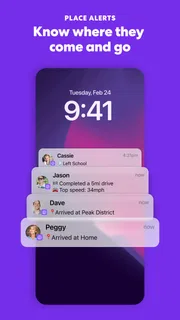
- Arrival alerts can notify you when someone reaches a saved place.
- A shared location history can help explain recent trips.
- The app supports private groups for different circles of people.
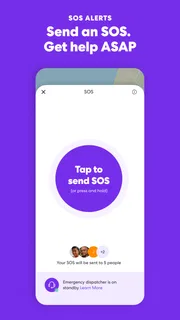
- Emergency features provide a way to contact circle members quickly.
Cons
- Continuous location access can reduce battery life.
- Accurate tracking depends on a reliable internet and GPS connection.
- Location sharing may feel intrusive to some family members.
- Some features require a paid subscription.
- Background permissions may need extra setup on some phones.


