
Our review
 Analysis by Lookingapps
I like weather apps best when they help me make a decision quickly rather than asking me to study a screen full of numbers. Weather Radar Home is built around that practical idea: it is a weather app from OmniHome Apps, with a focus on bringing radar, alerts, and forecasts into the home-screen experience. Its appeal is clearest when I want a quick check before leaving, while its value depends on whether I prefer visual radar information to a simpler forecast-first layout.
A quick glance matters more than a crowded forecast
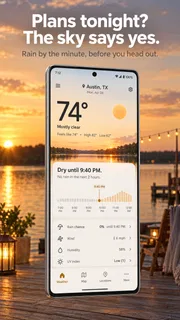
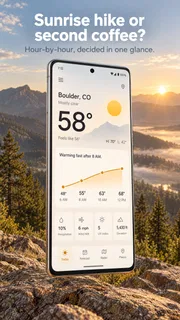
In everyday use, I would approach Weather Radar Home as a convenient way to keep weather close at hand, not as a replacement for careful planning during severe conditions. A home-screen view can save a few steps when I am deciding whether to take a coat, move a walk, or leave earlier. That is a meaningful advantage for someone who checks conditions several times a day, especially if opening a full-featured forecast app feels like more effort than the question deserves.
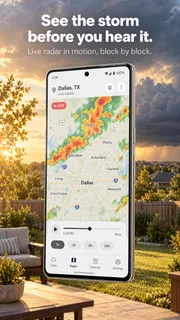
The app’s emphasis on radar is useful because a forecast number alone does not always answer the question I have. If rain is expected, I want to know whether conditions appear to be approaching or whether the weather may already be passing through. Radar gives that decision a visual context. I would still treat it as guidance rather than a guarantee: a map helps me judge what may happen nearby, but it should not be read as a promise about the exact conditions at my doorstep.
Speed expectations: useful when the answer is simple
The strongest speed benefit here is the possibility of checking weather from the home screen instead of navigating through several screens. For routine questions—whether to bring an umbrella, or whether a short trip looks sensible—the quicker route is more valuable than a dense set of additional charts. I would expect the app to feel most efficient when I already know what I want to check and can get to that information directly.
That convenience has a trade-off. A glanceable view can make a quick decision easier, but it is not necessarily the best place to investigate a complicated weather situation. If I need to compare several time periods or understand how a changing forecast affects a long drive, I would take the extra time to inspect the information more carefully. The home-screen approach should be thought of as a shortcut for everyday checks, not a reason to skip judgment.
For a realistic example, imagine getting ready for work while rain is possible later in the morning. A quick radar check can help me decide whether an umbrella belongs in my bag before I leave. If the weather looks uncertain, I can follow up with a fuller look rather than making a hurried choice from one glance. That two-step habit is more sensible than treating any radar display as a precise timetable.
Heavy-use moments: what to check when plans are changing
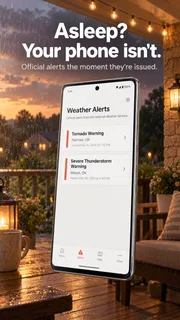
Weather apps are most tempting to open repeatedly when a storm is nearby or plans depend on a narrow window of dry weather. In those moments, radar and alerts are relevant because they can help me decide whether to wait, change a route, or bring outdoor plans indoors. The practical question is not how often I can refresh a screen, but whether the information changes what I should do.
More articles

Instagram Makes Everyday Moments Worth Sharing
A rare social app that can be a photo diary, a neighborhood window, and a lively conversation in the same session—though its best moments still require a little restraint.
I would avoid checking the display every minute and instead use it at decision points: before leaving, before starting an outdoor activity, and when conditions noticeably change. This keeps the app useful without turning an uncertain forecast into a constant distraction. It also helps me remember that a radar image is a snapshot of a changing situation; a single look should not carry more certainty than it deserves.
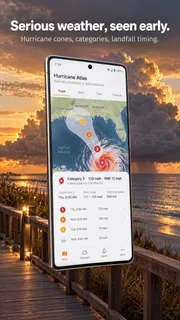
For longer outdoor plans, I would pair a quick radar check with a broader forecast and a backup plan. A home-screen glance may be enough for a short walk around the neighborhood, but it is less suitable as the only source for a day trip, a hike, or work that cannot easily be paused. If conditions are potentially hazardous, I would pay attention to relevant alerts and use cautious judgment rather than relying on a convenient view alone.
Reliability: useful guidance, not a promise
My standard for a weather app is not that it predicts every change perfectly; it is that it helps me make reasonable choices without encouraging false confidence. The combination of radar, alerts, and forecasts points toward a useful mix of visual context and practical warnings. Still, forecasts can change, and a local map cannot remove uncertainty. I would use it to inform a decision, then check again when the stakes or conditions justify it.
Reliability also includes how an app behaves after a disruption. I cannot responsibly promise how quickly it refreshes or how it recovers from a connection problem, so I would judge that on the device and network I actually use. If information appears stale, I would not assume the weather has stayed the same; I would reopen or refresh the view if that option is available, and use another trusted source when a timely warning matters.
This is an important distinction for anyone who expects weather information to be continuously current. A home-screen tool is convenient, but convenience does not mean every displayed detail is live at every moment. For ordinary planning, that may be a perfectly reasonable compromise. For urgent decisions, I would verify conditions instead of treating the first screen I see as definitive.
Device constraints and the home-screen trade-off
The app is free, carries an Everyone age rating, and its current version is 4.0.46. It supports devices running Android 8.1 or later, so people on older systems should check compatibility before expecting to use it. Those details matter most when someone is choosing an app for a spare or aging phone; a weather tool is only convenient if it runs on the device they have.
Because the experience is centered on the home screen, the way a person uses that screen matters too. If I keep my home screen minimal, I may not want weather information occupying space there. If I already rely on a compact home-screen setup, the approach could be a better fit. I would try it with my usual layout rather than assume that a glanceable weather view improves every phone’s organization.
Resource demands are another area where I would avoid guessing. I would pay attention during normal use to whether the app feels comfortable alongside my other everyday apps and whether the home-screen arrangement suits my device. If a phone is older or already feels strained, I would compare the experience with a simple forecast app that keeps the interface lean. The right choice is the one that remains convenient on the actual phone, not the one with the most ambitious presentation.
How it compares with familiar weather apps
Many weather apps prioritize a forecast page: open the app, scan the temperature and upcoming conditions, then close it. Weather Radar Home makes more sense to me if I want radar and alerts to be part of a faster home-screen routine. That difference is about workflow rather than a claim that one style is universally more accurate. Someone who mainly checks tomorrow’s temperature may prefer a straightforward forecast screen, while someone who watches rain around a commute may appreciate the visual emphasis.
It is also worth separating a useful interface from a complete planning tool. A radar-focused glance can help with near-term choices, but a trip planner or a detailed weather service may be a better companion when I need to compare multiple locations or make plans well ahead. I would not choose this app solely because radar sounds more advanced; I would choose it if seeing weather quickly is a real part of my routine.
The app has a 4.2 average from around 2.9 thousand ratings, and it has been installed over 500 thousand times. Those figures suggest that it has found an audience, but they do not tell me whether its particular home-screen approach suits my habits. The more useful test is whether I can answer my regular weather questions with less friction than I experience in my current app.
Who I would recommend it to
I would recommend giving it a try if you check conditions often, care about nearby rain, and want a quicker route to weather information than opening a conventional forecast page each time. It is especially plausible for people who make small decisions throughout the day—whether to walk, carry an umbrella, or shift an errand—rather than those who only check the weather once in the morning.
I would skip it if you prefer a very plain forecast, rarely look at radar, or do not want weather information occupying part of your home-screen routine. I would also avoid depending on it as the sole authority for high-stakes outdoor decisions. In those cases, a more detailed forecast source or a second check is the wiser choice. The app is most persuasive when its convenience matches a habit you already have.
Weather Radar Home was released on August 17, 2024, and the release date is less important to me than whether the current experience remains useful on my phone. Its developer, OmniHome Apps, has positioned it around quick access to weather rather than an elaborate planning workflow. For me, that is a clear and understandable purpose, provided I keep the limits of quick radar checks in mind.
My performance verdict
My overall impression is that this is a focused option for people who want weather close at hand and find radar helpful for immediate decisions. Its best quality is the potential to reduce the little bit of friction involved in checking conditions; its main limitation is that a glanceable view cannot replace deeper planning or remove forecast uncertainty. I would judge its speed and stability through ordinary use on my own device rather than assume the same experience for every phone.
If I were choosing today, I would try it for a few days of normal routines and notice whether the home-screen access actually saves time, whether the information is easy to interpret, and whether I still need to open another app for the questions I ask most. That practical test is the best way to decide whether its radar-first convenience is worth keeping. When quick local checks are part of your day, it has a sensible role; when you want a comprehensive forecast dashboard, a different weather app may fit better.
Weather Radar Home is worth considering as a free weather companion for people who value fast access over a deep, all-in-one forecast workspace. I would use it as a helpful first look, check further when plans depend on the details, and keep a backup source in mind for serious conditions. That balance makes its home-screen focus useful without asking it to do more than a quick weather tool should.
Pros
- Radar maps make nearby rain easier to track.
- Home screen widgets show weather at a glance.
- Severe weather alerts can help users prepare.
- Multiple locations are useful for travel planning.
- Forecast details support everyday scheduling.
Cons
- Radar updates may lag behind changing conditions.
- Some features may require a paid subscription.
- Frequent alerts can become distracting.
- Weather accuracy varies by location.
- The app may collect location data for forecasts.


