
Our review
 Analysis by Lookingapps
I judge a navigation app not only by whether it finds a route, but by how clearly it puts me in control while I’m travelling. Waze is built around changing road conditions and reports from people using the app, so its appeal is different from a quieter map that mainly guides you from one place to another. I find it most useful when a drive is familiar enough to manage but traffic, hazards or delays could still change the best route.
Trust starts with what the app makes visible
Waze is a free maps and navigation app from Waze, rated for Everyone and available on devices running Android 10 or later. Its scale is striking: it has more than 500 million installs, an average rating of 4.4, and around 8.9 million ratings. Those figures suggest a widely used service, but they don’t settle the personal question of trust. For me, the practical test is whether I can use its live guidance thoughtfully rather than treating every alert or suggested turn as unquestionable.
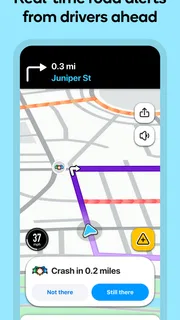
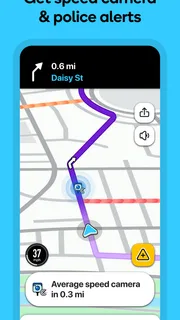
The app’s community-driven character is both its strongest distinction and the reason I keep some judgment switched on. Reports about traffic and road conditions can make a route feel more responsive than a static map, especially when a delay develops after I have set out. But any report is still a prompt to pay attention, not a guarantee that the road will look exactly as described by the time I arrive. I use the information to reconsider a route, not to stop watching the road or blindly follow a new instruction.
That distinction matters because navigation involves more than reaching a destination. A route change can send me onto unfamiliar streets, and a warning can compete for attention at the wrong moment. My approach is to check the route before moving, listen for guidance while driving, and leave any complicated decision until I can pull over safely. Useful navigation should support my attention, not replace it.
Why live reports can help—and where they need judgment
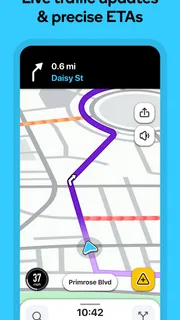
On a routine commute, a familiar route may be adequate until congestion appears. That is where Waze’s emphasis on current traffic and safety alerts can earn its place: I can use the changing picture to consider whether staying on my usual road still makes sense. The benefit is less about discovering a secret shortcut every time and more about having a reason to reassess when the drive stops behaving as expected.
There is a trade-off. A suggested alternative may be less familiar, and a route that looks attractive on a screen can involve turns or local streets I would rather avoid. If I’m carrying passengers who need a calm ride, driving somewhere new in poor visibility, or approaching a turn that would require a sudden lane change, I may prefer the route I already understand. A live recommendation is valuable only when it is also practical and safe for the situation.
What I check before relying on a route
I find it helps to enter a destination and review the overall journey before setting off, rather than starting to explore options while the car is moving. I pay attention to whether the route makes sense in broad terms and keep the guidance available for changes along the way. This small habit reduces the chance that a late instruction catches me unprepared, particularly when I’m driving somewhere unfamiliar.
More articles

Instagram Makes Everyday Moments Worth Sharing
A rare social app that can be a photo diary, a neighborhood window, and a lively conversation in the same session—though its best moments still require a little restraint.
For a realistic weekday example, imagine I’m heading across town after work and the main road begins to slow. I can use Waze’s live traffic view and alerts to decide whether a different route is worth considering. If the alternative involves a confusing turn or a road I don’t want to take, I can stay with the route I know and accept some delay. That is a better use of live guidance than treating the fastest-looking option as an order.
Visible choices and sensible boundaries
Because this is a navigation app, location is central to the task: directions depend on knowing where I am in relation to the route. Still, I avoid assuming that a particular service handles information in a certain way unless the app makes that clear to me. When I install or update any app, I review the permission prompts shown on my device and grant only what I’m comfortable granting for the functions I intend to use. I also revisit those choices if my needs change.
That is a useful distinction between a permission and a broader data practice. A device prompt can show what access the operating system is asking me to allow, while questions about storage, sharing or retention belong to the app’s own explanations and controls. I look for those details in the app and its official materials rather than guessing from the fact that navigation requires location. If I’m uncomfortable with a permission request, I pause and decide whether the app can still serve my needs with a narrower choice.
Location sensitivity is especially worth considering before a trip that begins at home, work or another place I prefer not to expose casually. I make a deliberate decision about when to open the app and whether I need it for that journey, instead of keeping navigation running out of habit. That is not a claim about how Waze handles location; it is a practical way to make my own use more intentional.
Account choices deserve a quick review
When an app offers account or profile controls, I take a moment to understand what I can manage there and what remains tied to the device or service. I don’t assume that signing in is required for every basic navigation task, nor do I assume that signing out changes every kind of data handling. I check the choices presented in the app and decide how much personalization or continuity I actually want.
The same care applies to community participation. Waze’s identity is closely connected to road reports, but I don’t need to treat every alert as an invitation to interact while driving. My priority is to keep my hands and attention on the drive; I would only make a report when it can be done safely, such as after stopping. That boundary lets the app’s shared information remain useful without making contribution more important than the person behind the wheel.
How it compares with familiar map apps
Compared with a conventional map app that I mainly open for directions, Waze feels more focused on what may be happening on the road right now. That can make it a compelling choice for regular drivers who encounter variable traffic and want alerts woven into their journey. A more general-purpose mapping app may suit me better when I’m planning a trip around places to visit, browsing an area on foot, or looking for a broad set of map and destination tools rather than a drive-first experience.
For long-distance travel, I would also weigh the route against my own priorities: predictable roads, comfortable stops, and clear turns may matter more than a constantly changing suggestion. Waze is not automatically the best choice just because conditions can change. If I want a straightforward route I already know, or if I prefer not to make decisions based on live community reports, another navigation option—or simply following a familiar road—may feel calmer.
There is also the human factor of screen attention. Any app that presents changing information can tempt me to check it repeatedly. I try to set up the journey before moving and rely on spoken or glanceable guidance rather than handling the phone during a drive. If the route changes at a point where I cannot respond safely, I would rather miss a turn and reassess later than make an abrupt manoeuvre.
Who will get the most from it
I’d recommend Waze to drivers who regularly travel through busy areas, value timely traffic context, and are comfortable using alerts as guidance rather than certainty. It can be especially handy when a daily route is disrupted and I need to decide whether a detour is worth attempting. The free price makes it easy to try, while its large audience gives the app a familiar place in the navigation category.
I’d be more cautious about recommending it to someone who wants a quiet, minimal route display, dislikes changing suggestions, or is uncomfortable with the location-related choices involved in navigation apps. It may also be a poor fit for a driver who tends to react to every prompt without assessing the road. In those cases, a simpler map experience or a preselected familiar route may reduce distraction and stress.
A cautious recommendation for everyday driving
My overall view is positive, with a clear condition: Waze works best when I stay the decision-maker. Its live traffic and safety-oriented guidance can make an ordinary drive more adaptable, and the community-focused approach gives it a character that feels distinct from a basic turn-by-turn map. The cost of that responsiveness is that I need to judge whether a changing route suits the road, my comfort level and the moment.
I would install it for everyday driving if I wanted current road context and was willing to review permissions and account choices with care. I would not rely on it as a substitute for safe driving, nor would I assume that every alert is complete or every shortcut is worth taking. Used with those limits, it is a practical navigation companion. Used without them, even a helpful alert system can become another source of distraction.
For me, the strongest reason to keep Waze available is not that it promises a perfect journey; it is that it can give me another useful signal when conditions change. I check the choices the app presents, make a route decision before it becomes urgent, and keep my attention on the drive. That cautious balance is what makes its live guidance genuinely helpful rather than merely busy.
Pros
- Community reports help drivers spot hazards and road closures.
- Routes can adjust to changing traffic conditions.
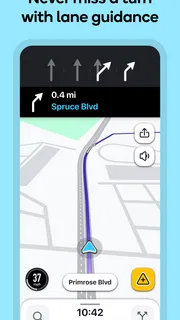
- Voice guidance reduces the need to look at the screen.
- Drivers can share their estimated arrival time.
- Map edits from users help keep local details current.
Cons
- Frequent alerts can distract during a drive.
- Route suggestions may use narrow or unfamiliar roads.
- Reliable navigation depends on a mobile data connection.
- Battery and data use can rise on long trips.
- Crowd-sourced reports may be outdated or inaccurate.


