
Our review
 Analysis by Lookingapps
I think of Upside less as a reason to change where I shop and more as a way to check whether an ordinary purchase could earn something back. That distinction matters: a cash-back app is only useful if its offers fit places I already visit and the extra steps feel worth taking. Upside is a free travel and local app from Upside Inc., centered on earning cash back at participating gas stations and food businesses. It is rated for Everyone, and its pitch is straightforward, but the practical question is whether you can use it without letting offers dictate your routine.
Trust starts with a sensible role for the app
In my view, the most comfortable way to approach Upside is as an optional savings tool, not a financial account that should run your day. I would open it when planning a fuel stop or meal, compare the available offer with my normal choices, and make the purchase only if the location and terms suit me. That keeps the app in a supporting role and avoids treating a displayed reward as a reason to spend more.
Upside has a 4.6 average from around 456,000 ratings, and it has passed 10 million installs. Those figures suggest that many people have tried it, but popularity is not a substitute for checking an offer yourself. I would still look at the details shown for a particular purchase, especially before driving out of my way or changing a familiar payment routine.
One useful mindset is to compare the reward with the whole cost of the detour. A nearby offer may be worthwhile when you are already heading that way; a farther location can erase the benefit through extra fuel, time, or inconvenience. This is a small but important distinction between cash back that naturally fits a trip and cash back that quietly creates a new trip.
What the app is—and what it is not
Upside is not a general budgeting tool or a replacement for a bank’s own rewards program. Its focus is local purchasing, particularly fuel and food, while the store summary positions it as something that can sit alongside existing credit and debit rewards. I see that as the strongest use case: add a possible extra benefit to spending you were already going to do, rather than expecting one app to manage every part of your money.
The app is free, which removes an up-front purchase decision, but “free” does not mean every offer is automatically worthwhile. The real cost is your attention: checking locations, understanding the offer, and following whatever steps apply to that transaction. If you rarely buy fuel or eat at places represented in the app, that effort may not return much value for you.
Upside was released on April 24, 2016, and the current version is 26.29.0. It supports Android 9 and later. I would treat those details as practical compatibility information, then make sure the app still behaves well on my own phone before relying on it as part of a routine.
More articles

Instagram Makes Everyday Moments Worth Sharing
A rare social app that can be a photo diary, a neighborhood window, and a lively conversation in the same session—though its best moments still require a little restraint.
Controls worth checking before you rely on an offer
A careful first session should be about understanding the choices the app presents, not rushing to claim an offer. I would inspect the account and settings areas, review the permissions Android or iOS displays, and decide whether each requested access makes sense for how I plan to use the app. A permission prompt is a choice to evaluate, not a reason to assume that access is essential or harmless.
I would also read the individual offer instructions before paying. Cash-back services can require a specific sequence, and a missed step can turn an attractive listing into a disappointing purchase. The practical habit is simple: check the location, the terms, and the required action while you still have time to choose another option. If anything is unclear, I would avoid building the purchase around an expected reward.
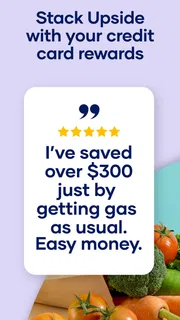
For someone who wants to stack rewards, the key is to keep the underlying payment method and its own reward rules in view. Upside’s summary encourages combining its cash back with existing card rewards, but I would not assume every card, transaction type, or merchant will qualify in the same way. Before changing how you pay, confirm that the offer’s instructions and your card’s conditions can coexist.
Data-sensitive moments deserve a pause
Location-related apps naturally bring up privacy questions, particularly when a person is moving between fuel stops and restaurants. I would pay attention to the operating system’s permission screen and choose the least access that still supports the way I use the app. If I only want to browse offers occasionally, I would consider whether I need location access all the time or whether a more limited option is enough for my habits.
Account creation and redemption are other moments when I would slow down. I would use a password I do not reuse elsewhere, avoid sharing account credentials, and check the app’s own explanations of how account information and rewards work. Those are sensible safeguards, not claims about a particular data practice. The important point is to make decisions based on the choices and explanations actually visible to you.
I would be especially cautious about linking any financial account or providing extra information simply because an offer looks appealing. Read the in-app wording first and ask whether the information is necessary for the feature you want. If you are uncomfortable with the request, skip that offer or use a different way to save. A small possible reward should not pressure you into a level of access you would not otherwise accept.
A realistic routine: fuel, lunch, and the final comparison
Imagine I am driving to work and already need fuel. Before leaving my usual route, I can check whether Upside shows a suitable nearby station, then compare the listed terms with the price and convenience I would normally choose. If the location is close and the offer is clear, I can consider it. If it requires a detour or leaves me uncertain about how to complete the transaction, I can stay with my usual station without feeling that I have lost a guaranteed saving.
At lunchtime, the same reasoning applies to food. If I am choosing between places anyway, checking the app can add a useful comparison. But I would not order a larger meal or make an unnecessary stop just to chase cash back. The best result is usually the one that fits the plan already in front of me, not the one that produces the most exciting-looking offer on screen.
A helpful tip is to check before you are standing at the pump or ready to pay. That gives you time to compare the offer with your normal route and read the instructions without holding up a queue. It also reduces the chance that you will make a hurried choice based on a reward headline and overlook a condition that matters.
Where Upside compares well—and where another choice wins
Compared with relying only on a card’s rewards, Upside can give you another place to look for a local offer while keeping your usual payment method in play. Compared with a general coupon app, its appeal is more focused on routine fuel and food spending rather than searching across every shopping category. I like that narrower purpose when I want a quick check tied to a real errand.
The trade-off is that a card reward may be more automatic, while a separate app asks you to pay attention to its own offer and process. If you value simplicity above squeezing out another possible benefit, using your normal card and skipping Upside may be the better choice. Likewise, a general-purpose budget tracker is a better fit if your main goal is seeing where all your spending goes rather than finding local cash-back opportunities.
Upside is also a weaker match for people who do not want to share location-related information with a local offers app, or who rarely visit the types of businesses it covers. You can still consider browsing without granting every permission, but your experience should be guided by the access choices the app and your device actually provide. If the required workflow feels intrusive or fiddly, the sensible move is to stop rather than force it.
Who I would recommend it to
I would suggest trying Upside if you regularly buy fuel or food, already compare nearby options, and are comfortable checking an offer before spending. It may suit commuters, people who take frequent road trips, or households that can coordinate a fuel stop with errands they already need to run. The value is clearest when the app fits an existing decision instead of creating a new one.
I would be less likely to recommend it to someone who expects effortless savings with no attention, has a strict preference against location-based services, or mainly wants a complete view of personal finances. It is also not a good reason to switch to a more expensive or inconvenient option. My rule would be to compare the total purchase and travel cost first, then regard any reward as a possible extra rather than part of the guaranteed price.
A cautious verdict for everyday use
My overall impression is that Upside has a practical, limited job: help people check for cash back on local fuel and food purchases while leaving room for existing card rewards. Its strong adoption and 4.6 average make it easy to understand why people try it, but neither figure tells you whether a particular offer fits your route, privacy preferences, or payment habits.
I would install it only with a clear routine: review permissions, inspect the offer before buying, avoid unnecessary detours, and keep my existing card rules in mind. That approach gives the app a fair chance to be useful without turning rewards into a chore. Use Upside when it supports a purchase you already planned; skip it when the extra steps, access, or travel outweigh the likely benefit.
Pros
- Offers cash back on eligible gas purchases at participating stations.
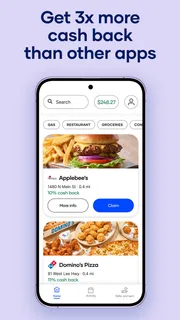
- Includes grocery and restaurant offers beyond fuel savings.
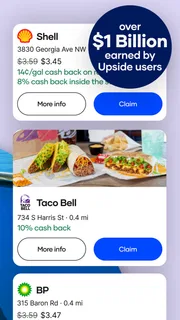
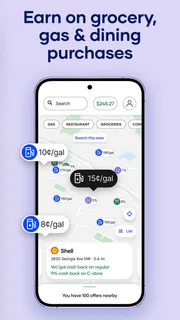
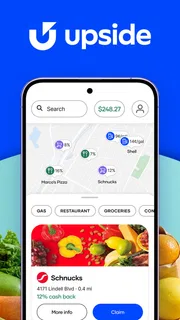
- Lets users browse nearby offers through an interactive map.
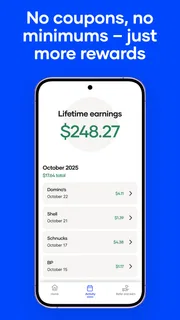
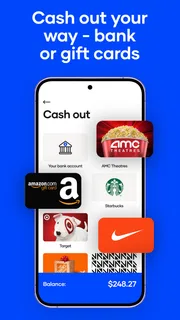
- Supports cashing out rewards through several available methods.
- Free to download and use without a required subscription.
Cons
- Offer availability varies by location and participating business.
- Cash back may require activating an offer before purchasing.
- Some offers have spending limits or other redemption conditions.
- Rewards can take time to become available for cash out.
- The app may collect location data to show nearby offers.


