
Our review
 Analysis by Lookingapps
When I need to make sense of care costs before booking an appointment, I would rather check a likely price and nearby options than guess and sort out the bill later. That is the practical appeal of UnitedHealthcare: its focus is on helping members find care and compare prices. It is a medical app from UNITED HEALTHCARE SERVICES, INC., and its usefulness depends less on how often I open it than on whether it helps me make a better-informed choice at the moment I need care.
Putting care and cost in the same search
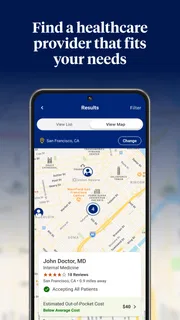
Finding a clinician and understanding what a visit might cost are usually treated as separate jobs. I might search a provider directory first, then call a clinic, check my insurance details, and still wonder what I will owe. UnitedHealthcare brings the care-finding and price-checking task into one app experience. That joined-up purpose is its most meaningful strength: it encourages me to consider practical cost alongside the question of where to go.
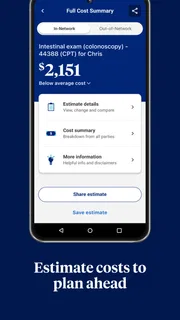
That distinction matters because a price estimate is not the same thing as a final bill. The amount I see can be useful for comparing options, but it should be treated as a planning aid rather than a promise. The care received, the details of my coverage, and how a service is billed can all affect what I ultimately pay. I would use the app to narrow down choices, then confirm important details before committing to a costly or non-urgent service.
The best reason to open it is to make a more informed choice before care, not to replace a conversation with a provider or insurer. That is a grounded role for a health-plan app. It can help organize the decision, while leaving clinical advice and final billing questions where they belong.
From a vague need to a useful shortlist
In practice, I would begin with the kind of care I need and use the app to look for relevant options and pricing information. The useful outcome is not simply a long directory; it is a shortlist I can act on. I can compare what appears available, consider the estimated expense, and decide which option deserves a closer look before I make contact.
A helpful approach is to search with the actual service in mind rather than choosing a provider based only on name recognition. If I am arranging a routine visit, for example, I would compare the options presented for that kind of care and note both the location and the displayed cost. If the app surfaces several possibilities, the lowest estimate may not automatically be the right choice: convenience, timing, and whether the provider fits my needs matter too.
One non-obvious benefit of checking prices before scheduling is that it gives me a better question to ask when I call. Instead of asking only, “Do you take my insurance?”, I can ask whether the specific service and provider details match the estimate I saw. That small change can make a phone call more useful. It also gives me a chance to catch a mismatch before I have invested time in an appointment.
More articles

Instagram Makes Everyday Moments Worth Sharing
A rare social app that can be a photo diary, a neighborhood window, and a lively conversation in the same session—though its best moments still require a little restraint.
I would keep the app open during the planning stage, then save or write down the details I need for the next step. A price shown on a screen is easy to misremember, especially when comparing several clinics. Recording the provider name, service, and estimate separately helps me avoid treating two similar-looking options as interchangeable. The app can support the comparison, but I still need to make sure I am comparing the same kind of care.
A realistic use case: planning routine care
Imagine I have a non-urgent health concern and want to arrange an appointment without committing to the first nearby option. I can use UnitedHealthcare to explore care choices and compare the costs presented, then contact a likely provider to confirm the appointment details and ask whether the quoted estimate applies to my situation. That sequence is more deliberate than booking first and investigating the likely expense afterward.
The app is especially useful in this scenario because the decision has room for a little research. I can weigh an option that is easier to reach against one that appears less expensive, rather than treating price as the only consideration. If the difference matters to my budget, I have a reason to verify the estimate before booking. If convenience matters more, I can make that choice with a clearer sense of the tradeoff.
There is also a useful role for the app when planning care for a family member, provided I have the appropriate access and information to manage the search. I can use it as a starting point for comparing options, but I should not assume that another person’s coverage or costs match mine. The practical lesson is to keep the search tied to the person who will receive care and to verify the relevant details rather than relying on a familiar account or an old estimate.
For urgent symptoms, I would not let price comparison slow down getting appropriate help. This is a planning tool, not a substitute for emergency care or professional medical judgment. Its strongest fit is the decision that can safely wait long enough for me to compare options and make a call.
Where estimates help—and where they can mislead
Price information is valuable precisely because medical expenses can be hard to anticipate, but it also needs careful interpretation. An estimate may depend on the service, provider, and coverage circumstances. If the appointment changes, additional services are involved, or the provider’s billing details differ from what I searched, the final amount may not match what I expected. I would use the displayed figure as a comparison point, not a guaranteed total.
That creates a little extra work. To get value from the app, I need to search accurately, compare like with like, and confirm details when the cost is significant. Someone hoping to tap once and receive a definitive bill may find the process less satisfying. The app can help me ask better questions, but it cannot remove every uncertainty from healthcare billing.
Another tradeoff is that a price-first search can tempt me to choose the cheapest option without considering whether it is suitable. I would not treat the lowest displayed amount as a recommendation about clinical quality or appropriateness. If I have a particular medical need, I should consider the right type of professional and seek guidance from a clinician when needed. Cost is one part of the choice, not the whole decision.
It is also worth remembering that this is a UnitedHealthcare service. It makes the most sense for people who can use the company’s member services and whose coverage information is relevant to the decisions they are making. If I am not a member, or if I need a broad, insurer-neutral directory, a general provider search or direct calls to local clinics may be a better starting point. Even for members, calling a provider can be the more direct route when I already know exactly where I want to go.
Who is most likely to benefit
I would recommend giving UnitedHealthcare a try if I were a member who regularly compares care options, wants a clearer view of possible costs, or is planning a non-urgent appointment. Its particular value is the chance to bring provider discovery and price awareness into the same decision. That can be helpful for people who prefer to prepare before making calls and for anyone trying to avoid choosing a clinic without first considering the financial side.
It is less compelling for someone who rarely needs to search for care, already has a trusted provider and does not need alternatives, or expects the app to settle every billing question. A person without a relevant UnitedHealthcare plan may also find that a general search tool or a conversation with their own insurer is more useful. I would not download it expecting a replacement for medical records, clinical advice, or a definitive explanation of every charge; its clear appeal is narrower and more practical.
The app is free, and it has an Everyone content rating, making it straightforward to consider as a general-purpose member resource. Its average rating is 4.6 from around 250,000 ratings, with roughly 26,000 written reviews and over 5 million installs. Those figures suggest it has reached a substantial audience, though they do not tell me whether it will fit a particular person’s plan or search needs.
UnitedHealthcare was released on September 26, 2018, and its current version is 3.16.0; it requires Android 10 or later. Those details matter if I am checking compatibility before installing, while the app’s core appeal remains its focused care-and-cost workflow. I would confirm that my device meets the requirement and that the app is relevant to my coverage before relying on it to plan a search.
A practical companion, not a final authority
My overall view is that UnitedHealthcare is most useful when I treat it as a careful first step: search, compare, shortlist, and verify. Its price-focused approach can make routine care decisions feel less like guesswork, especially when I am willing to follow up with a provider about the details. The extra confirmation is not a flaw unique to this app; it is a sensible part of using estimates in a complicated billing system.
I would keep it in my toolkit if I had UnitedHealthcare coverage and expected to compare care from time to time. I would choose another route when I needed urgent help, wanted an insurer-independent directory, or already knew the provider I planned to call. For the right member and the right moment, it offers a useful bridge between “Where can I go?” and “What might this cost?”—with the important reminder that a well-informed estimate is still an estimate.
Pros
- Find in-network doctors and care facilities nearby.
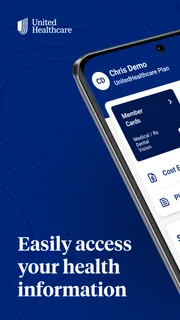
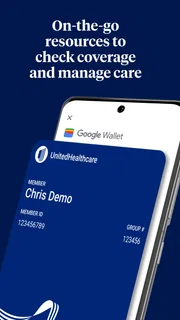
- View digital member ID cards from your phone.
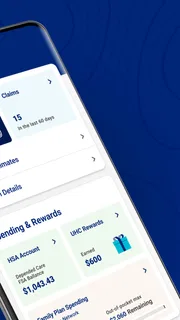
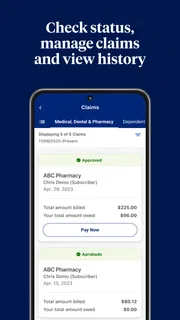
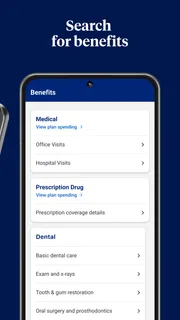
- Check claims and benefit details in one place.
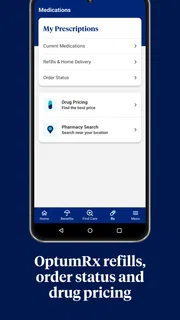
- Manage prescriptions and locate nearby pharmacies.
- Some plans support virtual care through the app.
Cons
- Available features depend on your UnitedHealthcare plan.
- Some account tasks require identity verification.
- Provider listings may not reflect recent network changes.
- The app is not available to every UnitedHealthcare member.
- Certain services may redirect you to a web page.


