





Our review
 Analysis by Lookingapps
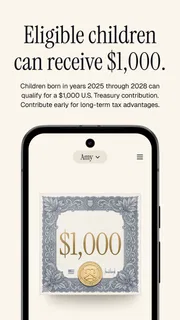
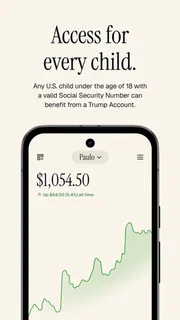
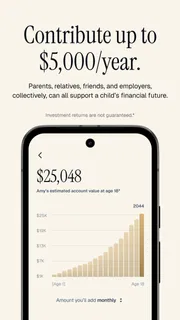
I would approach Trump Accounts: Official App as a focused financial tool, not as an all-purpose money manager. Its stated purpose is to help families invest in a child’s future, and that narrow aim is also the key to judging its value: it makes sense if you want to engage with Trump Accounts, but it should not be mistaken for a general investing or budgeting app. I’d treat it as a place to explore this specific program rather than assume it replaces the broader financial tools a household may already use.
A focused app for a particular family-finance task
The app is published by the Department of the Treasury and sits in the finance category. Its name signals that it is the official companion for Trump Accounts, which gives it a different role from a bank app, brokerage platform, or household budget tracker. The distinction matters: a specialized app can be useful precisely because it concentrates on one topic, but it may not help with the other parts of planning for a child’s financial future.
Its age rating is Everyone, so the app is presented as suitable for a broad audience. That does not mean every family will find it relevant; the central question is whether you are looking for information or support connected to Trump Accounts. If you mainly want to track spending, compare investments across providers, or manage several accounts in one place, this is not the kind of app I would choose as my main financial dashboard.
What the free access is worth
The app is free to download. That removes an upfront purchase decision, which makes it reasonable to install and inspect if the program is relevant to your family. Free access, however, should not be confused with a promise that every related financial service or action is free. I would separate the cost of getting the app from any decisions about accounts, contributions, or other financial arrangements, and check the terms that apply to those separately.
That distinction is useful in everyday planning. If you are deciding whether to spend time learning about a child-focused account, the app itself does not require a purchase to get started. If your real question is whether the account is financially right for your family, downloading an app cannot settle that by itself. I would use it as one information channel, then compare the program’s rules and implications with your household’s needs before making decisions.
The listing shows a 4.8 average from around 6,300 ratings, with about 770 written reviews, and more than a million installs. Those figures suggest substantial interest and a positive reception, but I would not treat ratings as proof that the app covers every family’s circumstances. Reviews can help reveal how people experience an app; they cannot replace careful consideration of what a financial program means for your own child.
Where a focused tool can help
The strongest potential value here is reducing the effort required to stay oriented around one specific subject. Parents often handle financial tasks in short windows between work, school schedules, and household errands. A dedicated app can be a practical starting point when you have a clear question about Trump Accounts and want to keep that inquiry separate from routine banking and bill payments.
More articles

Instagram Makes Everyday Moments Worth Sharing
A rare social app that can be a photo diary, a neighborhood window, and a lively conversation in the same session—though its best moments still require a little restraint.
For example, imagine you hear about the program while talking with another parent, but you do not have time to investigate it carefully. Rather than relying on a secondhand summary or mixing the topic into a general budgeting app, you could open the official app later, review the information available there, and note what you still need to understand. That is a modest but useful workflow: it turns a vague conversation into a specific research task.
A second practical use is preparing for a family discussion. If one parent is more engaged with financial planning than the other, a dedicated source gives both people a shared place to begin. I would suggest writing down questions before opening it: what does the account involve, what choices might a family face, and what would need to be checked elsewhere? This makes a focused app more useful than browsing without a goal, especially when the topic could influence long-term plans.
There is also a good reason to keep expectations narrow. A child’s future finances involve more than one program: families may also think about savings accounts, education costs, gifts from relatives, or other investments. A Trump Accounts app is most useful when it helps you understand this particular option, not when you expect it to coordinate every part of that larger picture.
Tradeoffs I would keep in mind
The main tradeoff is specialization. In a broad finance app, I might expect to see several financial activities brought together; here, the subject is deliberately specific. That focus can make the app easier to approach when you already know why you opened it. It can also make it a poor fit if you want a single tool for household cash flow, investment comparisons, and account monitoring.
I would not use an app’s official status as a reason to skip reading carefully. Financial decisions deserve attention to details, and families can have different priorities, timelines, and comfort levels with investing. My practical advice is to distinguish explanatory material from any step that commits you to a financial choice. If a screen prompts you to act, pause long enough to understand the consequences and confirm that the choice suits your situation.
Another tradeoff is that a mobile app may not be the best setting for every kind of research. A phone is convenient for checking a question while waiting in line, but comparing rules, discussing options with a partner, or reviewing household finances may be easier on a larger screen or with notes in front of you. I would use the app for focused, convenient reference and move to a more deliberate setting before making consequential decisions.
For readers comparing it with the usual alternatives, the difference is straightforward. A bank app generally centers on that bank’s accounts and transactions; a brokerage app is typically geared toward investments and portfolio activity; a budgeting app helps organize income and spending. This app’s identity is tied to Trump Accounts. It is not a substitute for those tools, and those tools may not offer the same focused starting point for this subject.
Who is most likely to benefit
I would recommend considering it if you are a parent or guardian who wants to learn about Trump Accounts, or if you are helping a family member understand the topic. It may also suit someone who prefers a dedicated app over searching across unrelated financial products. The fact that it is free to download makes a first look low-commitment, as long as you remember that the app’s price says nothing by itself about the cost or suitability of any financial decision connected to the program.
It is less likely to be worthwhile for someone who has no interest in Trump Accounts, needs a general-purpose investment platform, or wants a complete view of family finances in one place. If you already rely on a bank or brokerage app for a different task, this one should be viewed as a possible companion for a distinct purpose, not an automatic replacement. I would skip it if the subject does not apply to you rather than install it simply because it is popular.
The app is listed as version 2026.43.1, with a minimum operating-system requirement of 7.0. It was released on May 27, 2026. Those details matter most when deciding whether your device can run it and whether you are looking at the current release; they do not tell you whether the program is a good fit for your finances. Before relying on any app for an important task, I’d make sure it is updated and that the device you plan to use meets the requirement.
My verdict: useful when the subject fits
My view is that Trump Accounts: Official App has a clear, limited reason to exist: it gives interested families a dedicated mobile entry point for a particular child-focused financial subject. I like the low-friction fact that downloading it costs nothing, and I can see why a focused official app would be easier to navigate than trying to assemble a first understanding from general finance tools.
Still, I would not recommend it as a universal family-finance solution. Its value depends on whether Trump Accounts are relevant to you, and a specialized app cannot replace broader planning or careful review of financial choices. If you are curious about the program, install it and use it to organize your questions; if you need budgeting, account aggregation, or wider investment management, choose a tool designed for those jobs instead. That is the clearest way to get value from it without expecting it to do more than its focused purpose suggests.
Pros
- Official app for managing eligible Trump Accounts.
- Provides a direct way to check account information.
- Keeps account management in one dedicated app.
- May simplify access to official account services.
- Useful for families tracking a child’s account.
Cons
- Availability may depend on account eligibility.
- Some features may require identity verification.
- Account setup could involve extra paperwork.
- Users may need to share sensitive personal details.
- The app offers limited value without an eligible account.


