





Our review
 Analysis by Lookingapps
I’d describe TikTok as a video-first social app that can be entertaining within seconds, but takes a little longer to feel personal. Open it and you can start watching immediately; the more useful first step is teaching the feed what you actually enjoy. That distinction matters: a quick scroll can be fun, while a few deliberate choices and interactions make the app far more relevant.
TikTok is made by TikTok Pte. Ltd. and sits in the social category, though its short videos make it feel different from a conventional feed of status updates and photos. It is free to install, rated for teens, and supported by optional in-app purchases ranging from a few cents to nearly ten thousand dollars per item. I would treat those purchases as something to review carefully rather than a necessary part of getting started.
What to expect from the video feed
The main experience is a stream of videos chosen around what you watch and engage with. Topics can be as varied as cooking demonstrations, comedy, music, practical tips, and personal stories. This makes discovery the app’s strongest quality: instead of needing to follow several accounts before seeing anything worthwhile, a new user can encounter relevant clips right away.
The trade-off is that the feed can be absorbing and uneven. One useful video may lead to several others on the same subject, but the next recommendations may not match your mood. I find it helps to think of the feed as something I am shaping, not a neutral window onto everything happening. Watching a clip to the end, revisiting one, or choosing to move on can all influence what appears later.
The scale is substantial: TikTok has more than a billion installs and an average rating of 4.0 from around 70 million ratings. Those figures suggest broad appeal, but they do not guarantee that every person will like the recommendation style. If you prefer a chronological feed of updates from people you already know, a more traditional social network may feel more predictable.
Videos are also a different way to keep up with friends. A short clip can communicate a joke, a reaction, or a small moment more vividly than a text post, but it is not a replacement for every kind of conversation. I would use TikTok for discovery and casual sharing, while keeping direct, private, or time-sensitive conversations in a messaging app that is designed around them.
Set up with a purpose, not a rush
On a first visit, it is tempting to scroll rapidly and assume the feed will understand you. I get better results by pausing when something genuinely interests me and moving on quickly when it does not. That sounds simple, but it is a practical way to make early recommendations less random without spending ages searching for accounts to follow.
More articles

Instagram Makes Everyday Moments Worth Sharing
A rare social app that can be a photo diary, a neighborhood window, and a lively conversation in the same session—though its best moments still require a little restraint.
Before settling in, decide what you want the app to do for you. If you want quick recipe ideas, watch a few clips closely and note which creators explain steps clearly. If you are there for comedy, engage with the styles that make you laugh rather than every passing trend. A small, consistent signal is more useful than tapping on everything out of curiosity.
It is worth checking the account and privacy choices available during setup and revisiting them once you understand how you plan to use the app. A person who mainly watches may want a different level of visibility from someone who intends to post. I would not rush through choices simply because the feed is ready to start; a brief pause can make the experience feel more comfortable from the beginning.
For a teen, I would make the age rating part of the setup conversation rather than treating it as a label to ignore. The app is rated Teen, but that does not mean every video will suit every family or every younger viewer. It is sensible to decide together what kind of participation feels appropriate and to check the available account controls before making regular use a habit.
Your first useful result
A realistic first success is not building an audience. It is finding one video that answers a question you already had. Imagine you are trying to make a simple dinner after work: search or browse for an idea, watch the full explanation, and save or otherwise keep track of the creator or clip using the options available in the app. Then check whether the instructions are clear enough to use outside the video.
That last check is important. A quick cooking clip may omit quantities, timing, or context to keep the video short. I treat TikTok as a useful discovery tool, not an automatic authority. For advice that affects health, money, safety, or a major decision, I look for corroboration from a reliable source instead of acting on a confident-looking video alone.
The same workflow works for learning a small skill: find a clip, watch it carefully, and compare a second explanation if the first leaves a gap. Short videos are especially good at showing a movement or result that is awkward to describe in text. They are less dependable when a topic needs qualifications or a complete step-by-step lesson, so I switch to a longer tutorial or written guide when the details matter.
If you want to contribute, start with something you can explain simply: a quick demonstration, a reaction, or a small moment you are comfortable sharing. I would watch the finished clip before posting and ask whether it reveals anything personal that I would rather keep private. Posting is not required to get value from the app; passive viewing and careful discovery are perfectly valid ways to use it.
Why the feed sometimes feels confusing
A common first-time question is why a particular video appeared. The feed is shaped by patterns of viewing and interaction, so a clip can lead to related recommendations even if you watched it only out of curiosity. If the stream drifts away from your interests, be more selective: spend time on topics you want more of, skip those you do not, and use the app’s available feedback and discovery controls where appropriate.
Another point of confusion is the difference between a popular clip and a trustworthy one. TikTok makes it easy to encounter polished explanations and confident opinions, but presentation is not proof. I pay attention to whether a creator gives context, demonstrates the claim, or points toward evidence. For an everyday idea such as a recipe, experimentation may be low-risk; for medical or financial guidance, the same casual approach is not enough.
Some people also expect every interaction to stay private or every video to be intended for a small circle. Social apps involve choices about who can see and respond to content, and those choices deserve attention before sharing. I recommend checking the audience and interaction settings that are available, especially before posting personal material or letting a younger user create an account.
The app’s review volume is large as well: it has about 2.3 million written reviews. That gives a newcomer plenty of other user perspectives to consider, but reviews can reflect very different expectations, devices, and habits. I would use them as background, not as a substitute for trying the feed thoughtfully and deciding whether its style suits me.
How it compares with other social apps
Compared with a photo-led social network, TikTok puts more emphasis on watching and discovering video than on maintaining a carefully arranged personal gallery. Compared with a messaging app, it is much better suited to public-interest clips and entertainment than to a private back-and-forth. And compared with a long-form video service, its short format is convenient for quick browsing but can leave complex subjects feeling compressed.
That makes the best alternative depend on the task. For updates from close friends, I would choose a service where their posts are the main focus. For a detailed course or a full repair walkthrough, I would choose a longer video or written guide. For a quick demonstration, a fresh comedy clip, or a stream of ideas that might spark a new interest, TikTok is a natural fit.
It is also worth remembering that the app is free to download, not necessarily free of every possible expense. Optional purchases are listed from $0.05 to $9,999.90 per item, so I would check purchase prompts and device-level spending controls if children or shared devices are involved. You do not need to buy anything to begin exploring the core video experience.
Who will get the most from it
I recommend trying TikTok if you enjoy discovering creators and topics you would not have searched for yourself, or if you like visual explanations that get to the point quickly. It can also suit someone who wants a low-effort way to share a funny moment with friends. The best experience comes from having a little intention: follow interests rather than every trend, and take breaks when an open-ended feed starts consuming more time than you planned.
I would skip it, or keep its role limited, if you strongly dislike algorithmic recommendations, need a carefully ordered record of friends’ updates, or find endless video browsing distracting. It is also not my first choice for private conversations or high-stakes research. Those are not flaws that every user will feel, but they are real mismatches for people who expect a social app to behave like a messaging service, a reference library, or a simple chronological feed.
For a first-time user, I would begin with a clear interest, spend a short session noticing which clips are genuinely useful or enjoyable, and adjust what you watch accordingly. TikTok has been available since July 9, 2015, and its huge audience gives discovery plenty of variety; the personal experience still depends on how deliberately you use it. My advice is to treat it as a lively video companion rather than an all-purpose source of truth or communication. If the feed starts showing you things you value, keep it; if it mostly pulls you into aimless scrolling, another social format may serve you better.
Pros
- The For You feed quickly adapts to viewing habits.
- Built-in editing tools make short videos easy to create.
- LIVE features let creators interact with viewers in real time.
- Captions and accessibility tools support easier viewing.
- Users can save drafts before publishing videos.
Cons
- The personalized feed can make it easy to lose track of time.
- Some features may be restricted by age or region.
- Video uploads can use significant mobile data.
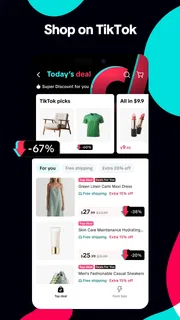
- Shop availability and product selection vary by location.
- Content moderation does not catch every unsuitable video.


