


Our review
 Analysis by Lookingapps
I see TikTok Pro as an entertainment app whose appeal depends on being connected at the moment you want to watch, explore, or take part. That makes the quality of the connection part of the experience, not just a background technical detail. When videos load smoothly, it is easy to slip into a quick browse; when a connection falters, the app’s short-form rhythm can lose its pull. My overall impression is that TikTok Pro suits people who enjoy discovering and responding to video content on a phone, especially when they have a reliable connection and a few minutes to spare.
Watching and joining in both depend on the connection
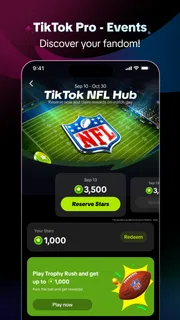
The app is listed in the entertainment category and is developed by TikTok Pte. Ltd. Its central idea is broader than simply watching: the experience invites people to participate and earn rewards. In practice, I would approach that promise as an extra reason to explore rather than assume that every session will deliver a particular reward. The most dependable reason to open the app is still the entertainment itself.
A connected session can move quickly from one video to another, and that immediacy is a strength when I am in the mood to browse. It also means that a pause in loading is more noticeable than it would be in an app built around longer, self-contained reading. If a clip stalls, the interruption arrives right in the middle of the activity, and it can be easier to close the app than wait for the flow to return.
This is why I would not treat TikTok Pro as a reliable way to fill time in every setting. On a strong home or work connection, it can be an easy entertainment break. On a train with patchy reception, or in a crowded place where mobile data is struggling, the same quick-browse habit may feel stop-start. If I know I will be somewhere with unreliable service, I would choose entertainment that does not depend so heavily on immediate loading.
Where it fits into an ordinary day
A realistic use case is a short break between tasks: I open the app, watch a few videos, and decide whether I want to interact or keep browsing. That kind of session works best when I have enough signal to avoid repeated waiting and enough attention to enjoy what I am seeing. The app is less suited to a moment when I need to stay focused on something else, because a stream of quick clips can make a planned two-minute break stretch longer than intended.
I would also think about the setting before relying on it for a commute. A reliable connection can make casual browsing a pleasant way to pass a few stops, but an underground section or a weak-signal route can interrupt the experience. If I am travelling and need something predictable, I would keep a non-streaming alternative in mind rather than count on a seamless session.
Small habits that make a session smoother
One useful habit is to open the app when I have a stable connection, rather than tapping into it while moving between networks. A change from Wi-Fi to mobile data can coincide with a pause, and it is easy to mistake that for a problem with the app itself. If a video takes longer than expected, I give it a moment before repeatedly tapping or switching screens; extra actions do not necessarily make a weak connection recover faster.
More articles

Instagram Makes Everyday Moments Worth Sharing
A rare social app that can be a photo diary, a neighborhood window, and a lively conversation in the same session—though its best moments still require a little restraint.
Another practical choice is to decide what I want from a session before I start. If I only have a brief break, I can browse with a stopping point in mind instead of letting one clip lead indefinitely to the next. If I am specifically interested in the participation or rewards side, I would check the relevant in-app details while connected and read any conditions carefully. That is more useful than assuming that simply watching guarantees a reward.
On the move, connection quality changes the mood
On a phone, an entertainment app needs to work around real-life interruptions: switching locations, brief pauses, and the temptation to check something while walking. TikTok Pro makes most sense when I can give it a little attention and a reasonably steady connection. I would avoid trying to browse while crossing a street or doing anything that needs concentration; the quick pace encourages looking at the screen, and that is a poor fit for situations where attention belongs elsewhere.
Compared with alternatives such as podcasts, downloaded music, or reading apps, TikTok Pro is more dependent on the immediate video experience. Those other options can be easier to fit into a commute or low-signal environment, while this app is better when I want visual variety and active browsing. Compared with other short-video entertainment apps, the basic trade-off is familiar: fast discovery is engaging, but it can make time and data use harder to predict.
The difference between a quick check and a long session is worth keeping in mind. If I open the app without a clear stopping point, the convenience of moving straight from one clip to another can keep me there. A simple routine—using it during a planned break and closing it when the break ends—helps make the experience feel intentional rather than automatic.
When a video stalls or the app stops responding
Connection trouble can look like an app failure: a clip may pause, take time to begin, or stop progressing. I would first check whether other connected apps are also slow, then try moving to a steadier network if one is available. If the rest of the phone is online but TikTok Pro remains stuck, closing and reopening the app is a sensible basic step. I would avoid assuming that a single stalled video means the account or app is broken.
Recovery is not always instant. A weak signal can return and then drop again, so repeated retries may add frustration without improving the session. My practical approach is to pause, confirm the connection, and return when it is stable. If the issue persists, checking that the app is current is also reasonable; the current version is 47.4.3, and it supports Android 6.0 or later. That gives Android users a straightforward compatibility check before troubleshooting further.
There is a useful distinction between losing a moment and losing a whole session. If the connection briefly dips, waiting before making several changes keeps troubleshooting simple. If the app repeatedly fails across a stable connection, restarting it and checking for an update are more useful than repeatedly refreshing the same content. This is basic advice rather than a guarantee that every interruption will resolve immediately.
What to consider if you are watching your data
Video browsing can consume mobile data more readily than text-based entertainment, so I would be cautious about using TikTok Pro on a limited plan. The exact amount depends on how long I watch and the network conditions, so I would not assume that a short-looking session has a fixed data cost. If I want to keep use predictable, I can reserve longer browsing for Wi-Fi and keep mobile sessions brief.
It is also worth separating the app’s free price from any in-app spending. TikTok Pro is free to download, but in-app purchases are listed from seven cents to $249.99 per item. I would review a purchase screen before confirming anything, particularly if I am exploring reward-related options. A free install does not mean every optional transaction is free, and knowing that distinction avoids surprises.
For people who share a device or manage a younger user’s app choices, the Teen age rating is relevant context. I would still use the usual judgement about what content and screen time are appropriate for that person. The rating is a starting point for a household decision, not a substitute for paying attention to how the app is being used.
Who is likely to enjoy it—and who may prefer something else
I would recommend TikTok Pro to someone who likes short-form video, enjoys exploring content in brief sessions, and usually has a dependable connection. Its audience is substantial: it has over ten million installs, an average rating of 4.4 from around fifty-five thousand ratings, and roughly eight thousand seven hundred written reviews. Those figures suggest that many people have tried it, though they do not tell me whether its particular style will suit an individual viewer.
I would be more hesitant to recommend it to someone who wants entertainment that works predictably in a low-signal area, prefers longer pieces of content, or is trying to limit unplanned screen time. A podcast or downloaded audio is often a better fit for a commute where the connection comes and goes. A reading app may be better for a quiet break that should not turn into a long scrolling session. The right alternative depends less on which app is “best” and more on whether the situation calls for visual browsing or something more interruption-resistant.
For a new user, I would start with a short session on Wi-Fi, explore how the app feels, and pay attention to whether the participation and reward elements genuinely add value for them. If the connection is stable and the browsing feels enjoyable, it can earn a place in a casual entertainment routine. If loading delays or open-ended viewing become the main experience, there is no reason to force it into a situation better served by another medium.
My connectivity verdict
TikTok Pro is most enjoyable when the network stays out of the way. A solid connection supports the quick, visual browsing that defines the experience, while weak service can turn that same pace into a string of interruptions. I like the idea of participation alongside watching, but I would treat rewards as an optional part of the experience and check their terms rather than expect a guaranteed outcome.
My recommendation is conditional but clear: try it if short-form video fits how you like to spend a break and you have a connection that can support it. Keep mobile data and session length in mind, and choose another option when reliability or offline-ready entertainment matters more. The app is free, and the Teen rating is worth considering for younger users; with those expectations set, it is a reasonable choice for connected, casual viewing—not the one I would rely on when the signal is uncertain.
Pros
- Event listings make it easier to discover activities shared by creators.
- Short videos offer a quick preview of featured events.
- Personalized recommendations can surface events matching your interests.
- Creator profiles help you find more event ideas from trusted accounts.
- The familiar TikTok-style feed is easy for regular users to navigate.
Cons
- Event details may vary in accuracy depending on the creator.
- Some listings may not include ticket prices or availability.
- Recommendations can reflect viewing habits more than event preferences.
- You may need to leave the app to book or buy tickets.
- Availability and features may differ by region or device.


