
Our review
 Analysis by Lookingapps
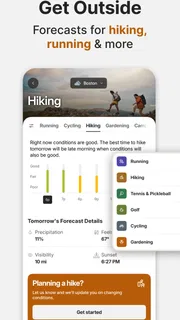
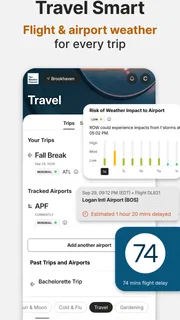
I find a weather app most useful when it helps a household make the same practical decision: leave now, take a coat, move the outdoor plans, or keep an eye on a changing forecast. The Weather Channel is built for that everyday role, with a radar view and weather alerts that can help turn a forecast into a plan. It is a free weather app from The Weather Channel, and its focus on severe-weather updates makes it more than a quick glance at the temperature.
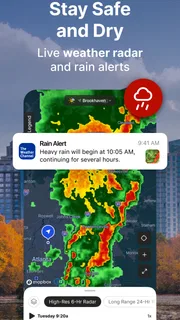
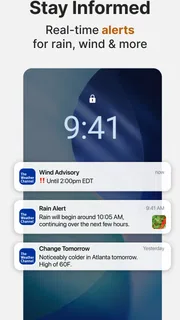
In my experience, its strongest reason to stay installed is the combination of live weather alerts and future radar. Those tools are particularly handy when a family or group is coordinating around school runs, errands, commutes, or time outdoors. It is not a substitute for paying attention to local conditions, but it gives everyone a shared starting point for deciding what to do next.
One forecast for a busy household
Imagine two people at home trying to decide whether to take a walk before dinner while someone else is on the way back from work. A basic temperature reading does not answer the most useful question: is rain likely to affect the plan soon? Looking at radar can make that choice easier, while an alert can bring attention to a more serious change without requiring someone to keep checking the screen.
This is where The Weather Channel feels most useful to me: not as a family organizer, but as a weather reference that different people can consult independently. One person can check conditions before leaving; another can look again before heading out later. That kind of informal coordination works well when people simply need the same current picture, rather than a shared calendar or a dedicated household feature.
A practical tip is to use the radar for timing decisions, not just to confirm whether it is raining at this moment. If you are planning a short walk, a pickup, or a trip across town, looking at the broader movement shown on the map can help you decide whether to wait or take a different route. I would still leave a buffer for changing conditions, especially when severe weather is involved. A radar display supports judgement; it does not make a plan risk-free.
That distinction matters in a shared household. The app can help people compare what they are seeing, but it should not be treated as a guarantee that every person has received or understood an alert. If one person is responsible for a child’s pickup or an outdoor commitment, I would check the forecast directly rather than assume another household member has already done it.
Useful for coordination, not household management
The app’s value in a shared setting is straightforward: it can give people a common weather reference. It does not need to be framed as a family-control tool to be helpful. If one person checks the radar and says a shower may affect the trip, others can open the app themselves and make their own judgement. That keeps the information visible without implying that the app coordinates people or assigns responsibilities.
More articles

Instagram Makes Everyday Moments Worth Sharing
A rare social app that can be a photo diary, a neighborhood window, and a lively conversation in the same session—though its best moments still require a little restraint.
This approach also avoids a common mistake: treating a weather notification as a complete plan. An alert can prompt a household to check in, bring outdoor items inside, or reconsider travel, but the family still needs to decide who will act. For a group that already communicates through calls or messages, weather information is a useful input, not a replacement for those conversations.
I would especially recommend this workflow for households with different schedules. Check the conditions before the first person leaves, then revisit the radar when plans change. That is more useful than repeatedly refreshing the app out of habit. It also helps avoid turning every small shift in the forecast into a household alarm.
Setup choices and personal boundaries
On a shared phone or tablet, I would treat the app as a personal reference rather than assume that everyone’s preferences or location needs should be combined. Each person can decide when to check conditions and how much they want to rely on notifications. If multiple people use one device, it is worth being deliberate about who is looking at the screen and what information they are comfortable sharing through ordinary device use.
That advice is about sensible device habits, not a claim that the app provides separate household profiles or special family controls. I would not choose it on the expectation that it will manage permissions between relatives. For a shared device, the practical boundary is simple: use the app to look up weather together when that is convenient, and keep personal device settings and account choices in the hands of the person who owns or manages the device.
Notifications are most valuable when they are allowed to interrupt for a reason. If every routine update becomes noise, people may start ignoring the alerts that matter. I suggest thinking about who in the household actually needs weather notifications and for what purpose, then setting up the device accordingly. For someone who only checks the forecast once before going out, opening the app when needed may be less distracting than relying on frequent prompts.
Future radar is also best used as a planning aid rather than a promise about exact timing. A household can use it to decide whether to bring an umbrella or postpone a short outdoor activity, but I would not base a tight schedule on a single screen. When the consequences of a forecast are significant, checking again closer to departure is a sensible habit.
Age, trust, and sensible use
The app is rated for Everyone, which makes its general audience broad, but that does not mean every child should be expected to interpret weather information alone. For younger users, I would use the radar and alerts as a conversation starter: explain what the household plans to do and why conditions might change those plans. The app can show information; an adult still needs to decide what it means for a child’s safety.
Trust is another reason to keep expectations realistic. The Weather Channel has an average rating of 4.6 from around 3.6 million ratings, and it has more than 100 million installs. Those figures suggest that it is widely used, but popularity is not a guarantee that every forecast will match what happens at a particular street or moment. I treat any weather app as guidance and pay closer attention when conditions are changing quickly.
The developer is The Weather Channel, a familiar name in weather information. The current version is 16.26.0, and the app runs on operating systems starting with version 9. It is free to install, though it offers in-app purchases ranging from $0.99 to $29.99 per item. I would check the purchase details in the app store before choosing anything paid, particularly if a child or another household member can use the device. The app’s free access is enough to judge whether its basic weather workflow suits your routine.
For parents, the useful question is less “Can the app make decisions for us?” and more “Will this make it easier to notice a weather change and talk about our next step?” In my view, that is the right level of trust. Use alerts as prompts, not commands, and have an adult handle decisions involving travel, outdoor activities, or severe conditions.
Where it stands among weather apps
Compared with a phone’s built-in weather screen, The Weather Channel gives radar and severe-weather notifications a more prominent role. That can be worthwhile if you often plan around rain or want to watch conditions evolve. If all you need is a quick temperature check before getting dressed, a simpler built-in app may be faster and less demanding.
Compared with other dedicated weather apps, the choice comes down to how you prefer to read the forecast. Some people want a compact view with only the essentials; others are willing to open a map and inspect conditions in more detail. I would choose this app if radar is something I expect to use, rather than install it solely because it has a recognizable name. The map is most valuable when it changes a decision, not when it becomes another screen to scroll through.
There is a trade-off in that extra information: more detail can mean more chances to get drawn into checking. If your household tends to worry over every forecast change, a stripped-down weather display may be a calmer fit. On the other hand, people who regularly travel across town, plan outdoor activities, or need to watch for severe weather may appreciate having alerts and radar together.
Who should choose it—and who may not need it
I would recommend The Weather Channel to people who want to see more than the day’s high and low, especially if weather affects commuting, school pickups, outdoor plans, or household routines. It also suits someone who likes checking a radar map before deciding whether to leave now or wait. The free starting point makes it easy to try that workflow before considering any paid options.
I would skip it if you want nothing beyond a quick glance at current conditions, or if notifications and detailed forecast views tend to distract you. A built-in weather app may be enough for that kind of use. I would also avoid treating the app as a substitute for official instructions or direct local judgement during dangerous weather; no phone display should be the only basis for a safety decision.
For a household, my verdict is positive with a clear boundary: this is a practical shared reference, not a system for managing family members. Use the radar to discuss timing, use alerts to prompt a check-in, and let each person make sensible choices about their device and notifications. If those are the needs you have, I think it earns a place on the phone. If your household only wants the current temperature, the simpler option is likely the better one.
Pros
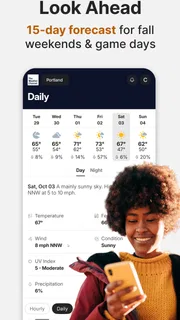
- Hourly forecasts make it easier to plan short outings.
- Radar maps help track approaching rain and snow.
- Severe weather alerts can provide timely local warnings.
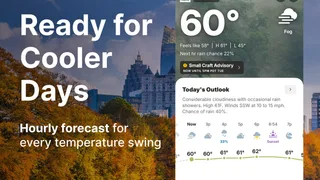
- The home screen offers a quick look at current conditions.
- Weather information is available for saved locations.
Cons
- Frequent ads can interrupt browsing.
- Some advanced features require a paid subscription.
- Radar updates may lag during rapidly changing storms.
- Forecast accuracy can vary by location and time.
- The app may use significant battery when location tracking is enabled.


