

Our review
 Analysis by Lookingapps
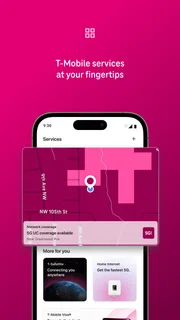
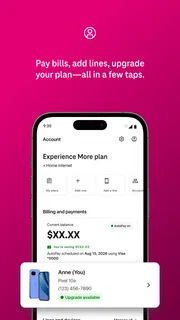
I would judge T-Life less by how much it can do on the first day and more by whether it still saves effort after the novelty wears off. It is T-Mobile USA’s lifestyle app for people who already have a reason to manage their T-Mobile relationship from a phone. That distinction matters: if you are a customer who routinely checks or handles account-related tasks, a single place to start can become a useful habit. If you rarely need to interact with your carrier, the app may feel like another icon waiting for a reason to be opened.
Useful at first, if T-Mobile is already part of your routine
The immediate appeal of T-Life is its role as a mobile starting point for T-Mobile customers. Instead of treating carrier matters as something to deal with only when a problem arises, I can see the value in having an app ready when I want to check in or take care of a task. That convenience is most convincing when the phone is already the place I go for everyday services.
One practical first-week test is to open it when something naturally prompts a carrier check: a question about the account, a change in plans, or a need to look into a service-related matter. If the app helps you get from that question to the relevant part of your T-Mobile experience without extra searching, it earns its place quickly. If you install it just to browse and have no recurring need, the initial curiosity may fade.
T-Life is free, and its Everyone age rating makes it broadly accessible. It sits in the lifestyle category rather than being a general-purpose productivity tool, which is a useful way to set expectations: its value is tied to your relationship with T-Mobile, not to an independent collection of everyday utilities. I would not install it expecting it to replace a phone’s settings, a general shopping app, or a dedicated tool for a different carrier.
It also helps to think of this as a convenience layer rather than a reason to change how you use your phone. The app can make sense when you want a direct mobile route into T-Mobile matters, but it is not automatically useful just because it gathers a carrier experience under one name. The first-week question is simple: does it make a task you already do easier to start or finish?
When a single app helps—and when it does not
Compared with the usual alternative of finding a carrier’s account tools through a browser or relying on separate support routes, a dedicated app can reduce the friction of remembering where to begin. That matters most for people who handle their mobile service regularly. It matters less for someone who contacts their carrier only once in a while and is comfortable using the method they already know.
I would also separate “having the app” from “needing the app.” A household member who frequently helps manage T-Mobile matters may appreciate a ready, familiar entry point. Someone who is not involved in those decisions may have little reason to keep it prominent. The right answer depends on who actually does the work, not simply who owns the phone.
More articles

Instagram Makes Everyday Moments Worth Sharing
A rare social app that can be a photo diary, a neighborhood window, and a lively conversation in the same session—though its best moments still require a little restraint.
A realistic first-week routine
Imagine noticing a question about your service while you are away from home. Rather than putting it off until you can sit at a computer, you reach for the T-Mobile app on your phone and see whether it can guide you to the right next step. That is the sort of small, ordinary moment in which a carrier app can prove itself. The useful measure is not how long you spend exploring; it is whether the next time the same kind of question comes up, you know where to go.
That workflow also suggests a modest tip: use the app when a real need arises instead of spending your first session trying to inspect every corner. A purposeful first visit gives you a better sense of whether its place in your routine is justified. It avoids confusing initial browsing with lasting value.
Does it keep earning space month after month?
For a lifestyle app tied to a carrier, recurring value is usually practical rather than entertaining. I would keep T-Life if it becomes the obvious starting point for the T-Mobile tasks I actually perform. I would be less persuaded by an app that gets opened once out of curiosity and then sits untouched. The habit is not “check the app every day”; it is “remember it when a T-Mobile matter comes up.”
That is a useful distinction for judging long-term value. A carrier app does not have to demand constant attention to be worthwhile. If it saves a few steps on the occasions when I need it, occasional use may be enough. On the other hand, if I repeatedly end up switching to a browser or another support route to finish what I started, the app’s convenience becomes harder to defend.
T-Life has a substantial audience: it has more than ten million installs, around 1.1 million ratings, and an average rating of 4.6. Those figures suggest that many people have found it worth trying, but they do not tell me whether it fits any one customer’s habits. I would treat them as context, not a promise that every task will feel effortless or that every user needs the app.
The best month-to-month test is to notice what happens during your normal service routine. Do you remember to open it when you need to handle something? Does it help you orient yourself, or do you still have to hunt around for the right route? Those observations are more useful than opening the app repeatedly just to justify keeping it.
Make the app serve a real habit
A practical approach is to place it where you can find it when a carrier question comes up, then let genuine use determine whether it stays there. If you are the person in your household who deals with T-Mobile matters, having a consistent mobile starting point can reduce the mental overhead of remembering which channel to use. If another person handles those tasks, keeping the app on your own home screen may not add much.
This is also where a dedicated app can compare favorably with generic alternatives. A browser is more flexible, and a phone’s built-in settings are better for device-level controls, but neither is necessarily the most natural first stop for a T-Mobile-specific question. T-Life makes the most sense when the task belongs to the carrier relationship itself. It is not a substitute for those other tools; it is a more focused option for a particular kind of need.
For a person who changes phones, travels, or otherwise has occasional reasons to review service matters, an app that is already installed can be easier than remembering to search for the right entry point under pressure. I would still avoid assuming that every need can be handled in-app. The sensible expectation is that it may streamline the start of a task, while the best route can depend on what you are trying to accomplish.
How much upkeep does it ask of you?
Its maintenance burden is best judged in terms of attention. A carrier app is useful when it stays ready for the moment you need it, but it can become clutter if it has no role in your routine. I would not keep opening it simply to make the installation feel worthwhile. If it is only useful during occasional account or service tasks, occasional use is a perfectly reasonable pattern.
As with any app, keeping it current is a sensible part of normal phone upkeep. Beyond that, the more important maintenance is personal: knowing whether you are the person who needs access to it and whether it remains a convenient route for your usual tasks. There is no benefit in treating it as another daily obligation if your carrier needs are infrequent.
It is also worth considering who shares responsibility for a household’s mobile service. If one person handles those decisions, they are the likely person to benefit most from having the app at hand. Other household members may be better served by asking that person for help rather than installing an app they will rarely use. That simple division can prevent duplicate effort and unnecessary app clutter.
Where the routine can become tiring
The main source of fatigue is not a single dramatic drawback; it is the mismatch between an app’s presence and the frequency of the need it serves. If you do not deal with T-Mobile matters often, opening a carrier app can feel like an extra step rather than a shortcut. In that case, a browser or the support route you already understand may be good enough.
Another point to keep in mind is that a broad carrier app can invite the expectation that everything should be handled in one place. I would approach it with a more measured standard: does it help with the particular thing I need today? If the answer is no, I would use the route that does, rather than repeatedly searching the app and turning a simple task into a longer one.
That is why I would not recommend T-Life to someone who is not a T-Mobile customer or who has no reason to manage a T-Mobile service. A general-purpose lifestyle app or a rival carrier’s own tools would be more relevant for that person. Choosing a carrier app based on its audience and your actual responsibilities is more important than choosing it because it appears to offer a broad mobile experience.
Who should keep it installed
I would keep it if I were regularly responsible for T-Mobile-related tasks, or if I valued having a familiar mobile entry point ready for those occasions. I would be more hesitant if I rarely interact with my carrier, prefer browser-based account management, or do not handle the service in my household. In those cases, the app may be harmless but still fail to earn lasting space.
For new users deciding whether to try it, the low-commitment starting point is straightforward: install it because you have a specific T-Mobile need, then judge it by how smoothly it supports that need. T-Life is free, so the decision is less about a purchase and more about whether the convenience is worth keeping another app on your phone. That is a personal trade-off, not a verdict that applies equally to everyone.
My long-term verdict
After the first-week curiosity fades, T-Life’s lasting value comes down to repeat usefulness. It is a sensible companion for people who already manage their T-Mobile relationship on a phone and want a dedicated place to begin. It is not compelling merely as a general lifestyle download, and people who rarely need carrier support may find that their existing habits are already sufficient.
T-Mobile USA released the app on June 6, 2016, and its long presence alongside a large user base gives it a clear role for customers who want a mobile route into the company’s services. That history does not remove the need to judge it against your own routine. I would focus on whether it consistently helps me start a relevant task, not on how many times I can open it in a week.
My recommendation is therefore conditional but positive: give T-Life a place if you are the person who handles T-Mobile matters and want a dedicated app to reach for when they arise. Keep it if it becomes a useful habit; remove it from your routine if you keep defaulting to other methods. The strongest reason to keep it is simple: it should save you effort on real carrier tasks, not create another task of its own.
Pros
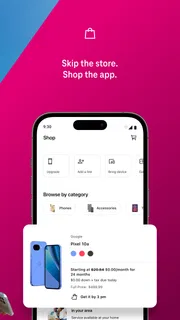
- Combines account management with shopping and rewards in one app.
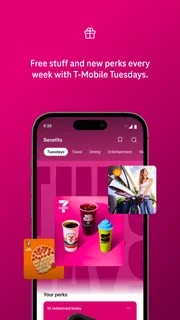
- Offers personalized deals that can help lower eligible purchases.
- Provides access to support without requiring a store visit.
- Lets customers review plan details and usage on the go.
- Includes tools for finding nearby T-Mobile locations.
Cons
- Many features are useful only to T-Mobile customers.
- Some offers may require specific plans or account eligibility.
- App performance can vary across devices and software versions.
- Personalized content may involve sharing usage or location data.
- Certain account changes may still require contacting support.


