
Our review
 Analysis by Lookingapps
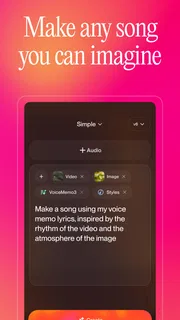
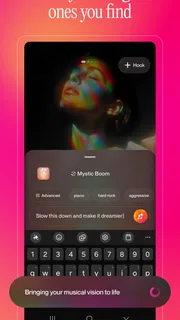
The first thing I noticed about Suno is how quickly an idea can become something you can actually listen to. Instead of opening a conventional music editor and building a track from separate parts, I can describe a mood, subject, or style and let the app generate a song. That makes it appealing for playful experiments, rough creative sketches, and the occasional “what if this were a chorus?” moment. It is less suited to anyone expecting precise control over every note or a finished, professionally polished mix.
Turning a passing idea into a song
Suno is a free music and audio app from Suno, Inc, centered on AI-generated songs. The experience is unusual compared with streaming apps: I am not choosing from a catalogue so much as prompting the app to make a new piece. Its audience is broad, from curious listeners who want a personalized novelty track to songwriters who need a fast starting point.
That speed is the main attraction, though it should be understood as speed from idea to first draft, not a guarantee that every request produces a keeper immediately. A prompt with a clear subject and a few musical cues gives the system something useful to work with. A vague instruction may still produce a song, but the result can feel less connected to what I had in mind. I get better mileage by deciding what the song is about and what feeling it should carry before asking for more detail.
For example, on a commute I might want a light, upbeat song about finally finishing a long week. A short description of the theme and mood is easier to refine than a paragraph trying to dictate every instrument, lyric turn, and production choice. Think of the prompt as a creative brief, not a mixing console. That expectation helps keep the first listen fun rather than turning it into a test of whether the app can obey an exact musical blueprint.
Where generation feels quick, and where it takes patience
For casual use, the appeal is that I can move from a text idea to an audio result without first learning an instrument or arranging a track. That makes Suno much less demanding to start with than a traditional digital audio workstation. A conventional editor is still the better place to make exact changes to timing, harmony, or individual parts; Suno is better when I want to hear a possible direction before committing to that work.
It is sensible to leave room for iteration. If the first result misses the tone, changing one part of the prompt at a time makes it easier to tell what helped. Reworking the subject, mood, and style all at once can make the next result difficult to evaluate. I also find it useful to listen for the one element that matters most to the task—perhaps whether the lyrics stay on topic or whether the energy suits the intended setting—rather than expecting every detail to land perfectly.
Generation is not the same as instant playback from a music library. The app has to create a response to the request, so a user should expect a wait rather than assume every tap will produce finished audio immediately. I would not rely on it for a time-critical cue or a tightly scheduled performance without preparing alternatives. For an idle moment, a writing warm-up, or a personal joke song, the wait is easier to accept because the point is exploring what the idea becomes.
More articles

Instagram Makes Everyday Moments Worth Sharing
A rare social app that can be a photo diary, a neighborhood window, and a lively conversation in the same session—though its best moments still require a little restraint.
How I would use it during a busy day
A realistic everyday use is making a playful song for a friend’s birthday or turning an inside joke into a short creative experiment. I would keep personal details modest and frame the prompt around the tone I want—warm, silly, reflective—rather than trying to cram in a full biography. Then I would listen once for whether the result feels appropriate and decide whether it is worth refining or simply sharing as a one-off bit of fun.
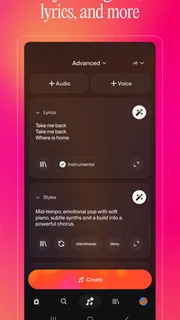
For a songwriter, a more practical workflow is to use the app to break a blank-page stalemate. I can test a theme or mood, notice a phrase or melodic direction that sparks an idea, and then carry that inspiration into a tool where I have more direct control. The generated track is a prompt for my own work, not a substitute for making careful edits. This distinction matters: if I need a precise chord progression or want to preserve a particular melody, a conventional writing or recording app is the more reliable instrument.
Another useful approach is to treat each generation as a comparison rather than a final verdict. I can hold the central idea steady and adjust just the requested atmosphere, then judge which direction suits the purpose. That is more informative than asking for several unrelated changes and hoping one happens to work. It also makes the app’s creative strength clearer: it can help me explore possibilities I might not have thought to try, even when I would not use the complete result as-is.
What happens when I use it heavily
Repeated experimentation is where the trade-off becomes more visible. A user who keeps revising prompts may spend more time choosing among versions than they expected, and the usefulness of each new result depends on how clearly they can describe what is missing. I recommend setting a small goal before starting: find a mood, test a song concept, or make one amusing track. Without that boundary, an easy creative loop can become a long session of chasing a perfect result that the app is not designed to guarantee.
There is also a difference between generating for fun and generating for a specific deliverable. If I need background music that fits an exact duration, has a particular arrangement, and can be revised note by note, Suno may be a poor final-stage choice. It can help me discover a direction, but I would move to a conventional audio editor for detailed finishing. For a quick concept or a personal experiment, accepting some unpredictability is part of the attraction.
Cost is worth keeping in mind if I find myself using it often. The app is free to install, with in-app purchases ranging from $2.99 to $699.99 per item. Those options make it important to check the purchase details in the app store before spending, especially if I am only testing whether AI song generation fits my routine. I would start with the free experience and decide based on how often I actually return to it, rather than assuming that more generation automatically means better creative results.
Reliability and the limits of an AI result
Reliability here is not just whether the app opens; it is whether the generated song serves the purpose I had in mind. I would treat each output as a draft whose relevance and quality need a listen. Sometimes the result may fit the prompt well enough to enjoy straight away. Other times, the lyrics, tone, or musical direction may not match my intention, and the sensible response is to revise the brief or move on rather than spend ages trying to force it.
That makes Suno more dependable as an idea generator than as a source of exact musical control. If I am making a private novelty track, an imperfect turn can be part of the humor. If the song is for a public presentation or a meaningful personal occasion, I would listen carefully before using it and keep a backup plan. The app is most satisfying when I have room to choose, refine, or discard the result.
I also would not assume that a generated track is ready for every context simply because it sounds complete. Listening on ordinary headphones or a phone speaker helps me check whether the overall mood works, but a more serious project deserves review in the environment where it will be used. Suno can get me to a listenable concept quickly; judgment about whether it is appropriate and finished remains mine.
Device fit, value, and who should choose something else
The current version is 1.94.0 and supports Android 8.0 or later. That is useful to know before installing on an older device, but compatibility alone does not tell me how smoothly every phone will handle a session. Music generation can be a heavier task than browsing a simple playlist, and I would avoid starting a long experiment when my device is already struggling or when I need it for something more important. Keeping expectations modest is especially sensible on older hardware.
The app has a Teen content rating, so I would still use ordinary discretion when creating or sharing material, particularly if younger listeners are involved. It has a 4.8 average from around 2.6 million ratings, and more than 10 million installs. Those figures show substantial interest, but they do not guarantee that its particular style of AI generation will suit an individual user. I would judge it by whether the creative workflow feels enjoyable and whether the results are useful for my own purpose.
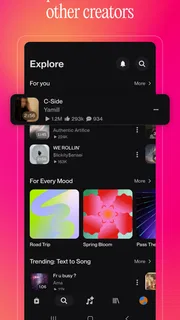
Compared with streaming services, Suno is for making rather than browsing familiar releases. Compared with a full music production app, it asks less technical skill upfront but gives me less fine-grained authorship over the finished sound. That middle ground is its identity: more hands-on than pressing play on a playlist, yet much less exact than building a track in a studio-style editor. If I want control, I would choose the editor; if I want a fast, surprising sketch, Suno makes more sense.
My performance verdict
I would recommend Suno to curious listeners, casual creators, and songwriters who want an easy way to test a musical idea without beginning from silence. Its strongest moments come when I give it a clear, manageable brief and stay open to an unexpected result. It is less convincing when I demand exact structure, guaranteed timing, or a polished track that needs no review.
In practical terms, I would start with one simple prompt, listen for the most useful part, and change only what needs changing. That workflow keeps the experience focused and makes it easier to decide whether another attempt is worthwhile. The app is free to try, but in-app purchases make restraint sensible until I know how much I will use it. Overall, Suno is a quick creative sketchpad for songs, not a replacement for a music library or a hands-on production setup. If that distinction matches what I want, it can turn a spare minute and a half-formed idea into an entertaining place to start.
Pros
- Turns text prompts into complete songs with vocals and instrumentation
- Offers a quick way to explore musical ideas without recording equipment
- Supports a wide range of genres and moods
- Makes it easy to share finished tracks with others
- Lets users create songs from custom lyrics
Cons
- Generated vocals can sound artificial or inconsistent
- Results may not match the prompt closely
- Free usage limits can restrict frequent creation
- Song generations may take time during busy periods
- Commercial use rights can depend on the plan and terms


