



Our review
 Analysis by Lookingapps
Snapchat makes the most sense when you treat it as a camera-first way to keep up with people, not as a replacement for every messaging app you already use. I find its appeal clearest in small, casual exchanges: a quick photo of something funny, a short video from the walk home, or a private conversation that feels less formal than a carefully composed post. If you are new to it, the first useful goal is simple: get comfortable making a Snap and sending it to someone you know.
What Snapchat feels like in everyday use
Developed by Snap Inc, Snapchat is a free communication app for people who prefer visual updates and quick interactions. It has a 4.2 average from around 40 million ratings, and more than a billion installs. Those figures suggest broad reach, but they do not tell you whether your friends use it; that matters more than popularity for a communication app.
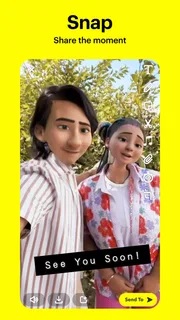
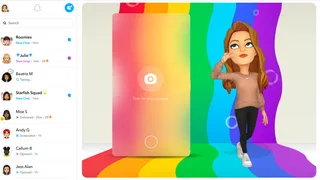
The basic rhythm is different from a conventional text messenger. You open to a camera-oriented experience, capture something in the moment, and choose who should see it. That makes the app feel spontaneous, though it can also make a first visit confusing if you expect a familiar inbox to be the obvious starting point. Once you learn where conversations and camera tools fit, the layout becomes easier to read.
I would recommend it most to people whose friends already share Snaps, or to anyone who likes communicating with pictures and short clips rather than long written updates. It is less compelling if your main need is a dependable archive of important conversations, a tidy place for work messages, or one inbox that brings all your contacts together. In those cases, a conventional messaging app is usually simpler.
The app is rated Teen, which is worth considering for families and younger users. Its playful camera tools can make sharing feel casual, but the social side still depends on who you connect with and what you choose to send. I would encourage a first-time user to begin with people they recognize and to pause before sharing anything they would not want copied or seen outside its original conversation.
Why a camera-first approach can work
Snapchat’s strength is lowering the effort required to share a small moment. A photo does not need to become a polished post, and a message can be more expressive than a line of text without turning into a full video call. That is useful for friends who want frequent, low-pressure contact but do not need every exchange preserved as a formal record.
There is a trade-off: a camera-first interface gives visual sharing priority, so it may not feel as direct as opening a text conversation in a messaging app. If you usually want to type a quick logistical note, such as confirming a meeting time, a standard chat app may get you there with fewer taps. I see Snapchat as a social complement rather than an automatic replacement.
More articles

Instagram Makes Everyday Moments Worth Sharing
A rare social app that can be a photo diary, a neighborhood window, and a lively conversation in the same session—though its best moments still require a little restraint.
Starting with a calm, useful setup
After installing, take a moment to orient yourself before sending anything. Find the camera, look for the area where conversations are handled, and explore the profile and settings screens at your own pace. You do not have to understand every icon or feature on the first day. A short tour is more helpful than tapping through unfamiliar controls while trying to send a message quickly.
Next, connect with someone you know and check that you have selected the intended recipient before sharing. This is a practical habit, not just a beginner precaution: when an app encourages quick capture, it is easy to move faster than you think. I would start with a harmless photo or a simple written message, then learn how the sending and viewing flow feels before sharing anything personal.
Think about your comfort with notifications and visibility while you set up. The right choices depend on how you plan to use the app and whom you want to hear from. Rather than accepting every prompt by reflex, read the wording on screen and choose what fits. This helps prevent the common feeling that a social app is suddenly demanding more attention or access than you intended to give it.
Snapchat is free to download, though it includes in-app purchases priced from about fifty cents to around four hundred dollars per item. You can begin using the core communication experience without treating purchases as a requirement. If an optional paid item appears, consider whether it solves a need you actually have; for a first Snap or a basic conversation, spending money is not the first step.
Your first successful Snap
For a reassuring first try, choose an ordinary moment that is easy to explain: a cup of coffee, a pet resting nearby, or the view on a familiar route. Capture it, check the preview, and send it to one trusted friend. That small sequence teaches the essential loop—make something, review it, choose a person—without the pressure of making a clever post or learning every feature at once.
A useful non-obvious habit is to treat the preview as a privacy checkpoint. Look for anything in the frame you did not mean to include, such as a name on a document or a person in the background. The speed of visual messaging is convenient, but it can encourage sending before you have noticed those details. A brief check makes the app feel more intentional without taking away its spontaneity.
You can also use a Snap to share context that would take several messages to describe. If you are trying to show a friend which entrance you are waiting at, for example, a quick image with a short note can be clearer than typing directions. For anything time-sensitive or important, though, follow up in a way that makes the key information unmistakable; visual messages are not always the best format for details you may need to find later.
When your friend replies, try responding in the same spirit rather than worrying about producing something polished. The appeal is often the small back-and-forth, not a perfect photo. If you would rather not use the camera, a text conversation can still be a more comfortable starting point. The point is to find a style of contact that feels natural to you, not to keep up with every feature.
Where beginners often get confused
The most common adjustment is understanding that Snapchat is not organized like a traditional inbox-first messenger. The camera is prominent, and the surrounding navigation can take a little exploration. If you open it expecting all your conversations to be immediately obvious, you may initially feel lost. Give yourself a minute to identify the camera and chat areas, then return to the one you need instead of repeatedly tapping icons at random.
Another source of confusion is the difference between making something and deciding where it goes. Capturing a photo does not mean you have to share it immediately. Pause to review it, choose the intended person or audience, and back out if you change your mind. This simple separation between creation and sending is one of the best ways to avoid accidental sharing when you are still learning the interface.
People also sometimes assume that an app designed around quick exchanges is automatically suitable for every kind of conversation. I would not use it as the only place for information that needs a stable, searchable record, such as detailed travel arrangements or instructions you will need weeks later. Keep durable notes or important plans in a tool designed for that purpose, and use Snapchat for the conversational moment around them.
Its casual tone can be another mismatch. If your friends prefer plain text, do not want to use a camera-led app, or are not active there, Snapchat may add friction instead of making communication easier. Ask the people you actually want to reach what they use. A social network is only useful as a messenger when the other person is willing to meet you there.
Choosing it over familiar alternatives
Compared with a standard messaging app, Snapchat makes visual sharing feel like the starting point rather than an attachment added to a text thread. That can make everyday updates more lively and less formal. In exchange, people who prioritize a clear chronological record, easy reference, or work-like organization may find a text-first alternative more practical.
Compared with a public social feed, Snapchat is better suited to direct exchanges and sharing with chosen people than to publishing a polished update for a broad audience. That distinction helps me decide what to send where: a fleeting joke or a small moment belongs naturally in a private conversation, while an announcement meant for many people may be easier to manage elsewhere. The right choice depends on audience, not simply on which app has more features.
Snap Inc has continued to update the app; the current version is 14.29.0.50, and it supports Android 6.0 or later. The version number is less important to a newcomer than whether the app runs comfortably on their device and whether their friends use it. If you are comparing options, start with the practical question of where your closest contacts are already reachable.
Who will enjoy it, and what to try next
I think Snapchat is a good fit for people who enjoy sending visual updates, want a relaxed way to stay in touch, and have friends who already participate. It is also approachable for a first-time user who is willing to learn the camera-and-chat layout one small step at a time. The most reliable first success is not exploring everything; it is sending one uncomplicated Snap to the right person and seeing whether that style of exchange suits you.
I would skip it, or keep it secondary, if you need a business-focused messenger, prefer conversations that are easy to search and revisit, or dislike social apps that put a camera at the center. That does not make the app poor; it means its priorities may not match yours. A familiar text messenger is often the better choice for practical coordination, while Snapchat feels more at home in informal, image-led contact.
Once the first exchange feels comfortable, explore at a pace that suits you. Learn one additional tool only when you have a reason to use it, and keep checking the recipient and preview before sending. The app is free, carries a Teen age rating, and offers optional purchases, but none of those details changes the key question: do you enjoy communicating this way with the people you care about?
My overall view is that Snapchat is most rewarding when it stays casual, personal, and deliberate. It can turn a small everyday moment into an easy conversation, but it is not the best home for every message or every audience. Start with a trusted contact, try one simple visual update, and decide from that real experience whether its fast, camera-led style earns a place alongside your usual messaging apps.
Pros
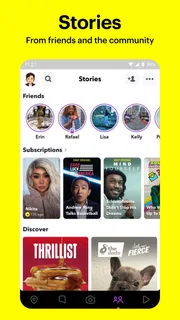
- Stories make it easy to share moments that disappear after 24 hours.
- Snap Map can help you see where friends choose to share their location.
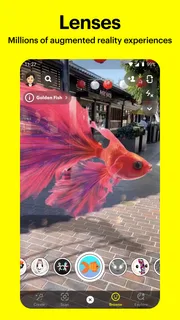
- Creative lenses and filters offer plenty of ways to personalize Snaps.
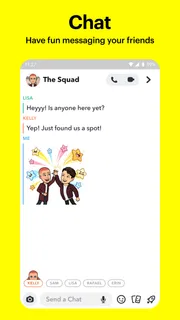
- Group chats support quick conversations with friends.
- Memories lets you save Snaps and revisit them later.
Cons
- Some features may feel confusing to new users.
- Location sharing can raise privacy concerns if settings are not reviewed.
- Discover may show content that is less relevant to your interests.
- Notifications can become distracting when many friends are active.
- Some lenses and features may require a newer phone.


