



Our review
 Analysis by Lookingapps
When a household is trying to agree on a concert, game, or comedy night, ticket shopping can get scattered across group chats, venue pages, and resale listings. SeatGeek gives me one place to browse event tickets and compare options, which makes it useful for turning “we should go sometime” into a concrete plan. I would treat it as a practical search and purchase tool, though—not as a family calendar or a shared account system.
One ticket search for a shared outing
SeatGeek is an events app from SeatGeek for buying and selling tickets to sports, concerts, theater, festivals, and comedy events. That variety matters when a group has mixed tastes: one person can look for a live show while another checks a game or a festival, without starting over in a different ticketing app for each kind of outing.
In a realistic household scenario, I might browse options on my phone, send a few possibilities to a partner or friend, and settle on one before buying. The app is most helpful at the discovery stage: it puts event choices and ticket listings in the same shopping flow. It does not remove the need to coordinate preferences, dates, transport, or who is paying, so I would agree on those details before anyone checks out.
The app is free to download, and its broad event mix makes it worth keeping around even if I only buy tickets occasionally. It has a 4.5 average from around 46,000 ratings, with more than five million installs. Those figures suggest it has reached a substantial audience, but they are not a substitute for checking the specific event and ticket terms that matter to your group.
Useful for comparing plans, not just finding an event
The main advantage over searching each venue or promoter separately is convenience. I can start with the kind of event I want, then look at available options in one place. Compared with a venue’s own ticketing page, a marketplace can be more useful when I am still deciding what to attend or want to browse across event types. If I already know the exact venue and event, its official ticket channel may be the more direct route.
A practical tip: narrow the group’s choice before focusing on seats. First settle on the event and date, then compare ticket options. Otherwise, it is easy for several people to send different listings for different nights and mistake them for comparable choices. For a shared outing, I would keep one person responsible for the final purchase and have everyone confirm the plan before that step.
Account boundaries matter on a shared phone
SeatGeek is best approached as an individual ticket-shopping account rather than a household account. If several people use the same device, I would avoid assuming that one person’s sign-in, saved details, or purchase activity is appropriate for everyone else. Each person should understand whose account is active and who is responsible for a transaction before any ticket is bought.
More articles

Instagram Makes Everyday Moments Worth Sharing
A rare social app that can be a photo diary, a neighborhood window, and a lively conversation in the same session—though its best moments still require a little restraint.
That boundary is especially useful when a phone is passed between family members. A child browsing events with an adult nearby is different from a child making purchasing decisions independently. I would keep the adult in charge of the account and checkout, and use the app together to review the event and ticket choice. This is a sensible household practice, not a claim that the app provides special family controls.
For a group of adults, the same principle prevents confusion: decide who will buy, then share the event details and cost outside the app if needed. The app can help everyone compare possibilities, but I would not rely on it to settle the household’s budget or keep a shared plan organized.
Coordinate before checkout
Ticket shopping has a point where browsing becomes a commitment. Before purchasing, I would check that everyone has agreed on the event, date, and the ticket option being considered. If a plan changes at the last minute, a ticket marketplace may involve different conditions depending on the listing and transaction, so read the relevant terms on the actual purchase screen rather than assuming every ticket works the same way.
Another useful habit is to keep the final confirmation with the person who made the purchase and make sure the rest of the group knows where to look for the event details. That reduces the chance of one person thinking another has bought tickets when nobody has. For an outing with several people, I would also decide in advance whether each person buys their own ticket or one person handles the group purchase.
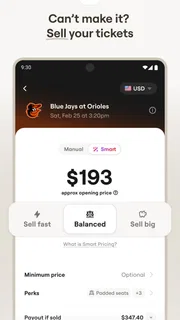
For selling, the same care applies in reverse. SeatGeek supports ticket sales as well as purchases, but I would check the individual event’s listing and sale instructions before offering tickets. Selling is not automatically the right fallback for a changed plan: timing, eligibility, and the terms attached to a ticket can affect what is possible. Treat the app as a place to manage a listing, not a guarantee that a buyer will appear.
Age, trust, and who should use it
The app is rated for Everyone, and that makes it suitable to browse in a household setting. Still, an all-ages content rating does not mean every event is appropriate for every person, or that younger users should handle purchases. I would check the event itself for age guidance and let an adult make the final buying decision when children are involved.
SeatGeek is a good fit for people who regularly consider live entertainment, want to browse more than one kind of event, or need a convenient starting point for a shared outing. It can also suit occasional buyers who would rather search one marketplace than keep several ticket apps installed. If I am buying for a group, I find the combination of broad browsing and a clear human decision-maker more useful than letting everyone independently rush to checkout.
It is less compelling for someone who only attends one venue and already prefers that venue’s own ticketing process. It may also be the wrong choice for a household that wants a single, shared family planner: its purpose is ticket shopping, not coordinating calendars, rides, reminders, or budgets. In those cases, I would use the venue’s channel for the purchase and a separate calendar or group chat for the planning.
What to expect from the app over time
SeatGeek first appeared on November 13, 2013, and its current version is 2026.43.0, with Android 10 as the minimum operating-system requirement. The app is free and carries an Everyone age rating. SeatGeek has around 12,000 written reviews, another sign that many people use it, although individual experiences can differ by event and ticket listing.
Those details make it easy to judge whether it fits your device and comfort level, but the more important decision is how you plan to use it. For me, it is strongest when I have a flexible idea—perhaps a concert or a game—and want to explore options before committing. It is less useful when the outing is already fixed and I only need one specific venue’s checkout page.
A household-friendly tool with clear limits
My overall view is that SeatGeek works well as a shared discovery tool, provided the household keeps account access and purchasing responsibility clear. I would browse together, agree on the event and ticket choice, and leave checkout to the person who owns the account and understands the cost. That simple workflow avoids a lot of avoidable confusion without expecting the app to manage family logistics.
My recommendation: use SeatGeek when you want to explore live events across several categories and compare ticket options in one place. Keep an eye on the terms for the particular listing, verify the group’s plan before buying, and choose a venue’s direct channel when that is already your preferred route. For a household outing, it is a helpful starting point—not a substitute for clear communication.
Pros
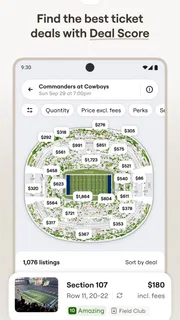
- Interactive seat maps help compare views before buying.
- Price filters make it easier to find tickets within budget.
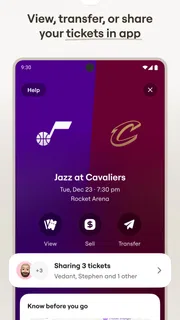
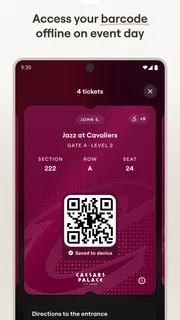
- The app keeps purchased tickets together for event entry.
- Event recommendations can help discover nearby shows.
- Mobile ticket access reduces the need to print tickets.
Cons
- Ticket availability can change quickly during checkout.
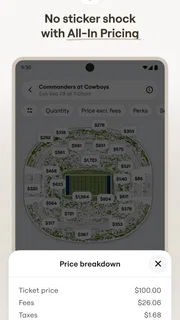
- Service fees may raise the final price considerably.
- Some events may not support mobile ticket delivery.
- Resale listings can vary in price and seat details.
- Refund options depend on the event and ticket terms.


