


Our review
 Analysis by Lookingapps
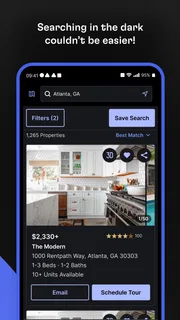
Apartment hunting is stressful even when you know what you want; it gets harder when listings are difficult to scan, compare, or revisit. In my experience, Rent. Apartments & Homes is most useful as a visual starting point for exploring rentals, rather than as a complete answer to every part of a move. It is a free House & Home app from Rent Group, Inc, and its focus on rental homes gives it a clear job: help you look through possibilities and decide which ones deserve closer attention.
How easy is it to read and navigate?
The app’s appeal is straightforward: rental options are easier to assess when you can browse them on a phone instead of juggling scattered notes and searches. I like this kind of app best when I treat it as a working shortlist. Rather than expecting the first promising result to be the right one, I would compare several homes, check what matters in each listing, and keep a separate note of questions to ask before arranging a viewing.
That approach is particularly helpful for people who are new to a city or unsure which neighborhoods fit their routine. A listing can prompt practical questions that are easy to overlook when searching casually: Is the location workable for a daily commute? Would the layout suit the people who will live there? Are the surrounding streets comfortable to navigate at the times you usually come and go? The app can help surface options, but the user still needs to judge whether a home works in real life.
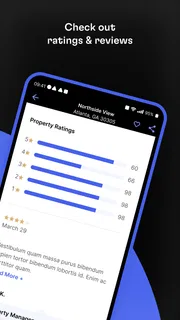
The app has a 4.7 average from around 146,000 ratings, and it has been installed over five million times. Those figures suggest that many people use it as part of their rental search, but they don’t tell me whether a particular listing is current or whether a home will meet an individual need. I’d treat each result as an invitation to verify details, not as a guarantee that the property is available or suitable.
Make the shortlist do the work
A useful habit is to decide on a few non-negotiables before opening the app. For example, someone who needs a step-free route, a quieter setting, or room for a particular household arrangement should keep those needs in view while browsing. It is easy to be distracted by attractive photos and postpone checking the practical details. I would write down what must be confirmed and compare every promising home against the same short list.
This also makes the app more manageable if a search produces many possibilities. Instead of repeatedly reopening listings and trying to remember why each one seemed promising, record the key question attached to each candidate: confirm access at the entrance, ask about noise, or check whether the stated layout matches your needs. That small workflow turns casual browsing into a more deliberate search without assuming the app provides specialized assessment tools.
Motor and sensory considerations
Rental browsing can take sustained attention: reading descriptions, moving between listings, and making decisions while other things are happening around you. I’d use the app in short sessions when possible, especially if dense text or prolonged screen use is tiring. A quick first pass can identify homes worth revisiting; a later, calmer pass is better for checking details and preparing questions.
More articles

Instagram Makes Everyday Moments Worth Sharing
A rare social app that can be a photo diary, a neighborhood window, and a lively conversation in the same session—though its best moments still require a little restraint.
For someone with limited hand mobility, any phone-based search can be frustrating if it requires frequent, precise taps or repeated navigation. I can’t assume a particular control or accessibility option is available, so I would test the current version on the device you plan to use before relying on it for a long search. If interacting with the app is uncomfortable, a family member or trusted helper can browse alongside you while you remain in charge of the criteria and decisions.
Photos can be useful, but they are not a substitute for a clear explanation of a home’s layout or access conditions. Images may leave out thresholds, narrow passages, the route from parking or the street, and other details that matter to someone with mobility or sensory needs. My practical advice is to treat visual impressions as prompts for follow-up questions. Ask for precise descriptions, and arrange an in-person or remote walkthrough when the details could affect whether you can use the space comfortably.
Searching around real-life constraints
The app is most valuable when your search is flexible enough to consider several homes, but it can still help when the situation is demanding. Imagine you are relocating for work and have only a few evenings to research neighborhoods. You could browse in short bursts, keep a shortlist, and use each listing to prepare a focused set of questions before contacting anyone. That is more realistic than trying to make a final decision from a single phone session.
For a caregiver searching on behalf of a relative, the best workflow is collaborative rather than purely delegated. The caregiver can gather candidate homes, but the person who will live there should set priorities and review the details that affect daily life. If travel is difficult, ask whether a viewing can be arranged in a way that lets the future resident understand the entrance, rooms, and immediate surroundings. A listing alone cannot show how it feels to move through a home.
People with limited data, older devices, or an unreliable connection should also plan around the fact that a mobile search depends on being able to use the app when needed. I would browse when I have a steady connection, note the essentials for the strongest candidates, and avoid assuming I can retrieve every detail at a moment’s notice. The app is available free, which lowers the cost of trying it, but access to a phone and a workable connection still shapes the experience.
Where it fits among other rental-search methods
Compared with general web searches, a dedicated rental app can make it easier to keep the task centered on homes rather than unrelated results. Compared with local agents, landlords, or community recommendations, though, it is a discovery tool rather than a substitute for direct conversation. I would use it to build a list of possibilities, then contact the relevant party to confirm availability and details. For a highly specialized requirement, a local housing organization or an agent familiar with that need may be a better source of guidance.
It is also worth remembering that the best match is not always the listing with the most appealing presentation. Photos and brief descriptions can make options easier to compare, but they may not answer questions about everyday access, building routines, neighborhood noise, or the exact route from the entrance to the rooms. The app helps organize the search; your own questions and follow-up checks are what make the final decision more grounded.
What can still get in the way?
The biggest limitation for an inclusive search is the gap between browsing and verification. A person may need detailed information about entrances, surfaces, lighting, noise, or room dimensions, and a rental listing may not communicate all of that clearly. That is not a reason to rule out the app, but it is a reason to avoid treating a promising listing as a confirmed fit.
There is also a difference between being able to use an app and being able to use the home it helps you find. A smooth search cannot fix a property that lacks the features you need, and a set of attractive images cannot establish whether a route or room works for your body or routine. I’d keep those two questions separate: can I comfortably search with this app, and can I comfortably live in this specific home?
Version 12.6.0 is the current version, and the app requires iOS 8.0 or later. It is rated for Everyone. The app has been available since August 25, 2010, and the number of reviews is around 8,700. These details help place it as an established, broadly intended rental-search app, but they do not replace checking how it behaves on your device or whether its listings suit your circumstances.
Who I’d recommend it to
I’d recommend Rent. Apartments & Homes to renters who want a phone-friendly way to explore housing options and are comfortable doing their own follow-up. It is especially useful for someone starting a search, comparing neighborhoods, or gathering candidates before reaching out. Rent Group, Inc is the developer, and the app’s large user base makes it a familiar option to try without paying for the download.
I would not make it my only resource if I needed detailed accessibility information, tailored housing advice, or certainty about availability before making plans. In those cases, I’d pair the app with direct conversations, in-person checks, or help from someone who understands the specific requirement. If screen interaction itself is a barrier, trying it briefly with your preferred device or getting assistance before building a long shortlist is a sensible first step.
Overall, I see this as a practical way to begin a rental search, not a tool that removes the uncertainty from renting. Its strongest role is helping you find possibilities and organize your next questions. Use it as a starting point, then verify the details that matter to your daily life. That balanced approach makes it more useful for a wider range of renters, including people who need to weigh access, comfort, and routine alongside price and location.
Pros
- Search rentals by location and preferred price range.
- Save promising homes to compare later.
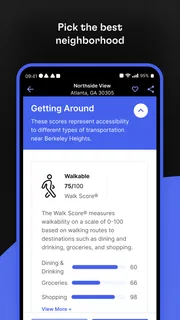
- Map view helps assess each property's surroundings.
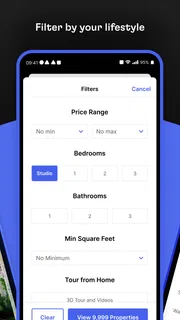
- Filters narrow results to match your housing needs.
- Contact property advertisers directly through listings.
Cons
- Listing availability may change before you make contact.
- Some listings may have incomplete property details.
- Rental prices and fees can vary by advertiser.
- The number of available homes depends on your location.
- You may need to verify listing details before applying.


