



Our review
 Analysis by Lookingapps
Looking for a home on a phone can be more tiring than it sounds: listings invite you to compare dozens of small details while you are commuting, sharing options with family, or trying to make sense of an unfamiliar neighborhood. I find Realtor.com Real Estate & Rent most useful as a starting point for that search, rather than a substitute for visiting a property or getting advice from a local professional. It brings homes for sale and apartments for rent into one place, and its best quality is helping me narrow a broad search into a manageable set of possibilities.
Readability and finding your way around
The app is a House & Home tool from realtor.com®, built around a straightforward purpose: browsing places to buy or rent. That focus helps keep the experience understandable. I can begin with a location and a kind of home in mind, then use the results to get a sense of what is available. For someone at the earliest stage, that is less intimidating than calling around before they know their budget or preferred area.
It is also popular enough to feel like a familiar mainstream option rather than a niche service: it has more than 10 million installs and a 4.7 average from about 569,000 ratings. Those figures are reassuring signals of broad use, though they cannot tell me whether a particular neighborhood has complete or current listings. I would still judge the app by how well it serves the places I actually want to search.
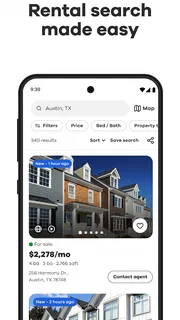
When I browse, I try not to treat a listing card as a complete picture. A compact preview is helpful for scanning, but important trade-offs often become clear only after opening a property and reading its details carefully. My practical approach is to shortlist a few plausible options, then compare them one at a time instead of rapidly scrolling and relying on memory. That small habit makes it easier to notice whether a home fits my needs rather than simply catching my eye.
Readable search is not the same as easy decision-making. Housing listings can contain many details, and a phone screen gives each one limited room. I recommend deciding on two or three non-negotiables before browsing—for example, the areas you would realistically travel from and the type of property you need. This makes the search more focused and reduces the chance that attractive photos distract from a deal-breaker.
Comparing homes without losing the details
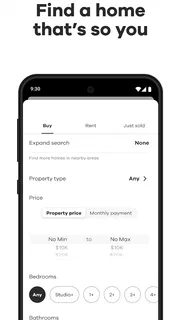
A useful workflow is to search with a broad idea first, then tighten the criteria only after seeing what the local market looks like. If I begin with an overly exact wish list, I may filter away homes that could work with one compromise. On the other hand, leaving everything open can produce a stream of options that is hard to assess. I would adjust gradually: first location and sale or rent, then the features that genuinely affect daily life.
For a couple or family, I would compare candidates against the same short checklist rather than asking everyone to remember the details from separate browsing sessions. Note the commute, the practical layout, and the costs or conditions that matter to your household, then return to the listing to verify each point. The app helps with discovery; the checklist supplies the consistency that a feed cannot provide on its own.
More articles

Instagram Makes Everyday Moments Worth Sharing
A rare social app that can be a photo diary, a neighborhood window, and a lively conversation in the same session—though its best moments still require a little restraint.
Motor and sensory considerations
Browsing property is a visual task, and that naturally creates friction for people who have difficulty processing photos, small on-screen details, or dense listing information. I would use the app in short sessions and pause when a result deserves a closer look. If visual comparison is tiring, choosing fewer listings and reviewing them carefully is likely to be more useful than trying to inspect a large number in one sitting.
There is also a motor-control trade-off in any phone-based search: scrolling through many results can require repeated, precise interactions. I would avoid trying to make a final choice while walking or using the app in a rushed moment. A quieter setting gives me time to read a listing, revisit a detail, and avoid accidentally moving past an option I wanted to consider. The app is a convenience for browsing, but a larger screen or help from another person may be preferable for an extended comparison.
For sensory comfort, the most practical adjustment is to control the pace and amount of information I take in. I would set a clear purpose for each session—such as checking one neighborhood or comparing a few rental candidates—rather than keeping an endless search open. That approach is not a special accessibility feature; it is a simple way to make a busy housing search less overwhelming.
Useful in everyday situations
Imagine you are on a lunch break and considering a move closer to work. You can use the app to explore what kinds of homes appear around the areas you are weighing, then save your more serious investigation for later, when you can examine each listing without rushing. The key insight is to use a quick browse for orientation, not as proof that a property is suitable. A map pin or appealing photograph cannot tell you how the street feels at night, how long the commute takes in practice, or whether a home meets your personal access needs.
It can also help when your plans are still flexible. A renter who has not settled on a neighborhood can compare broad areas before arranging viewings; a buyer can get a first sense of the kinds of properties that match a general budget and household size. I would keep a separate note of questions to ask an agent or landlord, especially about details that matter to you but may not be obvious from the listing. This turns browsing into preparation for a better conversation, rather than an attempt to make a decision from a screen.
The app is free, which makes it easy to try alongside other ways of searching. It is rated for Everyone, and the current version is 27.6.0. Its long history—the app was released on November 3, 2010—also suggests a mature product, but age alone does not guarantee that every listing or workflow will suit every user. I would treat the app as one useful channel, not the sole authority on a major housing decision.
Where it fits among alternatives
Compared with searching through individual property-company pages, a broad real-estate app is more convenient for getting an overview and spotting options across an area. Compared with asking a local agent or landlord directly, however, browsing is less personal and cannot resolve the specific questions that arise once a property becomes a serious candidate. I see those approaches as complementary: use the app to find possibilities, then verify details with the people responsible for the property.
It may not be the right choice if you want a fully guided relocation service, personal advice about a neighborhood, or a decision made for you. It is also not ideal as your only method if you need to assess sensory or physical access in person. A listing can help identify candidates, but it cannot reproduce the experience of entering a home, testing its routes, or judging noise and surroundings. In those situations, direct contact and an in-person visit matter more than convenient browsing.
Remaining barriers and a sensible routine
The biggest limitation I notice is inherent to property search: the app can show choices, but the user still has to interpret them and make difficult comparisons. Photos may draw attention to appearance while practical questions remain unanswered. I would not assume a listing covers every concern important to a renter or buyer; I would confirm the specifics that affect safety, comfort, access, and monthly planning before committing to a viewing or application.
Another source of friction is the sheer emotional weight of the task. Finding a home involves money, timing, and personal priorities, so a stream of appealing options can create more pressure rather than clarity. I recommend deciding in advance when to stop browsing for the day and keeping a shortlist that reflects real requirements, not every property that looks promising. That is especially useful when several people are searching together and have different priorities.
For a more inclusive routine, I would invite anyone who will live in the home to take part in reviewing the shortlist, especially if they have distinct mobility, sensory, or daily-living needs. Each person can identify questions that photos and brief descriptions cannot settle. Then use the app to keep the candidates organized and use direct follow-up or a visit to check the lived experience. This avoids mistaking an easy-to-browse interface for a complete assessment of whether a home will work.
My inclusive verdict
I recommend Realtor.com Real Estate & Rent to people who want a convenient way to begin exploring homes for sale or apartments for rent, especially when they are still defining their area and priorities. Its free access and focused purpose lower the barrier to getting started, while the large audience and strong average rating make it a well-established option to consider. For me, its value is strongest in discovery and shortlisting, not in replacing careful checks.
People who benefit from slower, more deliberate browsing can make the experience more manageable by searching in short sessions, limiting each comparison to a small group, and writing down follow-up questions. Those who need detailed personal guidance, extensive one-to-one support, or confirmation of a home’s real-world accessibility should pair the app with direct conversations and in-person visits. Used with those limits in mind, it is a practical tool for making the first stage of a housing search clearer without pretending that a screen can answer everything.
Pros
- Save favorite listings to revisit them later.
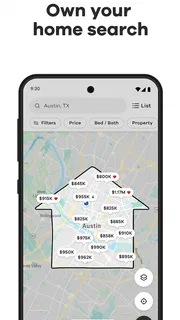
- Map search makes it easy to explore homes by location.
- Mortgage tools help estimate potential monthly payments.
- Listing alerts can notify you about new matches.
- School information adds useful context to local searches.
Cons
- Listing details may not always reflect the latest status.
- Some homes may have limited photos or descriptions.
- Mortgage estimates may differ from a lender's final quote.
- Alerts can feel frequent when search criteria are broad.
- Available listings vary significantly by location.


