

Our review
 Analysis by Lookingapps
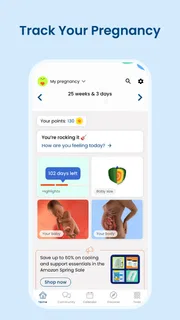
When I first open BabyCenter, I want one thing from a pregnancy app: a useful sense of what may be happening this week, without feeling as if I have to become an expert just to get started. This app is built around that week-by-week rhythm, with a focus on pregnancy and early parenting rather than being a general-purpose health journal. For a first-time parent, that can make the experience feel more approachable: there is a clear reason to come back, and the material is framed around a stage of pregnancy instead of a blank screen waiting for me to fill it in.
BabyCenter is a free parenting app from BabyCenter, with a Teen content rating. It has a 4.9 average from around 1.5 million ratings, and more than 10 million installs. Those figures suggest a widely used product, but popularity alone does not make pregnancy information right for every person. My view is that it works best as a reassuring companion for learning and keeping track of the journey, not as a replacement for a clinician or a definitive source for decisions about symptoms and treatment.
What the week-by-week approach is good for
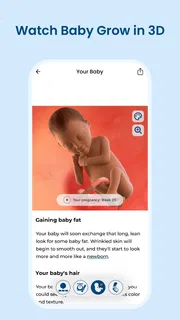
The main appeal is the way the app gives pregnancy a sequence. Instead of asking a new user to decide which topic to explore first, it offers a natural starting point: the current week. That is especially helpful when everything feels unfamiliar and even ordinary questions seem to arrive all at once. A brief visit can help me focus on what is relevant now, then leave the app without feeling obliged to read every article or track every detail.
The week-based format also suits people whose attention comes in short bursts. I might check it while waiting for an appointment, revisit a topic later with my partner, or use it to find a starting point for a question I want to raise with a healthcare professional. The value is not that an app can predict exactly what an individual will experience; it is that a weekly structure can make a large subject easier to approach in manageable pieces.
That framing has a trade-off. Pregnancy does not unfold identically for everyone, and a general explanation may not match my symptoms, medical history, or expectations. I try to read the material as context rather than a personal forecast. If a description does not fit, that does not mean something is wrong, and if a symptom worries me, browsing an app is not a substitute for contacting a qualified professional.
Who is likely to appreciate it
I would recommend trying BabyCenter if this is a first pregnancy and I want a guided place to begin, or if I prefer short, stage-specific reading to searching broadly online. It can also help a partner get oriented: sharing a weekly topic gives us a concrete conversation starter instead of expecting one person to explain everything from memory. The app is most useful when I treat it as a companion to appointments and trusted medical advice, rather than the authority that settles every question.
It may be a weaker fit if I want a highly customizable personal health log, a clinical decision tool, or a quiet app with no editorial reading. Someone who already has a clinician-provided tracking system and only wants to record measurements may find the week-by-week learning angle less important. Likewise, if pregnancy information itself makes me anxious, frequent exposure to new topics may not feel comforting. I can use the app selectively, but I should not feel that I need to keep up with every prompt or read every piece of content.
More articles

Instagram Makes Everyday Moments Worth Sharing
A rare social app that can be a photo diary, a neighborhood window, and a lively conversation in the same session—though its best moments still require a little restraint.
From installation to a useful first visit
My advice for a first launch is to keep the goal small: get to the right stage of pregnancy, then read one relevant item. The app’s central promise depends on week-by-week context, so the first meaningful success is not exploring every screen; it is seeing material that feels pertinent to where I am now. If setup asks me to provide pregnancy timing, I should enter it carefully and check that the resulting week makes sense to me. A small input mistake can make later content feel oddly early or late.
Once the app is showing the relevant stage, I would choose one question I genuinely have rather than browsing at random. For example, a first-time parent who is unsure what to expect before an upcoming appointment can read a short piece, note one question, and bring it to the clinician. That is a practical use of the app: it turns a vague feeling of “I should learn more” into a manageable action, while keeping medical decisions where they belong.
A second useful routine is to make a quick check-in at a predictable time, such as when planning the week or preparing for an appointment. I would avoid treating the app as a daily checklist unless that genuinely helps me. Pregnancy can already involve plenty of reminders and advice from other people; a tool is better when it reduces mental clutter rather than adding another obligation. A few purposeful visits may be more valuable than opening it repeatedly to seek reassurance that no app can provide.
The app has been available since March 11, 2011, and its current version is 6.17.0, with Android support from version 8.0. Those details matter if I am checking whether an older Android device can run it, but they do not tell me how well the app will suit my personal routine. I would judge that after the first visit: can I find relevant material quickly, does the week-based organization help, and do I feel more prepared rather than more pressured?
How to make the first action count
For a realistic first session, I would set aside a few minutes, confirm the pregnancy stage if prompted, and read one topic connected to something already on my mind. Then I would write down a question for a midwife or doctor if the topic raises one. This simple sequence helps avoid a common trap: collecting general information without knowing what to do with it. The app can help me prepare for a conversation; it cannot examine me, interpret my full history, or tell me whether a symptom is urgent.
If I am using it with a partner, I would share the specific point that stood out rather than handing over the phone and expecting them to navigate the whole app. That makes the information more personal and gives us a useful prompt for discussion. It can also reveal where our needs differ: one person may want a quick overview, while the other prefers detailed reading. Neither approach is wrong, and the app works best when it supports the conversation instead of dictating it.
Where confusion and friction can arise
The most important distinction for a new user is between general pregnancy education and individual medical guidance. A week-specific article can describe common developments, but “common” does not mean universal. I would not use a general passage to dismiss a symptom, compare my pregnancy with someone else’s, or decide whether to change medication or care. When something feels concerning, the right next step is to contact a healthcare professional, not to keep searching until an article feels reassuring.
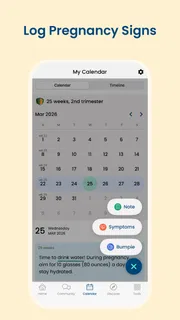
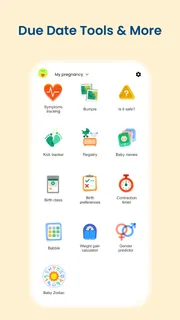
Another possible source of confusion is expecting a tracker to provide a complete personal record. The app’s identity is strongly tied to weekly development and growth, but I would not assume that every kind of health data, appointment note, or clinician-specific measurement belongs in it. If keeping a detailed record is important, I would check the available tools in the current app and decide whether they meet that need before relying on it as my only log. A dedicated health journal or a system recommended by a care provider may be a better fit for that job.
There is also a difference between having a wealth of material and having exactly the right answer. A pregnancy app can make useful topics easier to find, but reading more is not always better. If I notice myself repeatedly checking the same concern or feeling alarmed by material that is not personal medical advice, I would step back and use the app more selectively. I would rather leave with one grounded question for an appointment than spend an evening comparing every possible scenario.
In comparison with a basic calendar or notes app, BabyCenter offers a pregnancy-specific weekly frame that a blank planner cannot provide. A simple notebook, on the other hand, can be better for private, free-form notes and questions because it does not ask me to adapt to an editorial structure. Compared with searching the open web, a focused app can reduce the effort of finding a starting point, though I still need to evaluate health information carefully. The right choice depends on whether I want guided learning, personal record-keeping, or professional medical support; those are different needs, and no single app should be expected to cover them all.
Choosing a routine that stays reassuring
I would use notifications and regular visits only if they help me. If a reminder becomes another source of stress, there is no benefit in preserving the habit for its own sake. The same goes for reading ahead: some people feel calmer when they know what may be coming, while others prefer to focus on the present week. BabyCenter’s stage-based design naturally encourages looking forward, but I can keep the experience comfortable by choosing how much I read and when.
For someone who wants a pregnancy app mainly for a partner or family member, I would first agree on what information is useful to share. Personal pregnancy details can be sensitive, so a conversation about boundaries matters more than the convenience of a shared screen. The app can offer common context, but it should not create an expectation that the pregnant person must report every detail or follow a schedule that suits somebody else.
My verdict after considering the everyday use
BabyCenter makes sense for a first-time user who wants a clear, approachable path into pregnancy information. Its strongest practical idea is the weekly structure: it gives a newcomer a sensible place to start and makes a large subject feel less like an endless search. The first useful result can be very modest—understanding one topic well enough to ask a better question at an appointment—and that is a realistic standard for a support app.
I would not choose it as my only tool for medical decisions or as a guaranteed all-purpose personal record. Its content is general, and the experience may not suit someone who prefers a clinician-led plan, a private blank journal, or minimal pregnancy reading. Those are real limits, not reasons to dismiss the app; they simply define where it fits. If I wanted structured, pregnancy-focused reading that I could dip into at my own pace, I would give it a try. If using it made me more anxious, I would narrow my visits or choose a simpler alternative.
Overall, BabyCenter is a sensible companion for learning one stage at a time, especially when I approach it with a clear question and realistic expectations. It is free, has a 4.9 average from around 1.5 million ratings, and its long-standing presence makes it easy to understand why many people consider it. My recommendation is to start with one week-specific topic, turn anything important into a question for a care professional, and let the app support—not take over—the experience. That gives a first-time user a calm, useful first success without asking the app to be more than it is.
Pros
- Week-by-week guidance makes pregnancy milestones easier to follow.
- Appointment reminders help keep prenatal visits on schedule.
- A contraction timer can be useful during labor.
- The baby tracker helps record feeding and diaper changes.
- The interface makes common tracking tools easy to find.
Cons
- Some features may require a paid subscription.
- Health information is not a substitute for medical advice.
- Personalized guidance depends on accurate profile details.
- Frequent notifications may feel distracting.
- Some tracking tools are more useful after the baby arrives.


