





Our review
 Analysis by Lookingapps
I would reach for Posh when I want to find events beyond the usual group chat recommendations, or when I’m organizing a gathering and need a place to bring the details together. It is an events app from Posh, with a free-to-use listing and a Teen content rating. Its focus is social discovery: helping eventgoers and organizers connect, rather than acting as a general-purpose calendar or a complete replacement for every ticketing service.
Finding events and deciding whether they fit
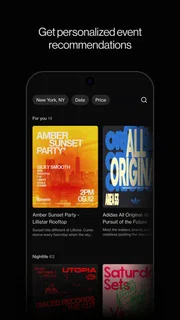
The appeal is straightforward: instead of relying only on friends forwarding a flyer, I can use an event-focused space to explore what people are putting together. That changes the discovery process. A calendar tells me what I already know about; a social event app can help me notice gatherings I might not have searched for by name. Posh describes a community of more than five million eventgoers and organizers, which gives the idea a broader scope than a personal invite list.
That breadth is useful only when the events available to me match my interests and location. I’d treat discovery as a starting point, not a guarantee that every worthwhile local event will appear. When I find something promising, I would check the event’s own details carefully—especially its timing, location, and any entry conditions—before making plans. The app can put an option in front of me, but the event organizer remains the important source for the specifics.
For an everyday example, imagine a friend cancels a weekend plan and I still want to go out. Posh may help me look for an event that suits the mood, then share the possibility with a friend rather than scrolling through unrelated social posts. That’s a more purposeful use than opening it only when I already have a ticket in hand: it gives the app a chance to help with the “what should we do?” stage.
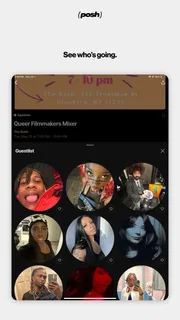
Its audience includes both people browsing and people hosting. The developer, Posh, positions the app around that connection, and the Events category makes its purpose clear. I like that the product is not framed as just an organizer’s utility. For attendees, the value is finding something to do; for organizers, it is having a dedicated setting in which to present an event to people who are already interested in going out.
Where it fits beside familiar alternatives
The usual alternatives solve different parts of the problem. A phone calendar is excellent once a plan is settled, but it rarely helps me discover a new event. Group chats are personal and convenient, though information can get buried between memes, replies, and unrelated plans. General social feeds can surface local happenings, but they mix event details with everything else. Posh’s advantage is its event-centered purpose; its trade-off is that it depends on useful activity in the community I care about.
I wouldn’t assume it replaces a dedicated ticketing app or an organizer’s own instructions. If I need a particular payment method, a specific venue policy, or a carefully coordinated private guest list, I’d check whether the event’s chosen process covers that need and use the relevant service when it does not. Posh is most compelling as a discovery and connection layer, not as a reason to stop checking the practical details that determine whether a plan works.
More articles

Instagram Makes Everyday Moments Worth Sharing
A rare social app that can be a photo diary, a neighborhood window, and a lively conversation in the same session—though its best moments still require a little restraint.
What the current version tells existing users
The current version is 8.24.0, and the app was released on May 16, 2023. Those facts give a useful snapshot: Posh is an established, actively versioned product rather than a newly launched idea. They do not, by themselves, tell me which screens or capabilities have changed between releases, so I would not read a particular feature history into the version number. What I can reasonably take from it is that the app has continued to receive version updates since its release.
For someone who already uses Posh, an update is worth approaching practically. Check the app’s current interface after updating, and confirm that the event information you rely on is still easy to find before a time-sensitive outing. If you organize events, review the presentation of your own event after making changes rather than assuming an older workflow or layout will behave exactly as before. That’s sensible maintenance for any evolving event platform, not a claim about a specific change in this release.
People considering the app can also see that it has a meaningful audience: it has over 100,000 installs, a 4.8 average from around 2,400 ratings, and 165 written reviews. I take that as encouraging evidence that people are using and rating it, not proof that it will have the right events in every town or suit every organizer’s workflow. Local relevance matters more than a headline rating when the point is to find something nearby.
Useful habits for attendees and organizers
One practical tip is to separate discovery from commitment. I’d first use Posh to spot an event, then confirm the logistics with the details shown for that gathering before inviting others or arranging transport. This avoids a common planning snag: a promising listing gets shared quickly, while a time or venue detail is overlooked. Keeping the event information in view when discussing it also makes it easier for friends to decide without a long back-and-forth.
Another useful habit is to make the invitation concrete. Instead of sending a vague message such as “we should go,” I’d share the event and ask one specific question: does the time work, or is this the kind of night everyone wants? That turns discovery into a decision and helps avoid treating a saved or shared possibility as a confirmed plan. For a group with different tastes, it is also easier to compare one event with another when each option is discussed on its own merits.
For organizers, I’d think of the event page as the first conversation with a potential attendee. Clear, direct details are more useful than relying on people to ask follow-up questions. Before sharing an event widely, I would check that the essentials are understandable to someone who has never heard of the gathering. This is especially important when the audience includes people outside an existing friend group: discovery can bring new eyes, but unclear information can make them hesitate.
Posh is less suited to someone who only wants a private, static list of appointments. A calendar is simpler for that. It may also be the wrong choice for a host whose main need is a specialized registration or ticketing workflow; in that case, a purpose-built service may be a better operational fit. And if I’m in a place where the event community is quiet, I would not keep checking out of habit. I’d use the app when I’m actively looking, while relying on local venues, friends, or other event sources as needed.
What still deserves a careful look
The central limitation of any social discovery app is that usefulness depends on what people around me choose to share. A large overall community does not automatically translate into a lively selection for my neighborhood, preferred scene, or schedule. I’d judge Posh by the events I can actually find and the quality of the information attached to them, rather than assuming the broader ecosystem guarantees a fit.
There is also a difference between discovering an event and knowing exactly what attending will involve. A listing can help me decide whether something sounds appealing, but it is still sensible to verify practical arrangements with the organizer when a detail could affect my plans. That extra check is not a reason to avoid the app; it is simply a good habit when an event involves coordinating with others or traveling somewhere unfamiliar.
The app is free, which makes trying it a low-commitment way to see whether its event community is relevant to me. I’d still consider the time cost: if I already get reliable recommendations through a local group and rarely want to browse, another app may add little. Conversely, if I often hear about events too late or want a more deliberate way to explore, a dedicated event space has a clearer purpose than another general social feed.
Who I’d recommend it to—and what to watch next
I’d recommend Posh to people who enjoy going out, want to discover gatherings, or organize events and want to reach people beyond their immediate contacts. It is particularly promising for someone who likes browsing possibilities before a weekend, then sharing a shortlist with friends. I’d be more cautious about recommending it as the only source of event information, or as a full planning system for a host with complex requirements.
The app has a Teen age rating, so it is not presented as an adults-only product. As with any social event space, I’d still make decisions based on the details of a specific event and use good judgment when meeting people or traveling to a venue. The rating describes the app’s age suitability; it does not replace common-sense planning around an individual gathering.
What I would watch over time is not a particular promised feature, but whether the app keeps making event discovery useful in the places and communities people care about. Version 8.24.0 shows a product that has moved beyond its initial release, while the real test for an attendee remains whether the events feel relevant and the information helps them act. For an organizer, the test is whether the right people can find and understand what is being hosted.
My overall view is that Posh has a clear role: it gives eventgoers and organizers a shared, event-focused place to connect. I’d install it when I want fresh ideas or need to put an event in front of a wider audience, then pair it with a calendar or another service for whichever practical task those tools handle better. That combination feels more realistic than expecting one app to do every part of making plans.
Pros
- Discover events tailored to your interests and location.
- Create polished event pages without design expertise.
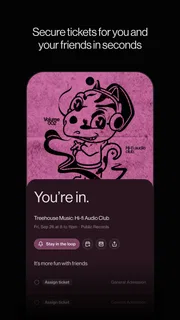
- Share invitations easily with friends and guests.
- Keep event details organized in one place.
- Find fresh local activities beyond the usual options.
Cons
- Event availability may vary by location.
- Some events may require separate tickets or fees.
- A smaller user base can mean fewer nearby listings.
- Guests may need the app to get the full experience.
- Notifications can feel distracting if not customized.


