


Our review
 Analysis by Lookingapps
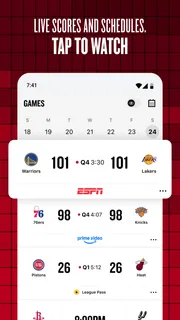
I’d recommend the NBA app to someone who wants a reliable place to follow basketball without piecing together scores, highlights, and coverage from several sources. My first impression is that it is built around the rhythm of the league: check what is happening, catch up on a game I missed, then dig into the numbers when a score makes me curious. That makes it useful even when I cannot sit down to watch a full game.
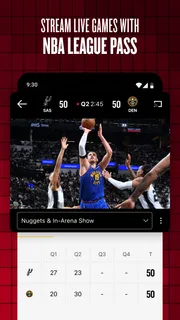
NBA: Live Games & Scores is the official basketball app from NBA Properties, Inc. It is free to install, though it includes in-app purchases, and its audience rating is Everyone. For a first-time user, the important distinction is that installing it does not automatically mean every piece of viewing content is included at no cost. I would begin by exploring scores, stats, highlights, and studio coverage before deciding whether any paid option fits how I watch.
What you can expect from the NBA app
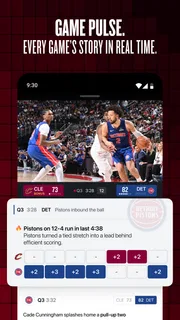
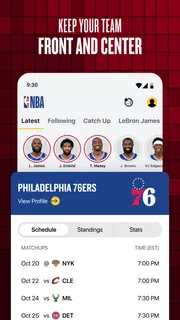
The app’s strongest appeal is having league-focused information in one place. Rather than treating basketball as a stream of headlines, it connects game tracking with highlights and studio content. I find that combination more practical than a score-only tool when I want context: a result tells me who won, while clips and discussion help explain how the game felt and what stood out.
It is especially handy for fans who follow several teams or cannot watch live. A quick check can answer the basic question—what is happening?—and the stats offer a route into the details. If I see an unexpected result, I can move from the score to the box-score-style information and then look for highlights or coverage. That sequence is more satisfying than switching between a general sports app, a video platform, and a separate source for basketball numbers.
The app has an average rating of 4.6 from around 251,000 ratings, with roughly 8,200 written reviews and over 50 million installs. Those figures suggest it has a broad audience, but they do not tell me whether it suits every fan. The most useful question is whether you want a league-centered companion or simply a quick scoreboard. For the latter, a lighter scores app may feel faster and less busy.
As a sports app, it is clearly aimed at people who care about the NBA specifically, not anyone looking for broad coverage across many leagues. That focus is a strength if basketball is your main interest: the terminology, stats, and coverage all point in the same direction. It is less compelling if you want one place to follow football, tennis, and basketball together.
Start with one team or one game
When opening a sports app for the first time, it is tempting to explore every menu at once. I would resist that. Pick a team you already follow, or start with a game that is currently in progress, and use the app to answer one clear question: What is the score, and what has happened so far? This gives you a useful first visit without requiring you to learn the whole interface.
More articles

Instagram Makes Everyday Moments Worth Sharing
A rare social app that can be a photo diary, a neighborhood window, and a lively conversation in the same session—though its best moments still require a little restraint.
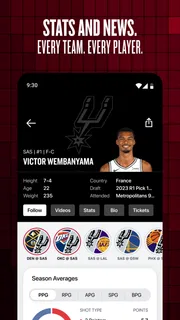
If you are new to basketball, begin with the score and the basic game statistics rather than trying to interpret every number. Look for the relationship between the score, the time remaining, and the teams’ shooting or rebounding figures. The numbers become more meaningful when tied to a particular moment. A high score late in a close game tells a different story from the same total during a one-sided contest.
For a returning fan, the better first step may be checking a team’s next game or reviewing a recent result. That makes the app useful between live broadcasts, not only during them. I like this approach because it turns a quick visit into a small routine: check the latest result, scan the key stats, then watch a short highlight if I want more than the final score.
A practical first-session workflow
Here is the first-session path I would use: open the app before or during a game, find the matchup you care about, note the score and game state, and then check the available stats. Afterward, use a highlight or studio segment to fill in the moments you missed. This is a concrete way to get value without committing to a long viewing session or making a purchase before you understand the app.
One useful habit is to separate “keeping up” from “watching.” If you are at work, commuting, or waiting for an appointment, use the score and stats for a quick update and save video for a time when you can pay attention. Video can be a poor choice in a noisy or low-bandwidth setting, while a score check can still answer the essential question. I would not rely on clips as a substitute for watching every possession, but they are an efficient recap when time is limited.
Another small but helpful workflow is to check the stats before searching for a highlight. If the numbers show that a game turned on a run, a shooting burst, or a rebounding advantage, you can watch with a more focused question in mind. That makes short clips more informative: instead of scrolling aimlessly, you are looking for the moment that explains the shift.
Where confusion can arise
The main point I would clarify for a first-time user is the difference between following a game and watching all of its video coverage. Scores and statistics serve a different purpose from live viewing, and the presence of video content does not mean every viewing option is automatically part of the free experience. The app is free to download, with in-app purchases ranging from $0.99 to $399.99 per item. I would check the details shown in the app before confirming any purchase, especially if you are installing it for a family member.
There is also a difference between a highlight and a complete game. A clip can show a decisive play, but it cannot preserve the buildup, defensive possessions, or stretches when a team slowly loses control. If you care about tactics or want the full emotional arc, highlights are a supplement rather than a replacement. If your goal is just to know the result and see the defining moments, they may be all you need.
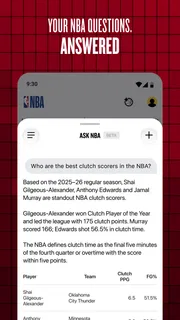
Stats can create a similar misunderstanding. A box score is useful for comparing contributions, but a single figure rarely explains the whole performance. I try to read a player’s numbers alongside the score and the game situation, rather than treating one impressive total as proof that someone dominated. That is especially important when you are catching up on a game you did not watch.
Finally, an official league app can feel more focused on the NBA than a general-purpose news reader. That is exactly what many fans want, but it can be too narrow for someone who only checks basketball occasionally. If you mainly need a simple alert or a combined view of several sports, your regular sports app may be the more convenient everyday choice. The NBA app makes more sense when you want basketball-specific detail and coverage in the same place.
Who will get the most from it
I think it is a good fit for dedicated fans who want to follow multiple games, revisit key plays, and look beyond the final score. It also suits people with irregular viewing time: a fan can check the game during a break, return later for the stats, and use highlights to catch the moments that matter. The official focus is valuable when you want NBA coverage rather than a general sports feed that treats the league as one item among many.
It is also welcoming to newer fans, provided they take it one step at a time. Start with a team, learn to read the game page, and use the clips to connect statistics with actual plays. You do not need to understand every advanced stat before the app becomes useful. A score, a few basic figures, and a well-chosen highlight are enough to make a game easier to follow.
I would steer away from it if you want a bare-bones scoreboard with minimal browsing, if you need a single app for a wide range of sports, or if your only interest is watching complete games and you do not want to assess paid options. In those cases, a simpler score tracker, a broad sports app, or a viewing service that matches your preferences may be a better fit. The right alternative depends on whether speed, multi-sport coverage, or full-game viewing matters most to you.
My verdict after weighing the trade-offs
The NBA app earns its place as a basketball companion because it brings together several useful ways to follow the league: live game information, statistics, highlights, and studio coverage. I would use it as the first stop when I want to understand what is happening in an NBA game, then choose whether I need a short recap or a deeper watch. That is more flexible than using a score page alone.
Its best quality is also its clearest boundary: it is designed for NBA fans. If you want league-specific detail, that focus saves time. If you want broad sports coverage or a stripped-down interface, it can feel like more than you need. The in-app purchase range is another reason to explore first and make a deliberate choice rather than assuming every video option is included.
The app was released on October 27, 2020, and remains a free download for an Everyone audience. Those basics make it easy to try, but I would judge it by a simple first test: can you find a game, understand its current state, and use the stats or a highlight to learn something you missed? If yes, it is already doing the job I want from an official league companion.
My recommendation is straightforward: install it if the NBA is part of your regular routine, begin with one team or one live matchup, and explore the free-to-access parts before considering purchases. For a fan who wants more than a final score but does not always have time for a full broadcast, NBA: Live Games & Scores is a useful, focused way to stay connected to the league. For casual, multi-sport score checking, I would choose a broader tool instead.
Pros
- Live scores make it easy to follow games as they happen.
- Game alerts help you keep track of important moments.
- Team pages provide a convenient way to follow your favorites.
- The schedule helps you plan around upcoming matchups.
- The app offers broad coverage of NBA games and news.
Cons
- Frequent alerts may become distracting without careful settings.
- Some features may require an account to access.
- Live updates can lag behind the action at times.
- The interface can feel crowded during busy game days.
- Video and live content may use significant mobile data.


