



Our review
 Analysis by Lookingapps
I judge a navigation app less by how polished its map looks while parked and more by what happens when I need it in a hurry, traffic changes, or my connection becomes unreliable. MapQuest: Get Directions is a free Maps & Navigation app from MapQuest that combines maps, GPS guidance, voice directions, and live traffic. In my experience, its appeal is straightforward: it can help with everyday driving without asking you to learn a complicated system first. Its strongest use is as a practical route companion, while its usefulness depends on having a working connection for parts of the experience, especially current traffic information.
When the route depends on a live connection
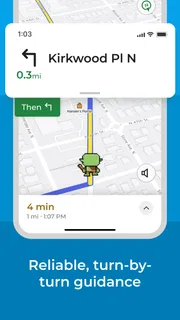
For a normal trip, I like being able to enter a destination, check the route, and follow spoken directions rather than repeatedly glancing at the screen. Voice guidance is particularly useful on unfamiliar roads, where a quick spoken instruction is less distracting than trying to read a map while driving. The map and GPS functions make the app feel oriented toward getting from one place to another, not simply browsing locations.
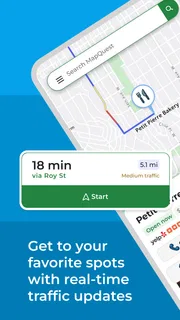
Live traffic can make a difference when a route crosses busy roads or when I am deciding whether to leave now or wait. It is most valuable as a decision aid: a slower-looking route may be worth considering if traffic is building on the obvious one. I would still check the suggested route against what I know about local roads. Traffic conditions can change quickly, and a live estimate is a snapshot rather than a promise about how long a journey will take.
That network dependence matters before departure. If I expect to pass through areas with patchy coverage, I would review the route while I have a reliable connection and avoid assuming every map or traffic detail will remain available after service drops. The app’s navigation features are useful, but I would not make an unfamiliar, connection-sensitive trip on the assumption that it will work exactly the same way without access to a network.
A practical habit is to check the destination and route while still parked, then set off only after the directions are clear. That gives me time to spot an awkward detour or a destination entered incorrectly instead of making those corrections at a junction. It also reduces the temptation to handle the phone while moving.
Good fit for ordinary driving
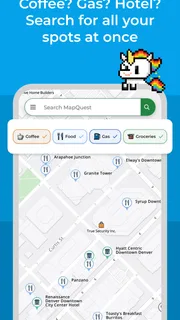
I see the app working best for errands, commutes, visits to a new address, and road trips where a driver wants spoken guidance and a quick view of traffic. If I already know the general area but not the final turns, voice directions can handle the routine while I pay attention to the road. For a trip with several stops, I would check each destination carefully before relying on the route, especially if the stops are close together or have similar names.
MapQuest has been available since February 15, 2011, and the current version is 10.30.0. Those details make it a long-running option rather than a newly launched experiment, but they do not guarantee that every road or local condition will be represented perfectly. I would still use my judgment around closures, temporary restrictions, and signs on the road.
More articles

Instagram Makes Everyday Moments Worth Sharing
A rare social app that can be a photo diary, a neighborhood window, and a lively conversation in the same session—though its best moments still require a little restraint.
Using it in the middle of a busy day
One everyday scenario is leaving work for an appointment across town during the afternoon rush. I would enter the address before leaving, compare the traffic picture with the route I expect to take, and start voice navigation once the phone is positioned safely. If traffic shifts while I am on the way, the live view gives me a reason to reassess rather than blindly treating the first plan as final.
For a less predictable outing, such as finding a service location in an unfamiliar neighborhood, the useful workflow is to confirm the exact destination before moving. A nearby street or similarly named place can send a driver to the wrong entrance even when the route itself is sensible. I would check the displayed destination and the final approach while stopped, then follow the spoken prompts and local road signs together.
When comparing it with familiar alternatives in navigation, the core question is not whether one app can draw a route; most map tools do that. It is whether the combination of map display, voice guidance, and traffic information suits the way I travel. MapQuest is appealing if I want those basics in one free app and prefer a direct driving-oriented experience. Someone who depends on a particular ecosystem, specialist transit details, or more extensive trip-planning tools may find a different map service better matched to their routine.
What to do when directions or service falter
No navigation app should replace attention to the road. If a direction sounds wrong, I would follow posted signs and road markings first, then pull over somewhere safe before checking the route. A missed turn is inconvenient; trying to correct it with hurried taps is worse. The same approach applies if the map seems slow to refresh or the phone loses its connection: pause safely, verify the destination, and resume only when the situation is clear.
Before a journey, I would also make sure the phone has enough battery for the trip and that the device can stay in a stable, visible position without obstructing the driver’s view. These are not special tricks for this app; they are sensible precautions for GPS navigation generally. They matter because a route can be excellent on screen and still become a distraction if the phone is hard to hear, see, or keep powered.
If a route looks unexpected, I would not immediately assume the app is broken. A one-way street, a turn restriction, or changing traffic can make the suggested path differ from the route I would choose from memory. I would compare the next instruction with the road layout and, if necessary, stop before changing the destination or route. That simple recovery approach is more useful than repeatedly switching between screens while driving.
Connectivity is also a reason to keep a backup plan for an important trip. I might note the destination and the main roads before leaving, or keep another way to identify the address if the phone cannot refresh. That does not mean the app is unreliable; it means live navigation is only one part of being prepared. For a familiar commute, the risk is small. For a time-sensitive journey through an area with uncertain reception, a little preparation is worthwhile.
Keeping mobile use sensible
Live traffic and navigation use a phone while you travel, so I would treat data access and battery as practical considerations rather than assume they are invisible. If I have a limited mobile plan, I would check my own device’s data usage after a typical drive and decide whether live traffic is worth keeping on for every trip. I would not promise a specific amount of data use, because it can vary with the journey, the connection, and how the app is used.
For a short, familiar drive, I may not need to keep watching the map once voice directions are guiding me. On a longer or unfamiliar route, having the map available can help me understand which road comes next. Choosing when to look at the screen is a useful trade-off: the display can clarify a complex turn, but spoken prompts are safer for ordinary stretches of driving.
The app is free to download, and it is rated for Everyone. It has an average rating of 4.4 from around 76,000 ratings, with more than 10 million installs. Those figures suggest that many people have tried it, though popularity cannot tell me whether its route choices will suit my particular town or driving habits. In-app purchases are offered, with items ranging from $1.99 to $39.99, so I would review any purchase details in the app store before buying anything.
MapQuest is not the right choice for every traveler. I would look elsewhere if my main need were detailed public-transport planning, a specialized cycling workflow, or dependable guidance in places where I expect to have no network access. I would also compare alternatives if I routinely need extensive customization or rely on features beyond maps, GPS directions, voice guidance, and traffic. For straightforward driving, however, it covers the essentials without making the setup feel like a project.
My connectivity verdict
After weighing its strengths and limits, I would recommend MapQuest: Get Directions to a driver who wants a familiar, uncomplicated way to follow routes and consider live traffic. The most useful approach is to plan while connected, check the destination before setting off, and let voice guidance handle routine turns while staying alert to road signs. That workflow makes the app more helpful and reduces unnecessary screen interaction.
MapQuest is a sensible option for everyday navigation, especially when a quick route and spoken instructions are what I need. Its reliance on connectivity for live information is a real consideration, not a reason to dismiss it. I would keep a backup for important trips, use a different tool when offline confidence or specialized travel planning is essential, and choose this one when I want accessible driving guidance in a free app. Its appeal is practical rather than flashy: it helps me get moving, provided I prepare for the connection conditions along the way.
Pros
- Voice-guided navigation helps keep driving directions clear.
- Offline maps are useful when mobile data is unavailable.
- Route options can help avoid toll roads.
- Gas price information can support trip planning.
- Walking and biking directions extend its use beyond driving.
Cons
- Offline maps require advance downloads and storage space.
- Gas price details may be outdated in some areas.
- Map coverage can be limited in less populated regions.
- Voice navigation may be less reliable with a weak GPS signal.
- Some features may require location access while the app is in use.


