
Our review
 Analysis by Lookingapps
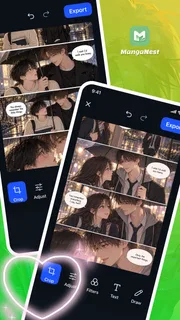
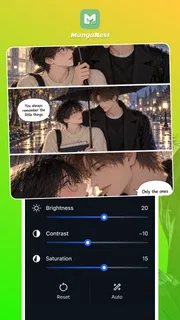
Turning a regular photo into something with a manga feel is less about finding a complicated editor and more about having a few useful creative tools close at hand. MangaNest is a photo-editing app built around that idea: it lets you crop images, apply filters, add text, and draw on top, giving you a straightforward route from a source photo to a manga-inspired creation. I like that the concept is easy to understand. You can start with an image you already have and shape it without needing to approach the project as a full-scale illustration.
From a photo to a comic-style idea
The most natural place to begin is with a picture that already has something you want to preserve: a face, a striking pose, a setting, or a moment that could work as a panel. Rather than making you build an image from a blank canvas, the app’s central workflow starts with photo editing. That makes it approachable if, like me, you want to experiment with a visual idea first and worry about fine details afterward.
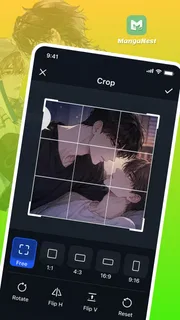
Once you have an image in mind, cropping is a useful first step. A tighter frame can bring attention to a character, while a wider crop can leave more room for a scene. This is a simple tool, but it has a real effect on how an image reads. Thinking about the final composition early can help the rest of the edits feel intentional instead of like a collection of unrelated effects.
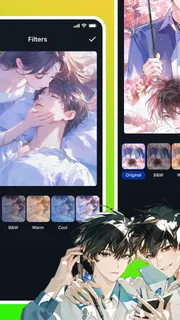
From there, filters offer a way to shift the mood. A filter can help a photo feel more dramatic, playful, or cohesive with the style you have in mind. I would treat this as a creative choice rather than an automatic shortcut to a finished manga panel: the result still depends on the original image and on how the different edits work together. The useful part is having filters in the same editing flow as cropping, text, and drawing.
The next stage is where a photo can start to feel more like a piece of comic art. Text gives you a way to add a line of dialogue, a caption, or a short sound effect. Drawing lets you add your own marks over the image, whether you want to emphasize a detail or contribute a more personal touch. These tools make MangaNest more than a basic crop-and-filter utility; they give you room to make an image feel authored rather than merely adjusted.
Building the image one decision at a time
A practical editing session can stay simple. I would choose the source photo, crop it to establish the main focus, and then test a filter that supports the mood. After that, I would add text only if it helps the image communicate something, and use drawing for details that benefit from a handmade finish. This order keeps the big visual decisions near the beginning and leaves expressive additions until the overall composition is clearer.
There is no need to use every tool just because it is available. A clean crop and a well-chosen filter may be enough for one image, while another could benefit from lettering or drawn accents. That flexibility is part of the appeal for casual creators: you can keep a quick edit quick, or spend longer shaping a more specific idea. The app’s focus remains easy to grasp even if your own approach changes from project to project.
More articles

Instagram Makes Everyday Moments Worth Sharing
A rare social app that can be a photo diary, a neighborhood window, and a lively conversation in the same session—though its best moments still require a little restraint.
For anyone making a sequence of images, consistency becomes important. Similar framing and a restrained approach to filters can help separate panels feel as though they belong together. Text and drawing can then carry the individual moments. The app’s tool set supports those choices, though the creative decisions still come from you. I see that as a sensible balance: it offers the basic ingredients for manga-inspired edits without claiming to replace the judgment involved in composition and storytelling.
Where the handoffs happen
The workflow moves through several kinds of work: selecting a photo, reframing it, changing its visual tone, and then adding graphic or written elements. Each handoff asks you to reconsider the image. A crop may change where text can fit; a filter may affect how visible a drawn line feels; and a caption can alter the mood of an otherwise quiet picture. Thinking about those connections helps the result feel unified.
That is also where a little restraint pays off. If the image already has a strong subject, too much text or drawing could compete with it. If the photo feels visually plain, a small amount of lettering or hand-drawn detail may give it a clearer personality. I would approach each stage as a choice, not a checklist. The tools are most useful when each one has a reason to be there.
Moving an edited image onward is another kind of handoff: the finished piece may be something you want to keep, show, or use as part of a larger creative project. The app’s stated purpose is editing photos into manga-inspired creations, so the reviewable experience centers on that transformation. For me, the important question is whether the image looks more like the idea I started with after working through the available edits. That is a more meaningful measure than simply counting how many effects were applied.
What the finished result can feel like
The best outcome is not necessarily an image that looks like professionally drawn manga. It is an image that carries a manga-inspired character while still making use of the photo you chose. Cropping can strengthen the composition, filters can establish atmosphere, and text or drawing can add a comic-like layer. When those elements support one another, even a modest edit can feel more considered than the untouched source.
I find the app’s appeal especially clear for people who want to experiment without first learning a heavyweight illustration workflow. The combination of familiar photo adjustments and creative overlays gives you an accessible starting point. You can make a playful edit, try out a scene idea, or give a personal image a more graphic presentation. The result will depend on your source material and choices, but the path from photo to stylized image is easy to understand.
There is also a useful distinction between editing and storytelling. The app can help prepare an image and add text or drawing, but the story still comes from the way you select and arrange those elements. A caption can suggest a character’s voice; a crop can make a moment feel intimate or distant. Those are creative decisions, and the app gives you tools to explore them rather than making them on your behalf.
Where the flow may feel limited
The simplicity that makes a focused editor approachable can also shape expectations. If you come looking for a complete comic-production environment, it is worth remembering the app’s stated core: photo editing with cropping, filters, text, and drawing for manga-inspired creations. That is a clear creative brief, not a promise of every tool a dedicated comic studio might offer. I would judge it on how comfortably those editing steps support the image you want to make.
The workflow can also lose momentum if you begin without a clear visual direction. A filter may look appealing on its own but clash with the crop or lettering you add afterward. Likewise, drawing can add personality, but it may distract if it does not serve the focal point. This is not a flaw unique to the app; it is a common friction point in visual editing. Starting with a rough idea of the desired mood and focal subject makes the available tools easier to use well.
Another practical consideration is that the app’s audience includes teenagers, so it is positioned for a teen audience rather than very young children. It is free, which makes it easier to try as a creative tool without an upfront purchase. The app has an average rating of 4.6 from around 3,700 ratings, and it has passed 100,000 installs. Those figures suggest that it has found an audience, though personal fit still comes down to whether its photo-first approach matches your needs.
A good fit for casual visual experiments
MangaNest is best approached as a focused way to turn photos into manga-inspired images, not as a shortcut that automatically creates a complete comic. Its core sequence is easy to picture: begin with a photo, refine the framing, choose a filter, and add text or drawing where it helps. That makes it approachable for casual edits and small creative experiments, especially if you enjoy working from images you already have.
The app is listed at version 1.6.21 and requires Android 7.0 or later. It was released on June 16, 2026, and is developed by Quanettema. Those details may matter when deciding whether it suits your device, while the more important creative question is whether you want a straightforward photo editor with a manga-inspired purpose.
Overall, I see it as a convenient option for people who want to give ordinary photos a more expressive, comic-like treatment. Its strengths are the clarity of its workflow and the mix of practical edits with personal additions. The handoffs between cropping, filtering, lettering, and drawing reward a little planning, but that is part of making an image feel cohesive. If your goal is to experiment with manga-inspired photo edits without turning the process into a major project, this app offers a sensible place to start.
Pros
- Offers a broad selection of manga and comics in one app.
- Lite branding suggests a streamlined option for mobile devices.
- Useful for readers who want to discover new comic series.
- A dedicated comic app makes browsing more focused.
- Can provide convenient access to reading on the go.
Cons
- The available catalog may vary by region.
- Some titles may not have complete chapters.
- Reading may require an internet connection.
- Ads could interrupt the reading experience.
- App features and content may change with updates.


