



Our review
 Analysis by Lookingapps
I judge a comics reader by what happens after the first few minutes: can I find a story, settle into a comfortable reading rhythm, and pick up where I left off without fighting the interface? MangaMuse:AceToon Lite & Comic is aimed at people who want manga and webtoons in one mobile reading app, with a dark presentation and a swipe-based way to save favorites. That combination makes it worth considering, especially if bright screens bother you or you like keeping a small reading queue close at hand. My main reservation is that a polished reading concept does not automatically make every part of the experience easy for every reader.
Reading comfortably and finding your way
The dark theme is the first detail I would notice during a long session. It gives pages and surrounding controls a subdued setting, which can feel gentler than a bright interface in a dim room. That is useful for evening reading, but a dark theme is not universally more readable: some people find light text on a dark background tiring, and the actual contrast matters. I would treat it as a helpful option for a particular context, not as an accessibility guarantee.
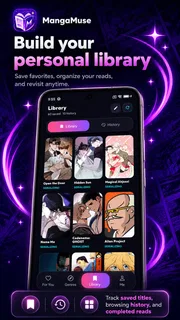
The app’s central activity is straightforward: browse comics, open a title, read, and use a swipe to save favorites. That swipe gesture is a small but meaningful shortcut when I am scanning several possible reads. Instead of interrupting the browsing flow to work through a more involved saving process, I can mark something that catches my eye and return to it later. It is especially practical when I am choosing a new series during a short break rather than committing to one immediately.
There is a trade-off in gesture-led navigation, though. Swiping is quick once I understand what it does, but a gesture can be less obvious than a clearly labeled button, and it may be harder for someone with limited dexterity or reduced precision. I would take a moment to test the interaction gently before using it while distracted. If the motion feels unreliable, the app’s usefulness will depend on whether the rest of the browsing flow offers an alternative that suits you.
For a reader who already knows the basic habits of comics apps, the format should feel familiar rather than demanding. For someone new to digital manga and webtoons, I would recommend trying a few titles before building a large reading list. That gives you a chance to see whether the way the app presents stories, moves between browsing and reading, and handles your preferred reading posture feels natural. The key question is not simply whether there is plenty to explore, but whether you can comfortably return to the stories you actually want.
Small choices that make reading easier
A useful workflow is to treat the favorite-saving gesture as a shortlist rather than a permanent library. While browsing, I would save a few promising series, then revisit that set when I have enough time to sample one properly. This avoids the common trap of opening every appealing cover and losing track of what I meant to read. It also gives the app a clear role: discovery first, focused reading afterward.
Another practical habit is to match the session to the setting. In a quiet, dim room, the dark presentation may help the screen feel less intrusive. In a bright place, I would check whether the page remains comfortable rather than assuming the same theme will work everywhere. A quick adjustment in where I sit or how I hold the device can matter as much as the interface itself, particularly when comic panels contain fine detail or dense lettering.
More articles

Instagram Makes Everyday Moments Worth Sharing
A rare social app that can be a photo diary, a neighborhood window, and a lively conversation in the same session—though its best moments still require a little restraint.
Gestures, sensory comfort, and different abilities
Comics are visually rich, and that is part of their appeal, but it also means reading comfort varies widely. A reader may need larger-looking text, stronger contrast, fewer distractions, or more time with each panel. MangaMuse:AceToon Lite & Comic’s dark theme addresses one sensory preference, but I would not assume it covers every visual need. Before settling into a long series, I would check a sample page at the screen brightness and viewing distance I normally use.
The swipe-to-save interaction is the clearest motor consideration. It reduces friction for someone who can make the gesture comfortably, while potentially creating uncertainty for someone who relies on taps or has difficulty with controlled movement. A useful test is to try saving a title when you are not in a hurry and see whether the gesture is easy to repeat without accidentally moving on. If that basic action feels awkward, the app may still work as a reader, but it may be less convenient as a discovery tool.
Sensory comfort is also about pacing. A webtoon or manga can invite a long, continuous session, yet not every reader benefits from that rhythm. I like the idea of choosing a stopping point before I begin: finish a chapter or reach a natural pause, then decide whether to continue. That makes the experience easier to manage during a busy day and prevents a casual check from turning into an uncomfortable stretch of screen time.
There is no single ideal reading setup. Some people prefer a low-lit screen and a dark interface; others need a brighter page to distinguish visual details. Some enjoy browsing with quick gestures; others prefer explicit controls that make each action visible. I would choose this app based on whether its actual reading presentation works for your eyes and hands, rather than on the assumption that a dark theme or a simple gesture will suit everyone.
When it fits into everyday life
One realistic use is a commute or a waiting room: I can browse when I have a minute, swipe to save a story that looks interesting, and leave the deeper reading for a calmer moment. The value here is separation between discovery and attention. A short, interrupted session is not ideal for following a complex story, but it can be enough to build a small list of candidates for later.
At home, I would use it differently. I would choose a comfortable seat, set brightness for the room, and read without repeatedly switching between titles. That makes the dark look more relevant and gives the story room to hold my attention. If I am tired, though, I would avoid treating the app as a substitute for rest; comics are engaging, and visual detail can become demanding when concentration is low.
For someone comparing it with a general-purpose manga or webtoon reader, the appeal here is the combination of those formats with a streamlined favorite-saving gesture and a dark reading identity. A broader comics service may be preferable if you want a different discovery system, more explicit navigation, or a reading setup you already know works for you. I would not switch from a familiar app solely because this one has a sleek presentation; I would compare how easily each lets me locate, save, and comfortably read the stories I care about.
The app is free, which makes a trial less of a commitment for readers who want to judge the interface firsthand. Its audience rating averages 4.4 from around 9,400 ratings, and it has passed 500,000 installs. Those figures suggest that it has found an audience, but they cannot tell me whether its gestures, contrast, and reading flow will suit a particular person. A brief hands-on check is more useful than popularity alone when comfort is the deciding factor.
Who should give it a try
I would point a manga or webtoon reader toward it if they value a dark visual style, like collecting possible reads as they browse, and are comfortable navigating with gestures. It may also suit someone who wants a free way to explore this kind of reading without first committing to a paid app. The Teen content rating is worth keeping in mind for households choosing apps for younger readers; it is a cue to consider whether the app is appropriate for the person using it, rather than a promise that every title will suit every age or taste.
It is a less obvious fit for readers who need clearly labeled controls for every action, dislike gesture-based interactions, or already rely on a reader whose presentation they know is comfortable. People particularly sensitive to contrast should test the dark theme rather than assume it improves readability. And if your main priority is a specific catalog or a particular set of reading controls, compare those needs directly before making this your everyday app.
What to check before making it your regular reader
MangaMuse:AceToon Lite & Comic is listed as a Comics app from FairfaxAngelic. The current version is 1.7.16, and the minimum operating system is 7.0. Those details are useful when checking whether the app is a practical choice for your device, but the more personal compatibility test is still the reading experience: can you see the pages comfortably, and can you move through browsing without unwanted effort?
I would also decide what “saving a favorite” means for my own routine. If I use that action to mark stories for later, I can keep browsing light and avoid opening titles just to remember them. If I expect it to serve as a detailed reading-management system, I should first confirm that the way I organize stories matches my habits. The swipe is a convenient discovery aid, but a quick favorite gesture is not automatically the same thing as a full planning or tracking workflow.
When evaluating an app for different abilities, I look for the point where a helpful design choice stops being enough. A dark theme can support a dim-room reader, yet does not solve every contrast need. A swipe can make saving fast, yet may be less accessible than a visible control. This is why I would try the app in the circumstances where I actually read: with one hand if that is typical, in the lighting I usually have, and when I am not rushed. That test reveals more than a feature list.
My verdict is cautiously positive. The app has a clear identity for manga and webtoon discovery, and its dark presentation plus quick favorite gesture give it a practical purpose beyond simply opening a comic. I would recommend it to readers who enjoy that style of browsing and find the interface comfortable in a short trial. I would steer someone toward a more familiar or more explicitly controlled alternative if gestures are a barrier or if their visual needs call for a reading setup this app does not suit.
The best reason to try it is the chance to see whether its particular combination of dark reading and swipe-based discovery makes your own routine easier. I would start with a short session, check both browsing and page comfort, and keep it only if those details feel natural. That is a fair way to judge a comics app: not by how many stories it appears to promise, but by whether it helps you enjoy the ones you choose.
Pros
- Offers a lightweight option for readers with limited device storage
- Lets users explore comics across multiple genres
- Provides a simple interface that is easy to navigate
- Supports reading on the go without carrying physical books
- May help readers discover titles beyond mainstream manga
Cons
- Its catalog may vary by region or change over time
- Some content may require an internet connection
- Reading comfort can depend on your device screen size
- Availability of specific languages may be limited
- The Lite edition may offer fewer features than the full app


