
Our review
 Analysis by Lookingapps
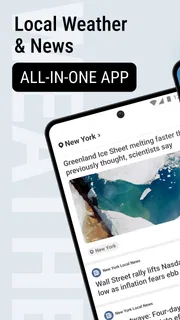
I find a weather app most useful when it answers a practical question quickly: should I leave now, take a coat, or wait for the rain to ease? Local Weather News - Radar brings weather information together with local and international news, so it can serve as a quick daily check rather than a dedicated forecasting workstation. Its radar and forecasts make it relevant when conditions may change, while the news feed gives the app a broader role than a simple temperature display.
That combination also makes connectivity part of the experience. Radar and current forecasts are most valuable when the app can retrieve fresh information, and news is naturally something I expect to load from a network. I would treat this as a convenient companion for connected, everyday use—not as my only source of safety-critical weather information or as a tool to rely on when I know I will be offline.
Quick checks work best with a connection
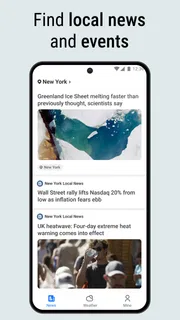
The app is a free weather and news app from EASE Group. Its central appeal is the mix of live radar, forecasts by the day and hour, and news covering local as well as international topics. In ordinary use, that means I can check the conditions before heading out and then move on to headlines without switching between separate apps.
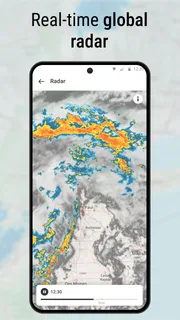
That convenience depends on a clear distinction: a forecast can help me plan, but it is not a guarantee that the weather outside will match the screen. Radar is especially useful for understanding what may be moving through an area, yet it is only as helpful as its freshness and connection at the moment I look. For a routine decision—whether to bring an umbrella on a short walk—that is a reasonable trade-off. For a serious storm decision, I would cross-check official alerts and local authorities rather than treating any single app as definitive.
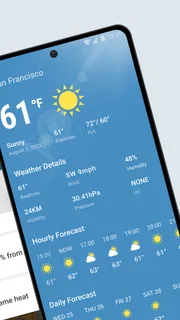
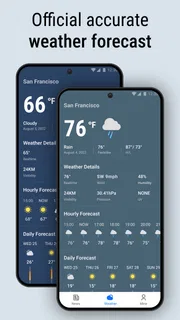
The hourly view is the part I would reach for when timing matters more than a broad summary. If I have a commute, an outdoor appointment, or a short window to run errands, looking at the hours ahead can help me compare options instead of judging the whole day by one headline forecast. The daily view is better for a looser plan, such as deciding whether laundry or a longer outing is sensible. These views complement each other; neither should be read as a promise of precise conditions at every moment.
Where the news feed fits
Weather and news make a useful pairing when I want a compact morning routine: check the local outlook, then scan what is happening nearby and farther away. It is also a sensible way to keep one app for two common habits. The trade-off is attention. Someone opening the app only to check rain may find headlines an unnecessary detour, while a dedicated news reader will usually offer a more focused reading experience.
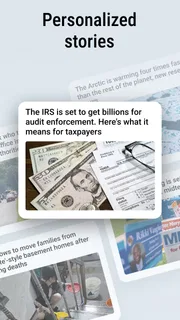
I would use the news side selectively rather than assume it replaces a full news service. Local and international coverage can broaden a quick check, but readers who need extensive topic controls, saved reading, or a particular editorial focus should compare it with news apps built around those needs. The app’s combined purpose is the point; it is not automatically the strongest specialist in either weather or journalism.
More articles

Instagram Makes Everyday Moments Worth Sharing
A rare social app that can be a photo diary, a neighborhood window, and a lively conversation in the same session—though its best moments still require a little restraint.
Useful on the move, with a little planning
On a connected phone, the format suits quick checks between tasks. Before leaving home, I would open the radar to get a visual sense of nearby conditions, then compare that with the hourly forecast to decide whether to shift my departure. That two-step habit is more useful than repeatedly reopening the app without a specific question: radar gives context, while the hourly view helps translate that context into a plan.
For a day with several stops, I would check once before setting out and again before an outdoor stretch if the weather looks changeable. This is a practical way to avoid unnecessary refreshing and to focus on decisions that could actually change. If the app has not updated because reception is weak, I would not assume that a radar image or forecast still reflects current conditions; I would try again when connected and use what I can observe around me in the meantime.
Travel introduces another judgment call. A forecast tied to the wrong place can be less useful than a broad regional outlook, so I would verify that the location being shown matches where I plan to be before relying on it. When moving between neighborhoods or towns, a quick location check is worth the few seconds, especially if rain or wind is the reason I opened the app. I would not make a major route or safety decision from a glance at a map without confirming the location and checking an authoritative alert source.
Weak signal, interruptions, and recovery
Connectivity problems are most noticeable when the information is time-sensitive. In a basement, a crowded station, or a rural stretch with patchy service, loading a live radar view or current headlines may take longer or fail. That is not a unique flaw of this app; it is a basic limitation of network-dependent information. The important practical point is not to treat a screen that has stopped updating as evidence that conditions have stayed the same.
If a page appears stuck, I would first check whether the phone has a usable connection, then return to the relevant view and try again once service improves. For an immediate weather decision, stepping outside to assess conditions or consulting a trusted alert channel is safer than repeatedly waiting on a slow refresh. This is particularly important when timing matters or conditions are already severe.
I also would not plan on the app as an offline forecast reference. Nothing about its main role makes that a sensible assumption: radar, fresh weather information, and news are most useful when they can be updated. Before a long trip or a day away from reliable service, check the outlook while connected and make a backup plan. If being able to consult stored forecasts without a network is essential, choose a service that clearly documents that capability.
Keeping use focused and data-conscious
Because the app combines several kinds of current information, I would open it with a purpose rather than leave it running in the background. A quick check before commuting, followed by another when plans change, is often enough for ordinary planning. This habit keeps the experience simple and avoids spending time refreshing a screen when no decision depends on a newer update.
For users with limited mobile data, it is sensible to load the information they need while on a trusted connection and avoid repeatedly reopening radar or news pages just to watch them update. I would also pay attention to what the phone’s own data-use controls show over time instead of assuming that any weather app has negligible network use. The app’s convenience comes from timely information, so there is a natural trade-off between frequent checking and keeping use lean.
News can encourage longer sessions than a weather check, which is another reason to separate the two habits. If I only need to know whether an outdoor errand is sensible, I can go straight to the forecast and leave the headlines for later. If I am already browsing news, the weather tools are there when useful. That small bit of discipline makes the combination feel practical rather than distracting.
Who should choose it—and who may prefer something else
I would recommend it to someone who wants a straightforward daily weather check alongside a news glance, especially if live radar and an hourly outlook are more useful than a highly specialized forecasting dashboard. It is also a reasonable option for people who prefer not to keep separate apps for every brief check. The app is rated Everyone, is free, and has an average rating of 4.3 from around 17,000 ratings, with over 5 million installs. Those figures suggest a well-used general-purpose option, though they do not tell me whether its forecasts suit every location equally well.
On the other hand, I would look elsewhere if I needed detailed meteorological tools, highly customizable news reading, or dependable access in places without a connection. A dedicated weather service may better suit users who want specialized maps and more control over forecast details; a focused news reader may suit someone who follows particular subjects closely. And for severe-weather preparedness, local official alerts remain a better authority than a general app, whatever its rating.
The app was released on August 12, 2022, and its current version is 1.8.9. It requires Android 8.0 or later. That gives Android users a clear compatibility check before installing; iOS readers should look at the relevant app store for availability and device requirements rather than assume the Android version details apply to Apple devices.
A sensible connected companion, not a safety net
My overall view is that Local Weather News - Radar makes sense as a convenient, connected daily companion. I like the practical pairing of radar, day-and-hour forecasts, and news, particularly for someone whose routine involves frequent short decisions rather than deep research. The strongest way to use it is to check the right view for the question: hourly conditions for timing, daily forecasts for broad plans, and radar for a visual sense of nearby weather.
The main limitation follows directly from that convenience: fresh information depends on access to a working connection, and a general-purpose weather-and-news app should not be mistaken for an emergency authority or specialist forecasting suite. If you are comfortable checking it while connected and verifying important warnings elsewhere, it can fit naturally into a morning or commute routine. If offline access, extensive controls, or highly detailed weather analysis is your priority, another app is likely a better match.
Pros
- Radar maps make it easy to follow approaching weather systems.
- Local forecasts help with planning everyday activities.
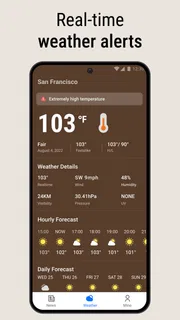
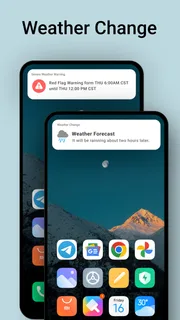
- Severe weather alerts can provide useful advance warning.
- Hourly forecasts show how conditions may change throughout the day.
- The interface is straightforward for checking current conditions.
Cons
- Forecast accuracy may vary by location and weather conditions.
- Some features may require an internet connection.
- Frequent alerts can become distracting if settings are not adjusted.
- Radar imagery may take time to load on slower connections.
- Ads may interrupt the weather-checking experience.


