


Our review
 Analysis by Lookingapps
I would judge a language-learning app not only by what it teaches, but by how easily different people can use it in the middle of real life. Learna is an education app from Deep Flow Apps focused on practicing English and Spanish with AI. Its premise suits learners who want to speak, not just memorize words, but the experience will work best for people comfortable learning through a phone and interacting with automated tools.
The app is free to install and has a 4.6 average from around 861,000 ratings, with over 50 million installs. That reach suggests it has found an audience, though popularity alone cannot tell you whether its learning approach fits your needs. I see its strongest potential in short, repeatable speaking practice: the kind you can fit between other commitments rather than a full classroom-style course.
Finding your way through practice
For language learning, readability is more than legible text. You need to understand what a task is asking, notice what to do next, and recover when you make a mistake. Learna’s focus on English and Spanish gives its learning experience a clear scope, which is helpful if one of those is your target. It is less appealing if you want a single app for a broader range of languages.
The most useful way to approach an AI-based speaking tool is to treat each session as a small conversation, not a test you must pass perfectly. I recommend deciding on one practical goal before opening the app: introducing yourself, asking for directions, or explaining what you need at work. A narrow goal makes it easier to judge whether the practice is helping, and it avoids the vague feeling of tapping through exercises without knowing what you can now say.
Version 4.0.2 is the current release, and the app is listed for devices running Android 7.0 or later. The age rating is Everyone. Those facts make the app broadly approachable on compatible Android devices, but they do not guarantee that every screen, prompt, or interaction will suit every learner. If you are choosing it for a child or for someone who needs a particular interface accommodation, try a session together first and see how the actual tasks feel.
A practical learning workflow is to use a short speaking session to expose gaps, then write down only the phrases you could not produce smoothly. Rehearse those phrases aloud later, outside the app, and return to a similar topic. This turns AI practice into a bridge between recognition and speaking from memory. It also helps you notice progress more clearly than simply counting completed activities.
Speaking practice needs room for different abilities
Speech-focused learning can be valuable for people who find textbook exercises intimidating, but it naturally puts more emphasis on listening and speaking than a quiet reading course would. That can be a good fit for a learner preparing for everyday conversations. It may be a poor fit at a time when speaking aloud is uncomfortable, impractical, or inaccessible. In that case, I would choose a resource centered on reading, writing, or self-paced text exercises instead of forcing a voice-based routine.
More articles

Instagram Makes Everyday Moments Worth Sharing
A rare social app that can be a photo diary, a neighborhood window, and a lively conversation in the same session—though its best moments still require a little restraint.
Motor access matters too. Any app that asks users to move between activities or respond on a touchscreen can create friction for someone who has difficulty with precise taps, repeated gestures, or holding a device. I would test the basic flow before committing to a long study habit: can you reach a lesson, understand its controls, and complete a response without awkward repeated attempts? A few minutes of testing will tell you more than assuming that a popular app will be easy for every hand or device setup.
There is also a sensory trade-off in speaking practice. A learner who is sensitive to audio, prefers silence, or needs to study around sleeping family members may not be able to use spoken exercises whenever they like. I would plan sessions for a comfortable place and time rather than expecting this to be a discreet tool in every setting. If you are in a noisy room, you may also find it harder to focus on spoken prompts and judge your own response.
Making practice fit into an ordinary day
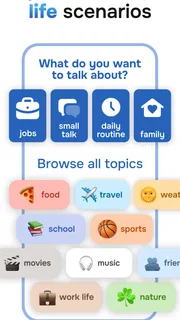
Imagine having ten quiet minutes before a shift and needing to greet customers in Spanish. I would use that time to practice a small set of likely exchanges, then repeat the phrases without looking at the screen. The value is not that an app can replace a real conversation; it is that rehearsal can reduce the awkward pause when you need to start one. For an English learner preparing for a first meeting, the same approach can help with a self-introduction and a few likely questions.
Short sessions are also useful for learners who struggle to protect a large block of study time. Rather than promising yourself an hour every evening, attach practice to an existing routine: after breakfast, during a quiet break, or before reviewing notes. Keep the goal modest enough that you can finish it. If your surroundings are unpredictable, choose a time when you can hear clearly and speak without feeling self-conscious.
For travel, I would use Learna as preparation rather than as the sole source of essential language. Practice the kinds of exchanges you expect to need, but keep a written backup of crucial names, addresses, or phrases. In a fast conversation with a stranger, you may not have time to open a lesson or rely on an AI prompt. That distinction matters: the app can help you rehearse, while a saved note or phrasebook can be more dependable in the moment.
Compared with a conventional vocabulary app, a tool built around AI speaking practice is appealing when your main weakness is producing sentences aloud. Flashcards are often better for quick recall drills and reviewing a fixed list of words; a teacher or conversation partner is better for human nuance, natural turn-taking, and the reassurance of a real listener. I would use Learna as a practice layer between those options, not as a complete substitute for either.
Where the experience can still create friction
AI practice is not the same as a human tutor. Automated feedback can help make practice less intimidating, but it should not be treated as the final authority on every pronunciation choice or the social meaning of a phrase. When a sentence matters—for a job interview, a formal email, or a sensitive conversation—I would check it with a trusted speaker or a reliable learning reference as well.
There is a motivation trade-off, too. A learner who enjoys speaking exercises may return often, while someone who prefers a visible syllabus, grammar explanations, or carefully sequenced textbook lessons may find this approach less satisfying. If you need to prepare for a specific exam, compare the app’s practice with the exam’s actual requirements before making it your main study plan. A general speaking routine does not automatically cover every test skill.
Cost is worth considering even though the app is free to download. Learna offers in-app purchases ranging from $0.99 to $199.99 per item, so I would check what a purchase unlocks and whether it matches your intended routine before paying. You do not need to buy anything merely because you want to try the app, but the price range makes it sensible to understand the specific offer rather than assume every useful feature is included at no cost.
Another limitation is context: speaking practice asks for more privacy and concentration than quietly reviewing a word list. A commuter surrounded by noise, a parent in a room where a child is sleeping, or a learner who shares a workspace may have fewer convenient moments to use it. In those situations, a silent study method can be more accessible, even if it does less to prepare you for speaking.
Who I would recommend it to
I would recommend Learna to English or Spanish learners who want regular, low-pressure opportunities to practice forming spoken responses and who can set aside a reasonably quiet moment. It is particularly promising for someone who understands more than they can say and wants to turn passive knowledge into active speech. The app’s Everyone rating may make it an option for a wide age range, while parents and learners should still judge whether the particular activities suit the person using it.
I would steer away from it as a primary choice if you need extensive human correction, a formal course plan, silent-only activities, or comprehensive preparation for a specific qualification. People who rely on particular assistive settings should test the app on their own device before building a routine around it. These are not reasons that the app cannot help; they are situations where another method may meet the need more directly.
The app has received around 6,100 written reviews, but I would still make the decision based on your own first session rather than on other people’s reactions. Try a realistic topic, notice whether you can comfortably follow the prompts, and ask yourself whether you would repeat the exercise tomorrow. That small test is especially useful when accessibility, confidence, or a busy schedule is part of the decision.
An inclusive choice, with a practical caveat
My view is that Learna’s clearest strength is the opportunity to rehearse English or Spanish aloud without arranging a conversation partner. That can lower the barrier for a hesitant learner and make spare minutes more purposeful. Its clearest caveat is that speaking-centered learning depends on a person’s environment, comfort with audio, and ability to interact with the app’s controls. Those needs vary, so the same feature can be empowering for one learner and inconvenient for another.
I would try it as one part of a flexible language routine: use it for spoken rehearsal, keep notes for phrases you want to remember, and turn to a human speaker or another study method when you need deeper explanation or a different mode of access. Deep Flow Apps offers a free starting point, with optional purchases, and the app’s 50-million-plus install reach makes it an established choice rather than an obscure experiment. My recommendation is to give it a short, purposeful trial—especially if speaking is your weak spot—and keep it only if the practice feels both usable and relevant to the conversations you actually want to have.
Pros
- Short lessons fit into spare moments.
- Speech exercises help build pronunciation confidence.
- Progress tracking makes learning goals easier to follow.
- Useful for beginners studying English or Spanish.
- Daily practice reminders can support consistent study.
Cons
- Some lessons and features may require a subscription.
- Speech recognition may struggle with varied accents.
- Learning both languages at once can feel overwhelming.
- A stable internet connection may be needed for some content.
- App reminders can become distracting if enabled frequently.


