




Our review
 Analysis by Lookingapps
Instagram is built around a simple idea: share moments, find people and interests you care about, and keep up with what others post. It brings photos, Stories, and Reels together in one social app, so it can feel like a quick place to check in or a destination where you spend much longer than planned. My overall impression is that it works best when you treat it as a flexible social feed rather than expecting every visit to be short, quiet, or predictable.
What using Instagram feels like
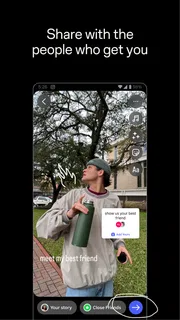
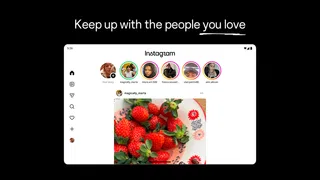
At its heart, Instagram is a visual social network. The store summary captures its central appeal: creating and sharing photos, Stories, and Reels with friends. That focus makes the app easy to understand even if you have never used it before. You open it to see what people are sharing, post something of your own, or explore content beyond your immediate circle.
The app is free to download, and its enormous audience is part of what makes it appealing. It has more than five billion installs, and its average rating is four out of five, based on around 170 million ratings. Those figures suggest a familiar, widely used service, though a large audience also means that the experience can vary depending on who you follow and what you want from a social platform. The app is rated for teens, so it is worth thinking about how social media fits into your own habits and household expectations.
Guides and analysis on Instagram

Instagram Makes Everyday Moments Worth Sharing
A rare social app that can be a photo diary, a neighborhood window, and a lively conversation in the same session—though its best moments still require a little restraint.
Quick visits and speed expectations
Instagram is designed for a steady stream of visual content, which naturally encourages quick browsing. A short visit might mean checking a few updates or looking at a Story; a longer one can turn into an extended scroll through videos and posts. I find that the app’s format makes it feel immediate: there is usually something new to look at, and switching from viewing to sharing is part of the same overall experience.
That sense of immediacy is not the same as a guarantee that every action will feel instant on every phone or connection. Performance depends on the device, network conditions, and the content being loaded. Rather than judging the app by a single moment, it makes more sense to consider how it behaves in your usual setting. If your connection is inconsistent, a feed centered on photos and video may feel less smooth than it does on a strong connection.
For people who mostly want to keep in touch with friends, the main appeal is convenience: one app brings together several ways to share and browse. For people who follow many accounts or spend time exploring, the experience can become denser. That is not necessarily a speed problem; it is also a consequence of the app’s abundance of content. I would approach it as a service for dipping into throughout the day, not as a tool that promises a fixed, distraction-free session.
When usage gets heavier
The more time you spend browsing, the more varied the experience becomes. A quick look at a few photos is a different kind of session from moving between Stories and Reels for a while. Video-heavy browsing can place greater demands on a phone and its connection than simply reading a short text update. That is a general expectation for visual media, not a claim that every device will struggle or that Instagram behaves the same way in every situation.
Heavy use can also change how the app feels even when it is running normally. A busy feed presents more things competing for your attention, and it is easy to lose track of time while moving from one piece of content to the next. I find that this is the more noticeable cost for many users: the app is designed to make browsing appealing, so managing your own stopping point matters as much as the technical experience.
If you use Instagram to post as well as browse, your sessions may naturally involve more steps. You might be choosing a photo, composing a Story, or deciding whether a Reel is worth sharing. The app’s social purpose makes those actions feel connected, but it also means that your experience depends on what you intend to do. A person who checks friends’ updates occasionally will have a different routine from a creator who regularly prepares and shares content.
Reliability in everyday use
Instagram has been around since 2012, and it is now a familiar part of many people’s online routines. Longevity and a huge user base make it easy to find people and content, but they do not mean every session will be identical. As with any app, the practical experience can be affected by a phone’s available resources, its operating environment, and the quality of the connection at that moment.
When something seems slow or does not load as expected, it is sensible to consider the basics before deciding the app itself is at fault. A weak connection, limited free space, or an older device can affect many apps, especially ones centered on media. Closing other demanding apps or trying again when your connection is steadier may help clarify whether the issue is temporary. Those are general troubleshooting steps rather than a promise that they will resolve every problem.
My reliability verdict is therefore measured: Instagram is a well-established service with a broad audience, but the smoothness of any particular session depends on circumstances beyond the app’s name alone. For day-to-day social browsing, that is a reasonable expectation. If you need uninterrupted access for a time-sensitive task, it is wise not to assume that any online service will be available without interruption.
Device limits and practical considerations
Because photos and video are central to Instagram, a phone’s overall condition matters. A device with limited resources may find extended media use more demanding than a newer or less burdened phone. This does not mean the app is automatically unsuitable for older devices; it means that the same session can feel different across phones. If you notice sluggishness, compare how the device handles other apps and consider whether the connection or available storage could be contributing.
Battery use is another practical consideration during long browsing sessions. Watching video and keeping an app open for a while can use more power than a brief check-in, as is true of many media apps. I would not treat that as a unique flaw, but it is worth keeping in mind if you spend a lot of time scrolling away from a charger. Short, intentional visits are easier to fit into a busy day and can help keep both your time and device use in check.
Instagram is free, with in-app purchases listed in a broad range from nineteen cents to ten thousand dollars per item. That range does not mean every user needs to spend money to use the app. It does make it sensible to pay attention to purchase choices, especially if the device is shared or used by a younger person. The core idea remains social sharing and browsing, while any optional spending should be approached deliberately.
Finding a comfortable way to use it
The app can serve different purposes depending on how you shape your account and habits. You may use it to keep up with friends, share personal moments, or explore creative posts and short videos. The strongest experience comes when the people and content you follow match what you actually want to see. A crowded or irrelevant feed can make any social network feel tiring, while a more intentional selection can make browsing feel useful and enjoyable.
I also recommend thinking about what you want from each visit before opening the app. If the goal is to check a particular update, it helps to leave once you have done that. If you are there to relax and explore, a longer session may be exactly what you want. Instagram does not have to be used in only one way, but its continuous visual content makes it helpful to set your own boundaries rather than relying on the app to decide when you are finished.
The social side is the main reason to stay. Sharing a photo or Story can feel more personal than posting a plain status, while Reels give the app a more entertainment-oriented dimension. That range makes Instagram versatile, though it can also make the experience feel busy. I see it as a strong option for people who enjoy visual communication and are comfortable with a feed that mixes connection and discovery.
Performance verdict
Overall, Instagram delivers a familiar, media-rich social experience with an immense community behind it. Its speed will depend on the phone and connection, and heavier sessions involving lots of visual content can be more demanding than a brief check-in. I would not describe that variability as a deal-breaker; it is a practical part of using a social app built around photos and video.
The app is most rewarding when you want to share moments, follow people you care about, and discover content through a visual feed. It is less suited to anyone looking for a quiet, tightly limited browsing experience unless they bring their own boundaries. The huge audience, straightforward purpose, and mix of photos, Stories, and Reels make it easy to understand why it remains a familiar choice.
My final take is that Instagram is worth trying if visual social sharing is what you want. Expect the experience to vary with your device, connection, and how heavily you use it, and keep an eye on how much time a scroll takes. Used intentionally, it can be a convenient place to stay connected and share everyday moments; used without a stopping point, it can easily occupy more of your attention than you planned.
Pros
- Stories make it easy to share casual updates that disappear after 24 hours.
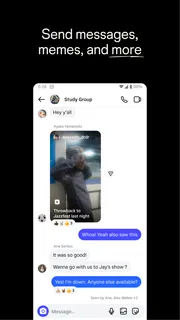
- Direct messages support private chats and group conversations.
- Saved collections help organize posts for later viewing.
- Alt text lets creators describe images for screen readers.
- Close Friends offers a smaller audience for selected Stories.
Cons
- The feed can encourage prolonged scrolling and frequent app checks.
- Public profiles may attract spam or unwanted interactions.
- Some features and settings are difficult to find.
- Reels recommendations can feel repetitive over time.
- Downloading your account data may take time to complete.


