






Our review
 Analysis by Lookingapps
When I’m looking for a place to live, I want more than a stack of listings: I need a way to compare homes, rentals, neighborhoods, and the people who can help with the move. Homes.com Real Estate & Rent is a free home-search app from CoStar Homes.com Android Team, and its mix of property, agent, and school searches makes it useful for exploring a move from several angles. I’d treat it as a practical starting point, not as a substitute for checking a property and its details directly.
What free access gets you
The app costs nothing to download and use, which makes it easy to try while you are still deciding where to live. That matters if you are browsing casually, comparing areas, or helping someone else search. The verified price is free; I wouldn’t assume that every service involved in a home purchase or rental is free simply because the app is. Any costs connected to an agent, application, or transaction depend on the people and arrangements involved.
Homes.com has been available since September 10, 2012, and the current version is 18.8.0. It has a 4.7 average from around 31,000 ratings, alongside roughly 3,100 written reviews and over a million installs. Those figures suggest that many people have tried it, but they don’t tell me whether a particular listing is current or suitable. For a housing search, I put more weight on checking the individual property and confirming important details than on an app’s overall rating.
The app is rated Everyone, and it requires Android 10 or later. That gives Android users a straightforward way to check basic compatibility before installing. The app’s category is home and household, though its purpose is more specific: finding homes and rentals, with agents and schools included as part of the search experience.
More useful than a listings-only browse
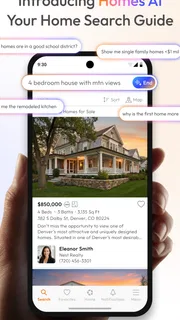
The value is in bringing several parts of a housing search together. A home search can quickly turn into questions about who represents a property, which schools are nearby, and whether renting or buying makes more sense. Having homes, rentals, agents, and schools in one app gives me a more connected place to begin that investigation than a service focused only on property listings.
That combination is especially useful early on, when I’m not ready to contact anyone or settle on a particular home. I can use the app to get a sense of what kinds of options are available and identify follow-up questions. For example, a school search may help me decide which areas deserve closer attention, but it should be treated as a research aid rather than a complete assessment of a school or neighborhood.
I also like that rentals are part of the same broad search as homes for sale. If my plans change, or I am weighing a temporary move against a longer-term purchase, I can explore both paths without making the app itself a commitment to either. That flexibility is real value for someone whose decision is still taking shape.
More articles

Instagram Makes Everyday Moments Worth Sharing
A rare social app that can be a photo diary, a neighborhood window, and a lively conversation in the same session—though its best moments still require a little restraint.
A practical way to compare options
For a useful search, I’d start with a few non-negotiables: the areas I can realistically commute from, the kind of property I want, and whether I’m looking to rent or buy. Then I’d compare a small group of candidates rather than endlessly scrolling. A short list makes it easier to notice trade-offs—such as a home that fits the location but not the layout, or a rental that looks promising but needs a closer check on its terms.
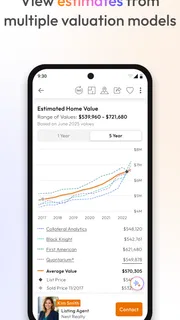
One helpful habit is to keep a separate note of questions for each property. The app can help surface candidates, but my decision depends on details I need to verify, such as availability, the condition of the home, and the exact costs or terms. I would confirm those with the listing contact before making plans around a viewing or application. This simple step prevents a polished listing from being mistaken for a complete picture.
Another useful workflow is to use school and agent searches as separate checks, not as automatic endorsements. I might first find a property area that looks promising, then explore school information and identify agents who could answer local questions. That sequence helps me keep the search organized while remembering that proximity or a profile alone does not establish whether a home, school, or professional is the right fit.
Where the experience has limits
A broad search app cannot remove the uncertainty that comes with real estate. Listings can change, and an app view is only a starting point for confirming availability and terms. I would not make a financial or moving decision based solely on what appears on a screen. A call, a visit, and a careful review of the relevant paperwork still matter.
The all-in-one approach also has a trade-off: people who want a narrowly focused service may prefer a specialist. If I already know that I only want to rent in one building or need detailed help with a specific transaction, a dedicated property manager, local agent, or rental service may answer my questions more directly. Homes.com is more useful when I need to explore and compare than when I expect it to handle every part of the process.
There is also a difference between browsing and making a confident choice. Searching for schools or agents can add helpful context, but it does not replace independent research, direct conversations, or an in-person look at an area. I’d use those categories to build a shortlist and prompt better questions, rather than treating the app as a final authority on neighborhood quality or professional credentials.
Because the app is free, there is no purchase decision to weigh against a paid plan. Still, free access does not mean the search takes no effort: comparing options, validating details, and arranging viewings remain the user’s work. Its value is the convenience of having several discovery paths together, not a promise that a move will be simple or that every result will meet expectations.
Who is most likely to get value
I’d recommend Homes.com to renters and buyers who are at the exploration stage, especially people comparing different areas or deciding between renting and buying. It can also help someone who wants to consider property choices alongside schools and agent options without starting in several separate places. Since it is free, trying it as one part of a broader search is a low-commitment choice.
Imagine I’m considering a move across town and have not settled on a neighborhood. I could browse homes and rentals to see which areas offer possibilities, look into schools near the places I’m considering, and use agent search to find people who may be able to answer local questions. I would then contact the relevant listing or professional to confirm the details and arrange a visit. That is a realistic use of the app: organizing the search, not completing the move from the phone.
It is less suited to someone who wants a definitive recommendation about where to live, a guarantee that every listing is current, or a replacement for professional advice. It may also be a poor fit for Android users whose device runs an earlier operating system than Android 10. In those cases, another compatible search option or direct contact with local professionals may be more useful.
On iPhone, I would check the app store for the available version and device requirements before planning to use it; the compatibility detail here is specifically for Android. That small check is worth making before building a workflow around any app, particularly when a housing search is time-sensitive.
My verdict on the value
For a free app, Homes.com offers a sensible starting point for exploring homes and rentals while also bringing agents and schools into the search. I like that it supports the early, sometimes messy stage when I’m still comparing possibilities. Its strongest value is helping me organize discovery across related housing questions, rather than simply showing me one kind of listing.
I’d install it if I were beginning a move, comparing renting with buying, or trying to narrow down areas before contacting people. I would skip relying on it alone if I needed verified, final answers about availability, costs, school suitability, or a property’s condition. My recommendation is straightforward: use Homes.com to build a thoughtful shortlist, then verify each important detail directly. That is where its free access makes sense—useful for starting the work, while leaving the final judgment in your hands.
Overall, I see Homes.com Real Estate & Rent as a convenient research companion rather than an all-purpose real estate solution. Its 4.7 average and wide reach may reassure a new user that it is an established option, but the best reason to try it is simpler: it lets you explore several connected parts of a housing decision without paying to get started. If that matches where you are in your search, it is worth a look.
Pros
- Map search makes it easy to explore homes by neighborhood.
- Saved searches help you revisit properties that match your needs.
- Listing photos provide a useful first look at available homes.
- Rental listings are included alongside homes for sale.
- Contact options help you reach listing agents from the app.
Cons
- Listing details can vary depending on the property and agent.
- Some homes may no longer be available when you view them.
- Search results may include sponsored placements.
- Location access may be needed for nearby property searches.
- The app is less useful in areas with limited listing coverage.


