
Our review
 Analysis by Lookingapps
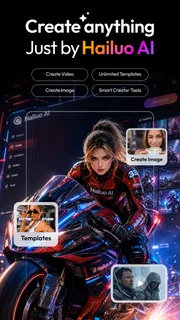
I reach for Hailuo AI: Image&Video Maker when I have an idea that is easier to picture than to explain: a scene, a mood, or a short visual concept I want to explore without starting in a full editing suite. It is a photography app from MiniMax AI, though its appeal is broader than polishing camera shots. The focus is AI-assisted image and video creation, so the useful question is less “Can it replace my camera?” and more “Can it help me turn a rough visual prompt into something I can actually use?”
That distinction matters. Hailuo is best approached as a creative tool for experimenting, not as a dependable way to document a real event or produce perfectly controlled footage. I find the promise most compelling when I am willing to review a result, adjust my idea, and try again. If I need predictable edits to a specific photograph, a conventional editor is often the more direct choice.
From a loose idea to a workable prompt
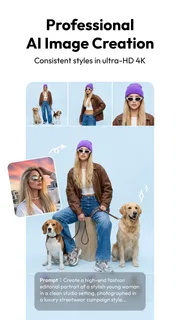
The starting point is usually a sentence in my head, not a finished brief. I might want a quiet rainy street with reflections, or a dreamy portrait with a particular atmosphere. With an AI creator, the way I describe that scene becomes part of the work. I get better direction by naming the subject, setting, lighting, and mood rather than piling on vague adjectives. That is a practical habit, not a guarantee: the generated result still has its own interpretation.
This makes the app approachable for people who do not know traditional image-editing tools, but it also changes what “easy” means. I do not have to master layers or a timeline before trying an idea; I do have to be willing to think clearly about what I want. A short prompt can be a good first test. If the outcome misses, I can narrow the description or change one element at a time instead of rewriting everything and losing track of what helped.
I would use this workflow for a mood board, a social post concept, a visual placeholder for a presentation, or a small personal experiment. It is less suitable when a client needs an exact logo, legible text, a particular person’s likeness, or a scene that must match a real location precisely. In those cases, I would make the controlled parts with familiar design or photo tools and treat AI output only as inspiration.
Choosing whether to make an image or video
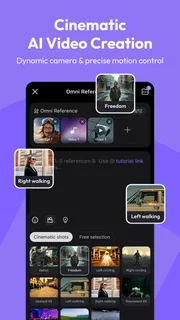
Hailuo’s image-and-video focus encourages trying an idea in more than one form. I would begin with a still concept when the composition matters most: it is easier to judge whether the subject, colors, and framing feel right before asking the idea to move. If the visual premise works as a still, it becomes a clearer starting point for a video attempt. This is a useful creative sequence, but I would not assume that a video will preserve every detail from an image unless the app’s current controls make that explicit.
For a quick everyday scenario, imagine I am preparing a post about a weekend café visit but have no usable photo of the atmosphere I want to convey. I can sketch a fictional, cozy interior as a concept, check whether the warm lighting and rainy-window mood fit, then decide whether an animated version adds anything. If I need to show the actual café or accurately represent its menu, I should take real photos instead. The AI workflow helps me explore a look; it should not be mistaken for evidence of a real place.
More articles

Instagram Makes Everyday Moments Worth Sharing
A rare social app that can be a photo diary, a neighborhood window, and a lively conversation in the same session—though its best moments still require a little restraint.
Iterating without losing the idea
The most useful discipline is to keep a stable core and change only the part that failed. If the image has the right mood but the wrong setting, I would adjust the setting while preserving the subject and lighting description. If a video concept feels too busy, I would simplify the action rather than adding more directions. This makes each attempt easier to assess and reduces the common frustration of receiving a different result without knowing why.
I also recommend separating “creative approval” from “ready to publish.” A generation can be attractive at a glance yet still have awkward details, inconsistent objects, or an unintended visual emphasis. I would inspect the whole image or clip before sharing, especially around faces, hands, lettering, and edges where small distortions are conspicuous. For a casual post, an imperfect result may be fine; for a public-facing campaign, it deserves a human quality check and possibly a conventional finishing pass.
Where the result goes after generation
AI creation rarely ends at the moment a result appears. I might want to compare versions, crop an image for a particular layout, add accurate text, or place a clip into a larger edit. That handoff is where Hailuo’s role becomes clearer: it can contribute a visual ingredient, while another app may be better for final composition, precise typography, or assembling several clips. I would plan for that division rather than expect one creator to handle every stage equally well.
For social content, I would first decide what the final post needs to communicate, then generate a visual that supports that message. Any wording that must be exact is safer to add in a standard design editor rather than rely on an AI-generated image to render it correctly. For a presentation, I would similarly use a generated image as an illustrative backdrop or concept, then add labels and explanations separately. This keeps the creative strength of the app while avoiding a weakness common to generated visuals: fine control over precise details.
Video has a different handoff problem. A single generated moment may look engaging but not provide the continuity or editorial rhythm needed for a finished sequence. I would treat it as a shot or visual accent, then judge whether it fits alongside real footage or other material. If the project depends on exact timing, repeatable camera movement, or continuity across multiple shots, a conventional video editor and planned footage are likely more reliable. Hailuo makes more sense when exploration is part of the goal.
One non-obvious trade-off is that a more elaborate prompt is not automatically a better prompt. Extra instructions can compete with one another, leaving the important subject less clear. I would write the central visual first, then add only details that genuinely affect the outcome. Another is that an image can be useful even when it is not publishable: it may help settle a color palette or composition before I create the final version elsewhere. That makes the app valuable in the early stage of a project, not only as a one-tap final-output machine.
What to expect from the finished work
I judge a generated result by whether it serves its intended job, not by whether it looks impressive in isolation. A concept image can succeed if it gives me a direction to develop, even if I would not use it as-is. A short clip can be entertaining but still need trimming or pairing with other material. This is why I would keep expectations flexible: the app can reduce the effort of visual experimentation, but it does not remove the need for taste, review, and follow-through.
There is also a useful distinction between personal creativity and factual representation. For fantasy scenes, stylized portraits, or visual brainstorming, invention is the point. For a product listing, news-related image, or anything that viewers might take as a record of reality, I would be much more cautious. If authenticity is central, a real photograph or footage is the better starting material. If mood and imagination matter more, Hailuo’s AI approach is a natural fit.
Who is likely to enjoy it
I would recommend trying it if you like exploring visual ideas but do not want to begin with a complex desktop workflow. It may suit a casual creator who wants to test a scene, someone making informal social content, or a designer looking for a fast concept to discuss before building the polished version. The app is free to install, and its audience is rated Teen, but in-app purchases range from $0.99 to $854.40 per item. I would check the purchase details in the app store before committing to paid use, and avoid assuming that free access means every desired creation workflow will have no cost.
Hailuo has reached over ten million installs, while its average rating is 3.4 from around ninety thousand ratings, with roughly 1.1 thousand written reviews. Those figures suggest a widely tried app with mixed reactions rather than a universally smooth experience. I would take that as a reason to test it against a small, low-stakes idea before building a project around it. The current version is 2.22.1, it was released on January 23, 2025, and it requires Android 7.0 or later. Its iOS availability should be checked in the relevant app store for the device and region you use.
The main friction is inherent to this kind of creation: the output may not match the prompt closely enough, and getting a better result can mean another round of wording and review. If you dislike iteration, need repeatable controls, or want direct retouching of your own photographs, an established photo editor may feel more satisfying. If you mainly need straightforward trimming and assembly, a conventional video editor is likely faster. Hailuo is at its best when the uncertainty is part of the fun rather than a problem you need to eliminate.
My recommendation after following the workflow
I see Hailuo AI: Image&Video Maker as a prompt-led idea studio: start with a clear visual intention, test it as an image or video, inspect the result, and hand it off to other tools when precision matters. The strongest approach is to use it early, when you are still deciding what a scene should feel like, then finish carefully elsewhere if the work needs exact text, consistent details, or polished editing.
If you want a dependable camera companion or a traditional editor with predictable controls, I would choose something built for that job. If you enjoy shaping a visual idea through experimentation and can tolerate occasional mismatches, this app is worth a cautious try. My advice is to begin with one simple concept, make deliberate changes between attempts, and decide based on the actual results whether its creative workflow suits you.
Pros
- Creates videos from text prompts and still images
- Offers multiple visual styles for creative experiments
- Makes short-form content without advanced editing skills
- Can animate a photo with a written prompt
- Provides a convenient mobile workflow for AI media creation
Cons
- Generated results may not match the prompt precisely
- Video generation can take time during busy periods
- Free usage may be limited by credits or daily quotas
- Results can look inconsistent between generations
- Some features may require a paid subscription


