
Our review
 Analysis by Lookingapps
When I’m trying to coordinate with family, the hardest part is often not getting directions but knowing whether everyone is where they expect to be. GPS Location Tracker Plus focuses on that practical problem: it lets people share their location and gives families a way to set alerts around a safe area. I see its value less as a general-purpose navigation tool and more as a shared check-in aid for people who have agreed to keep one another informed.
Location sharing is the heart of the app
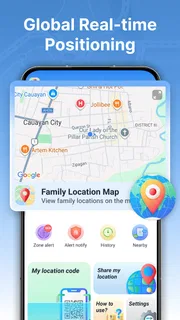
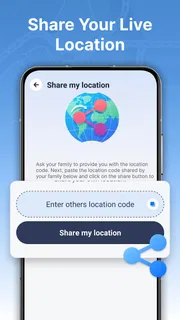
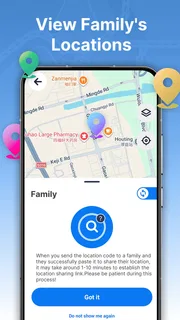
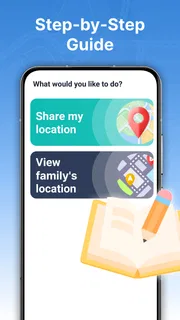
The app’s central idea is straightforward: view a family member’s real-time location, share your own, and use safe-area alerts to flag arrivals or departures. That combination can replace some routine “I’m here” messages, particularly when people are travelling separately or a child is making a familiar journey. The practical benefit is not that a map can answer every question, but that it can make a simple check-in easier.
In my view, the important distinction is between location sharing for reassurance and navigation for getting somewhere. A navigation app normally helps one person choose a route. GPS Location Tracker Plus is aimed at a group that has chosen to share location with each other. If you want turn-by-turn guidance, route planning, or help finding a new destination, I would use a dedicated navigation app instead.
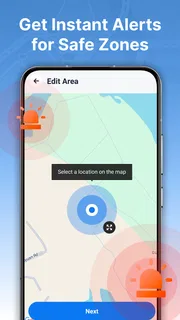
Safe-area alerts add a useful layer to that shared view. Rather than repeatedly opening a map to see whether someone has reached a familiar place, a family can use an area as a point of reference. This is most helpful when an arrival or departure matters more than watching a moving marker moment by moment. It can reduce unnecessary calls, but it should support an agreed check-in routine, not replace conversation when something genuinely needs attention.
What the map can—and cannot—settle
A location marker is a snapshot of a person’s position, not a full account of what they are doing. A family member arriving near a destination does not necessarily mean they are inside a building or ready to be collected. I would treat the map as a prompt for coordination, not proof of safety or punctuality. That distinction matters most when the location is crowded, the destination covers a large area, or plans change on the way.
It also helps to agree on expectations before sharing. Everyone should understand who can see their location and when the family intends to use the information. For a household, that can be as simple as explaining that the app is for school journeys and meeting up, not for checking a person’s every movement. The feature works best when the people being tracked understand and accept the arrangement.
Putting it to work in everyday routines
Consider a parent waiting to collect a teenager after an activity. If both have chosen to share location, the parent can check whether the teenager is still on the way or near the agreed meeting point. A safe-area alert can help mark a familiar destination, while a quick message remains the better way to resolve an unexpected delay. Used this way, the app can reduce repeated calls without turning the journey into a constant surveillance exercise.
More articles

Instagram Makes Everyday Moments Worth Sharing
A rare social app that can be a photo diary, a neighborhood window, and a lively conversation in the same session—though its best moments still require a little restraint.
A practical setup is to begin with one routine that already causes confusion: perhaps a school run, a commute, or a family member travelling home after dark. Agree on who will share, what place matters, and what action an alert should prompt. This small trial helps everyone judge whether the information is genuinely useful. It also avoids adding location checks to parts of the day where nobody needs them.
For a family coordinating several arrivals, the shared map may be more useful than a stream of separate messages. One person can see whether a relative is still travelling while another is already close to the meeting place. But I would still send a direct message if the plan changes. A location view can show movement; it cannot communicate that someone has taken a different entrance, needs extra time, or wants to meet somewhere else.
One non-obvious trade-off is that alerts work best when the chosen place has a clear purpose. A safe area around a home may be helpful for noticing an arrival, but a broad destination such as a shopping complex may not answer the question a family actually has: whether someone has reached the specific meeting spot. Choose areas around meaningful routine destinations, and keep the expected response modest. The alert should prompt a check, not be treated as a guarantee.
Make sharing deliberate, not automatic in your family habits
I would also establish a simple fallback for times when someone cannot be reached. For example, agree that an alert means “check the map or send a message,” not “assume everything is fine.” That prevents a useful convenience from becoming a source of false reassurance. If a trip is important or unusual, a direct confirmation is still the clearest way to know that plans have gone as expected.
Location sharing is sensitive by nature, so I would make consent part of the setup rather than an afterthought. A family member should know that their position is being shared and why. For younger users, explain the purpose in plain language and revisit the agreement as circumstances change. If a person is uncomfortable being tracked, respect that boundary and use ordinary calls or messages instead.
Where GPS Location Tracker Plus fits among alternatives
GPS Location Tracker Plus sits in the Maps & Navigation space, but its family-sharing emphasis gives it a different job from a conventional maps app. A standard navigation app is the better choice when you need directions, traffic-aware route decisions, or help exploring an unfamiliar place. A messaging app may be enough if your family only needs occasional, one-off location sharing. This app makes more sense when sharing and safe-area awareness are part of a recurring routine.
That focus is also a limit. If your household rarely needs to check one another’s location, installing a dedicated tracker may add more steps than it saves. If you want a complete family organizer with calendars, tasks, and communication tools, a location-focused app will not replace those functions. I would choose it for the specific problem of coordinating whereabouts, not as a hub for every aspect of family life.
It is also worth thinking about how often the family will act on location information. If everyone checks the map repeatedly but never changes plans or communicates differently, the app is not adding much. A useful test is whether it replaces a real source of friction: repeated “where are you?” messages, uncertainty about a familiar arrival, or difficulty meeting up. If none of those situations applies, a simple message is likely easier.
Who is likely to find it worthwhile
I’d consider it for families who travel independently but have a few regular moments when knowing someone’s general whereabouts makes coordination easier. Parents and children can use the same kind of routine around school or activities; adult relatives may find it handy when arranging a shared pickup or meeting. The key is that the group should want location sharing and should have a clear, limited purpose for it.
It is less suitable for someone seeking private navigation, a personal fitness tracker, or a way to monitor people without their knowledge. It is also not the right substitute for contacting emergency services or checking directly when a person’s safety is in question. A map can help with everyday coordination, but it cannot guarantee that a device is available, that a person has seen an alert, or that a plan has not changed.
The app is free, has an Everyone content rating, and is developed by Anuoluwapo Product Limited. Its average rating is 3.9 from around 3,200 ratings, and it has over a million installs. Those figures suggest it has reached a substantial audience, though they do not tell me whether it will suit a particular family’s habits. The more useful question is whether the people involved are comfortable sharing and whether alerts solve a recurring coordination problem.
A focused tool for family check-ins
GPS Location Tracker Plus is a focused option for families who want shared location and safe-area alerts to make everyday coordination less awkward. I like the clear use case: check whether someone is on the way, get a sense of arrival at a familiar place, and follow up directly when plans need discussion. Its strongest value comes from using those tools for a few agreed routines rather than treating continuous visibility as the goal.
The current version is 1.3.0.0, and the app requires Android 9 or later. Before relying on it for an important routine, I would install it on the devices involved, try a normal journey, and make sure everyone understands how the family will use the shared location. That low-stakes test is more useful than assuming a map view will fit every household’s needs.
My recommendation is conditional but positive: try it if your family regularly needs a simple way to coordinate whereabouts and everyone is comfortable participating. Choose ordinary messaging for occasional check-ins, and a dedicated navigation app when directions are the real need. Used with clear expectations, the location-sharing focus can save a few unnecessary calls while keeping the human conversation where it belongs.
Pros
- Location sharing can help friends coordinate meetups.
- Saved places make familiar destinations easy to find.
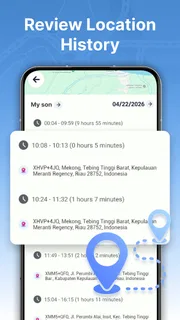
- Location history can help retrace recent trips.
- Map-based tracking makes shared locations easy to understand.
- A simple interface can be useful for everyday navigation.
Cons
- Accurate tracking depends on a reliable internet connection.
- Frequent GPS updates can drain the phone battery.
- Location access raises privacy concerns for some users.
- Indoor positioning may be less accurate than outdoor tracking.
- Some features may require a paid plan or subscription.


