


Our review
 Analysis by Lookingapps
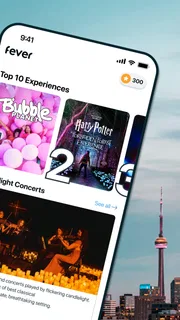
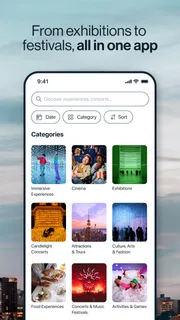
When I’m trying to make plans, the hard part is often not finding something to do but narrowing a huge list of possibilities to one that fits the day, the budget, and the people coming along. Fever is built around that discovery problem: it helps me browse events and experiences in major cities, including New York, Los Angeles, Chicago, Washington, DC, and Miami. I find it most useful as a starting point for choosing an outing, rather than as a guarantee that every listing will suit my tastes.
Finding an outing without starting from scratch
Fever is an events app from Fever Labs, and its focus is more specific than a general search engine or a broad social feed. Instead of beginning with a venue or performer I already know, I can use it to see what kinds of experiences are being presented in my area. That makes it handy when a friend asks what we should do this weekend and neither of us has a plan yet.
The app is free to download, and its Teen content rating is worth keeping in mind if a younger person will be browsing alongside you. The experience is oriented around events and tickets, so I would treat each listing as a decision point: check what is included, where it takes place, and whether the timing works before committing. Discovery is useful, but the details of a particular event matter more than a striking image or a short description.
I would especially recommend giving it a try if you live in one of the cities it serves or are planning a visit there. For someone in a smaller town, the value depends on whether Fever has relevant local listings; a general local-events search or venue calendar may be more useful if it does not. Its reach is substantial, with more than 10 million installs, but broad adoption does not mean every city or interest will be equally well represented.
How I would use it to make a real plan
Imagine I have a free Saturday evening and want to do something different from dinner and a film. I would browse for a few possibilities, then compare the practical details rather than choosing the first appealing result. I would check the location against the rest of the evening, make sure the event works for the group, and leave enough time to understand any ticket conditions before paying. This simple shortlist approach makes browsing feel purposeful instead of endless.
A useful habit is to decide on constraints before opening the app: a rough time window, how far you are willing to travel, and whether the group wants something relaxed or more involved. That helps separate genuinely workable options from events that look interesting but would make the evening inconvenient. If I am organizing for friends, I would share the shortlist and agree on one choice before moving to checkout; it is easier than buying first and trying to persuade everyone afterward.
What the reputation tells me—and what it cannot
Fever has a 4.7 average from around 144,000 ratings, alongside roughly 4,100 written reviews. That is a strong signal that many people find the app useful, but I would not treat an overall score as a substitute for checking the specific experience I want to book. An event can be well presented in the app and still be a poor fit for my schedule, preferences, or group.
More articles

Instagram Makes Everyday Moments Worth Sharing
A rare social app that can be a photo diary, a neighborhood window, and a lively conversation in the same session—though its best moments still require a little restraint.
Trust matters more when an app is part of a purchase than when I am casually browsing. My practical approach is to use Fever to discover an option, then slow down at the listing and checkout stages. I look for the event’s essential details and read the applicable terms before confirming anything. That is a sensible routine for any ticketing app, and it prevents an attractive recommendation from doing all the decision-making for me.
Keeping control while browsing and booking
For privacy and account controls, I would rather stick to what I can actually see and manage in the app than assume anything about behind-the-scenes practices. I check the choices presented during setup and while using the app, and I avoid granting access or sharing information unless I understand why it is being requested. If a permission prompt appears, I consider whether the relevant action needs that access; if I am only browsing, I do not treat every request as automatically necessary.
The same caution applies to personal details and payment. I enter information only when it is needed for the step I am taking, and I review the final order before confirming it. If I no longer want to use an account, I look in the app’s account settings for available controls rather than assuming that uninstalling the app changes account information. Those are practical user habits, not claims about a particular policy or control that I cannot verify from the experience at hand.
Some moments deserve extra attention: creating an account, choosing an event, and completing a purchase. During casual browsing, I can take my time and compare. At checkout, I make sure I have selected the right event and understand the transaction details before proceeding. If I am buying for someone else, I would confirm names, timing, and the plan with them first. These small checks are more useful than rushing because an event looks popular or time-sensitive.
Where Fever beats the usual alternatives
Compared with searching the web one venue at a time, Fever can make discovery feel more concentrated: I can explore event ideas without already knowing which organizer or location to search for. That is its clearest advantage for me. It is also different from asking friends or browsing social posts, where recommendations can be personal but scattered and difficult to compare.
The trade-off is that a discovery app is not always the best source for every kind of event. If I already know the venue, artist, or organizer, checking that source directly may be a more straightforward way to confirm the latest details and purchase options. If I want a neighborhood-wide calendar, free community activities, or a comprehensive list of small local happenings, I would compare Fever with local listings instead of assuming its selection is exhaustive. I use it to find candidates, not to define everything available.
Fever is currently at version 5.251.1, and it supports devices running operating system version 7.0 or later. The app first appeared on March 19, 2014, so it is not a brand-new entry in the events space. Those details are useful when checking compatibility, but they do not change my main advice: the quality of the experience depends on whether the events shown match the city and occasion I have in mind.
Who should try it, and who may prefer another route
I think Fever is a good fit for people who enjoy trying new experiences, especially when they are open to suggestions and want a convenient place to begin. It can also help visitors who do not know a city’s event scene yet. A useful workflow is to browse early, save a small mental shortlist, and verify each candidate’s logistics before the group commits. That gives the app room to inspire a plan without turning the first appealing result into an automatic purchase.
I would be less enthusiastic if I wanted a guaranteed complete directory of every event nearby, or if I already had a trusted organizer and only needed that organizer’s ticket page. People who dislike browsing curated choices may also find a direct venue calendar faster. And if an event’s details are unclear to me, I would not rely on the general appeal of the app to fill in the gaps; I would seek clarification before buying or choose an option with clearer information.
My verdict is cautiously positive. Fever is a practical discovery tool when I want ideas for an outing and am willing to check the specifics before booking. Its strong user rating and broad adoption make it easy to consider, while the best experience still depends on local selection and careful choices around each event. I would install it for inspiration, keep control of what I share, and treat the final listing and purchase details as the part that deserves my full attention. Used that way, Fever can help turn “we should do something” into a more concrete plan without making the decision for me.
Pros
- Discover concerts and local events based on your interests.
- Buy tickets directly through the app.
- Save event tickets for convenient access.
- Browse events in multiple cities and countries.
- Share event plans with friends.
Cons
- Ticket availability varies by event and location.
- Service fees may increase the final ticket price.
- Popular events can sell out quickly.
- Event details may change after tickets are purchased.
- Some features may require location access.


