
Our review
 Analysis by Lookingapps
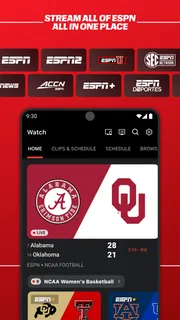
I would choose a sports app based on what I actually need on game day: a quick score check, a steady stream of news, alerts for teams I follow, or a way to watch live action. ESPN brings those jobs together, which makes it useful when I follow more than one sport or want a familiar place to start. It is a free sports app from Disney, and its long track record is reflected in a 4.5 average from around 1.2 million ratings. That popularity is reassuring, though it doesn’t mean its mix of coverage will suit every fan.
Decide what you want from a sports app
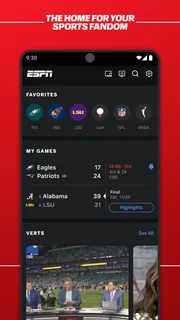
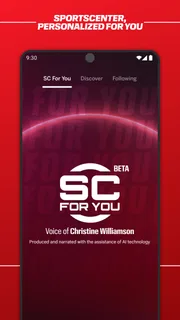
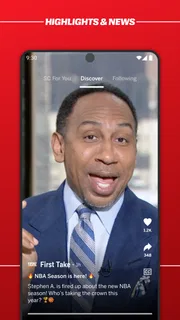
Before installing it, I’d ask whether I want a broad sports companion or a specialist tool. ESPN is designed to cover the everyday rhythm of being a fan: checking what is happening, catching up on news, setting alerts, and watching live sports. That breadth is its main advantage over an app devoted to one league, one club, or one kind of coverage.
The trade-off is that a broad app can feel busy. If I only care about one team and want an uncluttered stream of updates about it, a team-focused app may be more direct. If I mainly want a score ticker and nothing else, a lightweight scores app may be quicker to open and scan. ESPN makes more sense when I expect to move between scores, stories, and live coverage rather than use just one of those.
It is a sports app for a wide audience, with an Everyone 10+ age rating. I’d still treat live video and news as things to choose deliberately, especially if a younger family member is using the phone. The label is a useful guide to suitability, not a substitute for deciding which content and notifications make sense for your household.
Where ESPN earns its place
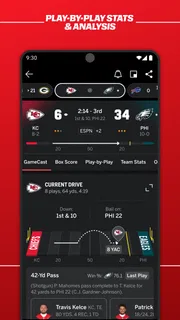
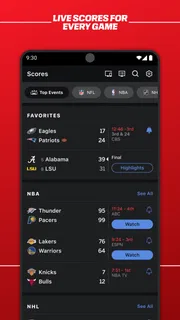
For me, the strongest case is the combination of score-checking and context. A score tells me what happened; a news story can help explain why it matters. When I’m following several events, having those kinds of information in one sports-focused app can save the small but repeated effort of jumping between separate sources.
Alerts are most useful when I set them with a clear purpose. I’d choose only the teams or events I genuinely want to track, then use notifications for moments when checking manually would be inconvenient. For example, if I’m cooking dinner while a game is on, an alert can tell me when to pick up my phone rather than leaving the app open and repeatedly refreshing it. The practical tip is to start narrow: too many alerts turn a helpful nudge into noise.
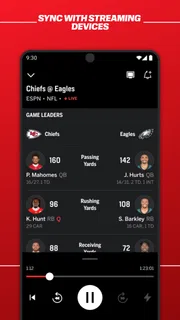
Live sports are another reason to keep ESPN installed, particularly if I want to check whether the app can serve my viewing needs alongside its news and score features. I wouldn’t assume that every event I follow will be available to watch in the app. A sensible routine is to check the event and viewing options before settling in, then use ESPN for scores or coverage when live viewing is not the part I need.
More articles

Instagram Makes Everyday Moments Worth Sharing
A rare social app that can be a photo diary, a neighborhood window, and a lively conversation in the same session—though its best moments still require a little restraint.
Its scale suggests that many people use it as a regular sports destination: it has over 100 million installs and around 199,000 written reviews. Those figures are signs of reach, not proof that every person will like the layout or find the coverage they want. I’d use them as context, then judge the app by whether it follows the sports that matter to me.
How I would use it during an ordinary week
On a busy day, I’d open ESPN for a fast check of scores, read one or two relevant updates, and leave rather than letting a feed absorb my attention. Before a game I care about, I’d tune alerts to that event or team. Later, if I have time to watch, I’d look for live coverage in the app. This sequence makes the app useful without requiring me to browse everything it offers.
That workflow also helps separate three different needs. Scores are for a quick status check, news is for background and developments, and live coverage is for watching. If I keep those goals in mind, ESPN’s range feels purposeful. If I open it without knowing what I’m looking for, the volume of sports content may make a simple task take longer than it should.
One non-obvious advantage of keeping the same app for all three tasks is continuity: I can check an event, read about it, and then look for a way to watch without starting over in a different sports service. The corresponding drawback is dependence on one app’s coverage and presentation. For a major personal interest, I would still keep a specialist source in mind if ESPN does not provide the depth or focus I want.
When another kind of app may be better
A dedicated league or club app can be the better choice when I want news that stays tightly focused on one team, especially if I value club-specific material more than broad sports coverage. A scores-first alternative may suit someone who wants a compact view and rarely reads articles or watches video. A general news app may be enough for an occasional fan who only wants major headlines and does not need sports alerts.
These alternatives are not automatically better; they simply make different priorities easier. ESPN’s advantage is range, while a narrower app can reduce distractions or go deeper into a particular interest. I’d avoid installing several overlapping apps just in case. Instead, I’d start with ESPN, identify what it handles well for my routine, and add a specialist option only if there is a real gap.
There is also a practical distinction between following a game and watching it. ESPN can bring live sports into the same experience as scores and news, but I would not make it my only plan for a specific event until I have checked whether that event is available to me. If guaranteed access to a particular match is the deciding factor, checking the relevant viewing options in advance is more useful than assuming a broad sports app will cover every case.
Free to install, with purchases to consider
ESPN is free to download, so trying it does not require an upfront purchase. It also offers in-app purchases ranging from $4.99 to $79.99 per item. I’d check what a purchase includes and whether it matches my actual use before paying; the presence of paid options does not mean every feature I want is included in the free experience.
For someone who only wants scores and occasional news, I’d begin without spending anything and see whether the app already fits. If I’m considering a paid option for viewing or another extra, I’d compare it with the services I already use and ask how often I would rely on it. A purchase is easier to justify when it solves a recurring need, not when I’m reacting to one game I happen to want to watch.
Switching from another sports app is relatively low-risk if I treat ESPN as a trial rather than replacing everything immediately. I’d install it, follow a small set of teams, and compare the usefulness of its alerts and coverage over a normal week. If it gives me the right information at the right time, I can make it my main app; if not, I can return to the narrower tool that already works for me.
The real cost of switching is attention rather than learning a complicated system. New alerts need to be chosen, and a different feed may bring stories I do not care about. My advice is to avoid enabling every notification at the start. A short, selective setup makes it easier to tell whether ESPN is genuinely helping or merely adding more interruptions.
Who I recommend it to
I’d recommend ESPN to fans who follow multiple sports, like having scores and news close together, or want a single place to check for live sports as well. It is especially practical for people who dip in throughout the day rather than sit in one app for hours: check a score, read a useful update, and move on. Disney has been developing the app since its release on June 15, 2010, and it remains a widely used option, with a 4.5 average rating.
I would hesitate to recommend it as the only sports app for someone whose priority is deep coverage of a single team, a minimal scores-only screen, or dependable access to one particular live event. In those cases, a specialist source or a service focused on that viewing need may be a better fit. ESPN’s broad approach is valuable only when the breadth is something I will use.
Overall, I see ESPN as a strong starting point for everyday sports tracking, not a universal replacement for every league’s own app or every viewing service. I’d install it free, keep alerts selective, and judge it by how often its mix of scores, stories, and live coverage saves me a step. If that combination matches the way you follow sports, it is an easy app to try; if you want one narrow feature done with minimal distraction, choose a more focused alternative instead.
Pros
- Personalized alerts keep you updated on selected teams and events.
- Live scores make it easy to follow games while away from a TV.
- The interface offers quick access to leagues and team pages.
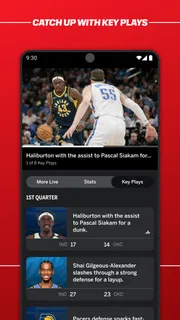
- On-demand clips provide highlights for catching up on key moments.
- Following favorite teams helps tailor the app's news feed.
Cons
- Some live content requires a paid subscription or TV provider login.
- Streaming availability varies by location and broadcast rights.
- Frequent notifications can become distracting without careful settings.
- Video quality may suffer on slower or unstable connections.
- The app may use substantial mobile data during video playback.


