




Our review
 Analysis by Lookingapps
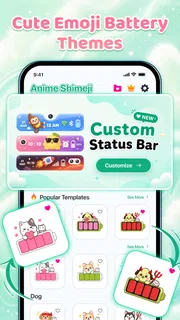
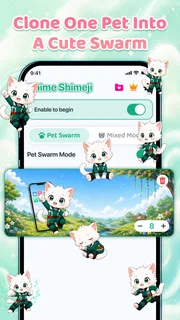
I judge a phone-personalization app by whether it makes the home screen feel more like mine without turning a small visual tweak into a chore. Emoji Battery & Shimeji Pet combines two playful ideas: a character that can appear on the screen and a battery indicator styled with an emoji. That pairing gives it a clearer purpose than a plain wallpaper changer, but it also means the appeal depends on whether you enjoy decorative details staying visible during everyday phone use.
What the free version gives you
This is a free personalization app from Tools for Everyday - AI Tasks, with in-app purchases listed at $2.99 to $19.99 per item. That makes it possible to try the app without paying upfront, while leaving paid options for people who want to spend more on its extras. I would treat the free access as a chance to see whether the look suits your phone before considering any purchase, rather than assuming every design choice is included at no cost.
The app is rated for Everyone, and its current version is 1.0.7. It requires Android 8.0 or later, so checking your device’s Android version is a sensible first step if you are installing it on an older phone. It has a 4.2 average from around 67,000 ratings, and has passed over 1 million installs. Those figures suggest a sizable audience, though they cannot tell you whether you personally will like a character or emoji style on your screen.
Its name points to a focused combination: an animated-style screen companion and a customizable emoji battery icon. I find that more appealing than an app that promises to overhaul every corner of a phone but leaves the user with a pile of unrelated settings. Here, the decision is narrower: do you want a cute visual companion and a less conventional way to glance at battery status?
Why the pairing can work
A character and a battery symbol serve different purposes. The character is there for personality; the emoji indicator is meant to make a routine status element more expressive. When the two fit the same visual mood, the result can feel intentional rather than like two decorations added separately. That coherence matters most on a home screen you look at repeatedly, where mismatched icons and widgets can quickly feel noisy.
There is also a practical distinction from choosing a static wallpaper. A wallpaper changes the background, while a screen pet suggests a livelier presence and an emoji battery gives one familiar phone detail a different look. Neither is a productivity upgrade, but both can make a device feel less generic. I would see the app as a small, visible customization layer, not as a replacement for a launcher or a full theme system.
Getting a look that stays comfortable
My first tip would be to start with restraint. Put the pet and battery treatment on the screen you actually use, then live with the arrangement through ordinary tasks before adding more visual changes. A charming character can feel delightful when you unlock your phone a few times; the same element may become distracting if it competes with app icons or important information. Testing the layout in your real routine is more useful than judging it only from a setup screen.
More articles

Instagram Makes Everyday Moments Worth Sharing
A rare social app that can be a photo diary, a neighborhood window, and a lively conversation in the same session—though its best moments still require a little restraint.
Think about contrast as well as cuteness. A bright emoji can be easy to spot against one background and hard to read against another, while a character may draw attention away from the apps you need quickly. If your home screen already has several widgets, try removing or repositioning one before deciding the pet is the problem. This is a practical way to separate the app’s visual contribution from clutter that was already there.
For a simple everyday scenario, imagine checking your phone between errands to see whether you need to charge it before heading out. An emoji-based battery treatment can make that glance feel more personal, while a screen pet adds a friendly touch when you unlock the device. The useful test is whether the battery remains easy to interpret at a glance. If the decoration makes you pause to work out the status, the novelty is costing you convenience.
Where the tradeoffs show up
The main tradeoff is that decoration takes up attention. People who like clean, information-first screens may find a pet unnecessary, even if it is cute. Anyone who relies on a minimal layout for quick access, accessibility, or a work-focused setup should weigh that before installing another visual element. In those cases, a standard battery indicator and a restrained wallpaper may be the better choice.
There is a second tradeoff in the purchase structure. The app is free to start, but individual in-app purchases range from $2.99 to $19.99. That is a broad span, so I would check the exact item and its price in the app store before buying rather than treating the lowest amount as the cost of every option. A paid extra is worthwhile only if it delivers a style you will actually keep using; paying for a novelty you tire of after a day is poor value, even at a modest price.
I would also avoid assuming that a large number of ratings guarantees a perfect fit. Personalization is unusually subjective: one person’s cheerful screen pet is another person’s visual distraction. The average rating is useful as a rough signal that many people have engaged with the app, but it cannot predict how well its style will match your wallpaper, icon arrangement, or tolerance for animated-looking decoration.
How it compares with familiar alternatives
Compared with a wallpaper-only app, this one has a more interactive-feeling idea because it brings a character into the phone experience and changes the appearance of the battery indicator. A wallpaper app is the more straightforward pick if you only want a new background and prefer not to add screen elements. Conversely, if you want broad control over icons, widgets, and the overall layout, a launcher or a full theme tool is likely a better fit than a focused pet-and-battery combination.
There is no need to replace your usual battery display just because an emoji option sounds fun. If battery status is something you check often and value above appearance, keep the clearest indicator available to you. If you enjoy giving small interface details a personal style, the emoji approach is a reasonable experiment. The right comparison is not which option has more features; it is whether the extra character and visual treatment improve your particular home screen.
Who is most likely to enjoy it
I can see this working well for someone who likes cute customization but does not want to rebuild their entire phone interface. It is also a natural fit for people who enjoy changing small details to match a mood, wallpaper, or personal style. Because the app is free to begin with, curious users can explore the basic appeal before deciding whether any paid item is worth considering.
I would skip it if you prefer a quiet, uncluttered screen, want a comprehensive theme editor, or find decorative characters distracting. It is also not the right choice if you expect a battery utility whose main purpose is detailed monitoring: the concept here is visual personalization, not a promise of deeper battery analysis. Keeping that distinction in mind prevents a cute appearance from being mistaken for a technical upgrade.
For parents or anyone setting up a device for a younger user, the Everyone age rating is reassuring as a content classification, but it does not tell you which visual styles that person will prefer. I would let the person who will use the phone choose the look, and check any purchase prompt together before spending. That keeps the app’s playful purpose separate from an unplanned in-app purchase.
My recommendation
Overall, I think Emoji Battery & Shimeji Pet is worth trying if your goal is to make an Android home screen feel more cheerful with a character and a personalized battery symbol. Its free starting point lowers the commitment, while the listed purchases mean you should inspect individual prices before deciding to unlock anything. The developer is Tools for Everyday - AI Tasks, and the app is available for devices running Android 8.0 or later.
My practical recommendation is to install it, test the look on your normal home screen, and ask two questions after a day or two: can you still read your battery status instantly, and does seeing the pet make unlocking the phone more enjoyable? If both answers are yes, it is delivering value in exactly the way this kind of personalization should. If the decoration gets in the way, remove it and stick with a simpler wallpaper or standard interface theme.
So I would call this a good fit for people who value personality over minimalism, not a must-have for every phone. The free access makes trying it a low-commitment decision, but paid extras deserve a deliberate choice rather than an impulse buy. If you want a small visual lift and like the idea of a screen companion, give it a try; if you want a cleaner display or deeper system customization, another approach will suit you better.
Pros
- Cute animated pets add personality to the battery display.
- Battery status is easy to spot at a glance.
- Emoji themes offer a playful way to customize the screen.
- Shimeji characters make the interface feel more lively.
- The app can appeal to users who enjoy virtual pets.
Cons
- Animated characters may distract on a busy screen.
- Some features may require in-app purchases.
- Battery indicators can be less precise than system settings.
- Extra animations may affect battery consumption.
- The playful style may not suit a minimalist home screen.


