

Our review
 Analysis by Lookingapps
I judge a video editor less by how many buttons it offers than by whether it helps me turn a rough idea into something I’m comfortable sharing. Edits, Instagram’s video-editing app, is aimed at that practical moment: making a short video without first committing to a heavyweight desktop-style workflow. Its appeal is easiest to understand if you already make clips for social platforms, but the decision to try it should come down to what you need from an editor—not just the name on the screen.
What the free price does—and doesn’t—tell you
Edits is free to download, which makes it easy to explore without paying upfront. The app does include in-app purchases, with listed items ranging from $0.99 to $1,049.00 each. That is a very broad range, so I would not treat “free” as a guarantee that every possible purchase is inexpensive, or assume that any particular paid item is necessary. Check what an item actually offers in the app before buying it.
For someone simply deciding whether to install a video editor, the useful distinction is that the starting cost is zero while optional purchases exist. I’d begin by trying the parts that are available without spending money and only consider a purchase if I could name a specific editing need it solves. That keeps the decision tied to practical value rather than to a vague promise that a paid option will automatically make videos better.
The app is rated for Everyone, and its current version is 452.0.0.50.64. It requires Android 9 or later on Android devices. Those details help with basic suitability and compatibility, but they do not tell me whether a particular phone will feel fast or whether an individual feature suits a particular project. If your device is near the minimum operating-system requirement, it is sensible to check that the app installs and behaves well on your own phone before planning a regular workflow around it.
Value comes from finishing the clip
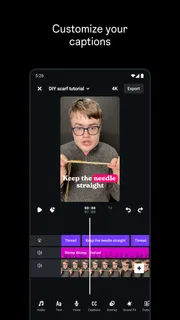
Edits is in the video players and editors category, but its value is not simply that it can sit beside other editing apps. A mobile editor earns its place when it reduces the distance between recording an idea and producing a coherent clip. I find that especially useful for a quick sequence of everyday moments: select the footage, trim away the dead time, put the strongest moment first, and watch the result through before sharing.
That last check matters more than it sounds. A clip can look fine while I’m editing a single shot, then feel rushed or confusing when viewed from the beginning. I recommend watching the whole sequence once without stopping and asking whether each cut has a reason. If the point of the video is not clear by the second or third shot, rearranging the footage may help more than adding decoration.
Edits has attracted a 4.7 average from around 1.9 million ratings, and it has over 100 million installs. Those figures suggest that many people have tried it, but they are not a substitute for judging the editing experience against your own habits. A popular app can still be the wrong fit if you need detailed control, work with long projects, or prefer to keep every stage of production in a different tool.
More articles

Instagram Makes Everyday Moments Worth Sharing
A rare social app that can be a photo diary, a neighborhood window, and a lively conversation in the same session—though its best moments still require a little restraint.
A useful routine for everyday footage
Here is the kind of scenario where I would reach for a phone editor: I’ve recorded a few short clips during a walk, a family get-together, or a small personal project, and I want one finished video rather than a camera roll full of fragments. I would first decide what the viewer should remember, then remove clips that do not support that idea. Keeping only the moments that move the story forward is often more effective than trying to rescue every recording.
A helpful, slightly less obvious habit is to make a rough cut before choosing any visual treatment. When I edit in the opposite order, a polished-looking shot can become hard to remove even if it adds nothing. I would also keep an untouched copy of important source footage until I have watched the completed video and am happy with it. That simple safeguard gives me room to revise the edit without feeling that an early decision is permanent.
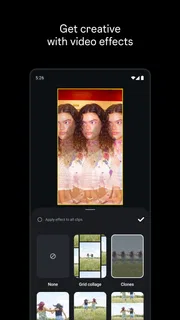
For a spoken clip, I would listen with the screen turned away at least once. That makes pauses, abrupt changes, and distracting background sound easier to notice than when I’m focused on the picture. For a montage, I would check whether the rhythm feels intentional rather than merely fast. These are not special effects or hidden buttons; they are practical ways to get a better result from whatever editing controls the app provides.
Where it sits beside other editors
Compared with the usual alternatives, Edits is best considered as a phone-first option for people who value a direct path from clips to a shareable video. General-purpose mobile editors may suit someone who wants a different editing layout or a broader set of controls. Desktop software is a better choice when a project needs precise timeline work, a keyboard-heavy process, or a more involved finishing stage. I would not choose any mobile app on the assumption that it can replace every tool in those workflows.
The trade-off is convenience against depth. A focused mobile workflow can make simple edits feel approachable, but a user who wants extensive control over every layer may find a phone screen limiting. This is particularly true if the project depends on many clips, exact timing, or repeated revisions. In that case, the time saved by starting on a phone can disappear once fine adjustments become fiddly.
Another trade-off is staying within one editing environment versus choosing the best tool for each stage. If you already have a routine built around a different editor, moving everything to Edits may not improve anything. I would test it on one low-stakes clip first, then compare the time and effort involved with the app I already use. A small trial is more informative than rebuilding an established process around a new download.
Who is likely to get the most from it?
I would recommend giving Edits a try if you often record short videos on your phone and want a straightforward place to shape them before sharing. It is also a reasonable starting point for someone who has never edited video and would rather learn by improving a real clip than by studying a complex timeline. Because the download is free, the first useful test does not require a purchase; the important question is whether the workflow feels comfortable on your device.
It may be a less satisfying choice for a creator who needs detailed, repeatable control over a complicated project, or for anyone who wants to make substantial changes across many tracks. It is also not automatically the right option just because Instagram developed it. If your goal is to prepare a polished long-form piece, manage a large library of source material, or work with a precise production process, compare it with more comprehensive editors before settling on a routine.
Parents and other adults considering the app for younger users should keep the Everyone age rating in perspective: it describes the app’s content rating, not whether every online sharing choice is appropriate for a particular child. I would make that decision based on the intended use and the family’s own rules, rather than treating an age label as a substitute for supervision.
My verdict: try it before you spend
Edits makes the most sense to me as a free starting point for phone-based video work, not as a promise that one app will suit every level of editing. I like the low-risk way to test whether it fits a simple routine: make a short cut, review it from beginning to end, and see whether the result is easier to produce than it is with your current method. Instagram is the developer, and its scale is clear from the app’s reach, but the best reason to keep it is still that it helps you finish the kind of video you actually make.
My advice is to install it if you want to edit short clips on your phone and are willing to judge it by a real, small project. Keep using it if the controls and results fit your habits; choose another editor if you hit a wall when you need more precise control. Treat purchases as optional decisions that deserve a specific reason, not as a required step to get started. For casual and social video editing, Edits is worth a free trial, with its value depending on how well its workflow matches yours.
Pros
- Offers precise timeline controls for arranging clips.
- Includes tools for adjusting color and exposure.
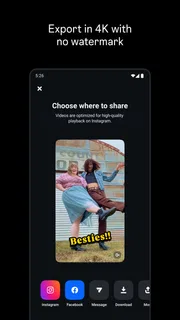
- Exports videos without adding a watermark.
- Lets you save drafts and revisit edits later.
- Provides presets for a quicker editing workflow.
Cons
- Some advanced features may require an Instagram account.
- High-resolution exports can take time on older phones.
- Large projects can use substantial storage space.
- The interface may take time to learn for beginners.
- Availability of features can vary by device and region.


