







Our review
 Analysis by Lookingapps
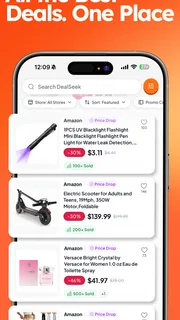
I see DealSeek: Coupons & Discounts as a shopping companion for people who already know what they want to buy and would like to check for a saving before paying. That distinction matters: it is not a replacement for comparing products or deciding whether a purchase is worthwhile. Its value is in making the hunt for a usable promotion part of the shopping routine, rather than something I remember only after I have reached checkout.
A useful last check, not a reason to shop
DealSeek is a free shopping app from DealSeek LLC, with a focus on promotional codes and discounts. The idea is straightforward, but the practical test is whether it can fit into a real purchase without turning a quick errand into an extended search. I would treat it as a place to look for a possible deal, then judge each offer by whether it applies to the item and terms I actually need.
That makes the app most appealing to deliberate shoppers. If I have a specific item in mind, I can check for a promotion before placing an order and compare the result with the seller’s own offers. If I am only browsing for entertainment, a stream of discounts can encourage unnecessary spending. A coupon is useful only when it lowers the cost of something I already intended to buy.
The app has an average rating of 4.8 from around 19,000 ratings, and it has passed the one-million-install mark. Those figures suggest that many people find the concept worth returning to, but they do not guarantee that any particular code will work for a particular basket. Coupon value depends on the merchant, product, timing, and restrictions, so I would still verify the final amount at checkout.
Where it can earn a place in a shopping routine
The strongest case for DealSeek is the moment just before purchase. A shopper may have compared several options, chosen a retailer, and be ready to pay. Checking a dedicated promotions app at that point is a low-effort way to see whether there is a discount worth applying. It keeps the search focused on saving on a planned purchase, rather than scrolling through unrelated bargains.
For example, imagine I need to replace a household item and have already settled on a model after comparing its features and price. Before ordering, I can make DealSeek one stop in a short checklist: check the retailer’s own promotion, look for a relevant code in the app, and compare the final checkout total. If the code is valid and the saving is meaningful, I use it. If it is expired, restricted, or less helpful than another offer, I move on instead of letting the search dictate what I buy.
That workflow also helps answer a common question: should I open the app before or after choosing a product? I would start with the product and retailer, then check for savings. Starting with whatever promotion looks most exciting can lead to a less suitable purchase, especially if the discount applies only to a particular product or spending threshold. A code should be the finishing check, not the shopping plan.
More articles

Instagram Makes Everyday Moments Worth Sharing
A rare social app that can be a photo diary, a neighborhood window, and a lively conversation in the same session—though its best moments still require a little restraint.
DealSeek belongs to the same broad category as coupon websites, retailer newsletters, and browser-based deal searches, but it offers a dedicated mobile route for checking promotions. Those alternatives can still be better in specific cases. A retailer’s own app or mailing list may have an offer tied directly to an account, while a general search can help compare prices across sellers. I would use DealSeek alongside those sources when the purchase justifies the extra check, not assume one source will always have the best deal.
The trade-off: finding a code is not the same as saving
The main limitation of any promo-code-focused shopping tool is that a listed offer only helps if it works for the exact purchase. A code may have conditions, may no longer be active, or may exclude the item in a basket. Even when a discount applies, a different seller’s lower base price could still produce a better total. The sensible comparison is the amount due at checkout, not the size or wording of a promotion.
This is where I would keep expectations measured. DealSeek can make looking for a discount more convenient, but it cannot remove the need to read the offer’s terms or check the final total. If applying a code takes only a moment, the trial is worthwhile. If the deal requires changing to a product I do not want, adding unneeded items, or spending a long time testing alternatives, the supposed saving may not be a saving in any meaningful sense.
Another practical trade-off is attention. Promotions can make shopping feel urgent, even when the underlying purchase is not. I would avoid opening a coupon app simply to find a reason to buy something. Instead, keep a short list of planned purchases and check for a discount when one is ready. That habit preserves the useful part of DealSeek while reducing the chance that a promotion becomes an excuse to spend.
Readers may also wonder whether it replaces price comparison. I would not use it that way. A coupon check answers, “Can I reduce the price at this seller?” Price comparison answers, “Is this seller’s price competitive in the first place?” Those are different questions. Check the base price first when alternatives are available, then use a code to see whether the chosen seller becomes the better option.
Who is likely to get the most from it
I think DealSeek is best suited to people who shop online often enough to benefit from checking for promotions, but who prefer a focused step over repeatedly searching the web. It is especially useful for a careful buyer who already compares products and wants one more opportunity to reduce the checkout total. It can also suit someone who tends to remember coupon codes only after placing an order and wants to build a more consistent pre-purchase habit.
It is less compelling for shoppers who rarely use promotional codes, buy mostly from retailers with their own strong member offers, or prefer to make purchases in person. It may also frustrate anyone expecting every displayed promotion to work without checking its conditions. If the main goal is finding the cheapest seller, a price-comparison service is the more direct tool; if the goal is a retailer-specific loyalty benefit, that retailer’s own channel may be a better first stop.
For a family or shared household, a useful approach is to check only after agreeing on the product and acceptable price. That avoids turning a shared shopping decision into a debate over every possible promotion. For a larger planned purchase, it can make sense to compare the retailer’s offer, a coupon from DealSeek, and the total at another seller before deciding. For a small everyday item, the time spent searching may be worth more than a minor discount.
What its standing and version mean in practice
The app is rated for Everyone and is free to download. It was released on July 1, 2025, and its current version is 1.63.29; it requires Android 7.0 or later. DealSeek’s 4.8 average and substantial audience make it a well-established choice among users who have rated it, though I would treat those signals as a reason to try it rather than proof that every promotion will suit me.
One useful way to evaluate it personally is to keep the first few checks low-stakes. When a planned order is already in progress, see whether a relevant offer can be found, whether its conditions are clear, and whether the final checkout total actually changes. This gives a more useful answer than judging the app by the number of promotions encountered. The measure that matters is not how many offers appear, but whether the app helps complete a purchase I already wanted at a better price.
If a code fails, I would not keep repeating the same attempt without checking the terms or trying the retailer’s own promotion. A brief comparison is sensible; an endless hunt for a marginal discount is not. That boundary is especially helpful for shoppers who are prone to chasing deals. Decide in advance how much effort a purchase deserves, then stop when the likely saving no longer justifies it.
My verdict
My overall view is that DealSeek: Coupons & Discounts is a practical extra step for planned shopping, with its clearest value arriving just before checkout. It does not need to replace a retailer’s own offers or broader price comparisons to be useful; it can sit between choosing a product and paying, giving me another place to check for a relevant promotion.
I would recommend it to shoppers who already have a purchase in mind and are willing to verify the terms and final total. I would skip it if I wanted a guaranteed discount, a complete comparison of every seller, or a reason to browse and buy more. Used with restraint, DealSeek can make a coupon check easier to remember. Its best contribution is modest but worthwhile: helping a planned purchase cost less when a suitable offer is available, without confusing a discount with a good buying decision.
Pros
- Searches multiple retailers for deals in one place
- Category filters make it easier to find relevant offers
- Coupon codes can be copied quickly for checkout
- Nearby offers help shoppers find local savings
- Deal alerts can highlight new discounts
Cons
- Some coupons may be expired or unavailable
- Savings can depend on retailer terms and exclusions
- Offers may require account registration
- Deal availability can vary by location
- Frequent alerts may feel distracting


