
Our review
 Analysis by Lookingapps
When I try a weather app for the first time, I want to answer one practical question quickly: should I change what I’m doing today because of the weather? Daily Weather Alarm - Radar is aimed at that everyday need. It is a free weather app from X5 Network Area, with a straightforward “Daily Weather” identity rather than a promise of elaborate forecasting tools. My first impression is that it makes most sense for someone who wants a simple place to check conditions, not a full weather workstation.
What to expect from a quick weather check
The app is in the weather category, and its purpose is easy to understand: keep a daily weather check within reach. That can be useful before a commute, a school run, an errand, or a walk when the forecast might affect what you wear or when you leave. I’d approach it as a convenient companion for routine decisions, rather than assuming it can replace a specialist forecast service for high-stakes planning.
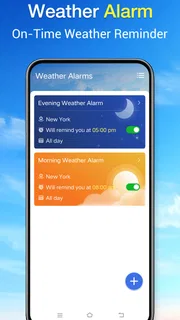
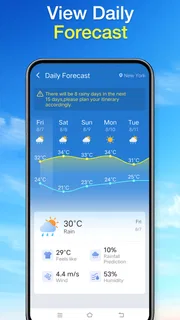
The name includes “Alarm” and “Radar,” which may lead new users to expect particular tools or a specific alert workflow. I would avoid making plans based on those words alone. The app’s short description is simply “Daily Weather,” so the sensible first step is to open it and see what it actually presents on your device. Let the visible forecast guide your first decision, rather than relying on an assumed feature.
It is listed at version 1.4.0 and has an average rating of 3.0 from 294 ratings, with 49 written reviews. That gives me reason to set a measured expectation: it may suit a basic routine, but it is worth checking whether its presentation and local relevance fit the way you use weather information. It has over 100,000 installs, which suggests it has found an audience, though popularity alone does not tell me whether it will match your needs.
The app is free and rated for Everyone. It was released on August 7, 2026, and requires Android 8.0 or later. If you use an older Android device, check compatibility in the app store before planning to install it. iPhone users should look for the app in the appropriate store rather than assuming Android availability means an iOS version is offered.
Getting through the first setup calmly
After installing, I’d begin with the simplest possible test: open the app and look for the weather information it makes available for the place you care about. If it asks you to choose or confirm a location, use the place where you will actually be spending the day—not necessarily your home address. That small choice matters when you commute, travel between neighborhoods, or are checking conditions for someone else.
I would not rush through any setup prompt. Read what the app is asking and decide whether that choice is useful for your routine. If you want to check the weather occasionally, it may be enough to open the app when needed. If you hope to build a daily habit, take a moment to make the opening screen easy to interpret before relying on it during a hurried morning.
More articles

Instagram Makes Everyday Moments Worth Sharing
A rare social app that can be a photo diary, a neighborhood window, and a lively conversation in the same session—though its best moments still require a little restraint.
A useful first-session workflow is to check the current day, identify the detail that could change your plans, and then close the app. For example, if you are deciding between walking and taking transit, focus on whether the forecast suggests a practical reason to bring a coat or leave earlier. This keeps the app useful even before you know every part of its interface.
Your first useful result: make one decision
Rather than browsing without a purpose, tie the first check to something concrete. Suppose you need to take a child to school and then walk to work. Check the local conditions before choosing what to wear, and make a separate check before leaving if the weather could affect the return trip. The goal is not to predict every change; it is to make one better-informed choice with the information on screen.
That approach is especially helpful if you are new to weather apps and find dense charts distracting. A quick daily check should answer a narrow question: do I need to adjust my plans? If the screen gives you enough context to answer, you have reached a meaningful first success. If it leaves you unsure, compare the result with a weather service you already trust before making a consequential decision.
For a more careful routine, compare the forecast with what you can observe outside. A forecast is a planning aid, not a guarantee that conditions at your exact street will match a broader local prediction. I find this check particularly useful when conditions look changeable: glance at the app, look outside, and leave a little flexibility in the plan instead of treating either source as infallible.
Where new users can get confused
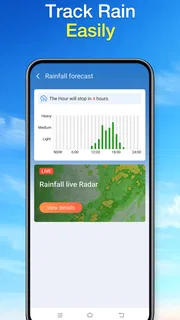
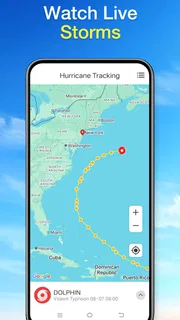
The main source of possible confusion is the product name. “Radar” often suggests a live map, while “Alarm” suggests scheduled notifications. Those expectations are understandable, but the name itself does not explain how either might work. Before depending on a radar view or an alert to wake you or prompt a departure, confirm that the option you need is actually present and that you understand how to use it.
Another common snag is checking the wrong place. A forecast for home may be a poor guide to a day spent elsewhere, and a location that was useful yesterday may not be the one you need today. Before acting on a forecast, make sure the displayed location matches your plan. This is a simple habit, but it can prevent the familiar mistake of dressing for one part of town while heading to another.
It is also easy to confuse a fast glance with a complete forecast. If you are planning an outdoor event, a long drive, or work that depends on conditions, take time to inspect whatever relevant information the app provides and confirm important details elsewhere if needed. I would not treat a compact daily check as a substitute for specialist weather information when safety, travel, or significant expense is involved.
Ratings can help set expectations, but they should not decide the matter for you. A 3.0 average indicates a mixed reception, not a guaranteed experience on your device. I’d use the app for a few ordinary checks and judge whether the location and presentation make sense to me. If the information feels hard to interpret or does not answer my day-to-day questions, I would move on rather than force it into my routine.
How it fits beside other weather apps
Compared with the weather app already installed on many phones, Daily Weather Alarm - Radar is worth considering if you prefer to try a separate, free daily-check option. The built-in app may be more convenient because you already know where to find it. This one needs to earn a place by making your everyday check clearer or more comfortable; the name alone is not a reason to switch.
Compared with a detailed weather service, a simple daily-oriented app may feel less demanding for routine decisions, but users who need extensive maps, detailed forecasts, or specialized alerts should choose a service that clearly supports those needs. The best alternative depends on the task: a quick check before a walk is different from monitoring conditions for a trip or outdoor work. I would keep a trusted specialist option available for the latter.
There is a practical trade-off here. Keeping a second weather app can offer another way to check conditions, but it also creates another screen to learn and another forecast to compare. If you often find yourself checking several apps and getting conflicting impressions, settle on one service for ordinary decisions and reserve a second source for important plans. More information is not always more useful when it does not change what you will do.
Who should try it, and when I would skip it
I’d recommend giving it a fair try if you want a free Android app for everyday weather checks and are comfortable judging the experience yourself. It may suit someone who likes opening a dedicated app before leaving home and wants a direct starting point rather than searching around for weather information. Its Everyone rating also makes it broadly suitable from a content-rating perspective.
I would skip it if you need a particular advanced tool and cannot verify that the app provides it, or if your current weather app already gives you the information you use without friction. People who make safety-sensitive decisions based on detailed forecasts should favor a service designed to show the specific information they require. Likewise, anyone using an Android version earlier than 8.0 should check compatibility before attempting an install.
The developer is X5 Network Area. As with any weather app, I would evaluate the actual usefulness of its local forecast and interface instead of assuming that the developer name, install count, or title tells the whole story. A few ordinary checks are enough to learn whether it belongs in your daily routine.
A sensible next step after the first check
Once you have used the app to make one small decision, test it again at a different point in your day. Check the location, see whether the information remains easy to understand, and notice whether it helps you act rather than simply adds another forecast to consider. If it fits, make it part of a quick morning routine; if not, there is little reason to keep opening it out of habit.
My overall view is that Daily Weather Alarm - Radar is best approached as a modest daily weather option, not as a tool whose name guarantees radar monitoring or alarms. Its free price makes trying it straightforward for compatible Android users, while its mixed rating is a good reminder to assess it personally. Keep it if it helps you make a clearer everyday choice; use a more specialized alternative when the decision calls for deeper weather detail.
Pros
- Get a quick weather update when your alarm goes off.
- Radar maps help you check approaching precipitation.
- Useful for planning outdoor activities before leaving home.
- Combines weather checks with a daily alarm routine.
- A practical option for people who prefer weather alerts in the morning.
Cons
- Forecast accuracy can vary by location and provider.
- Radar data may not update instantly.
- Weather alerts can become distracting if left enabled.
- Some features may depend on an internet connection.
- It may use extra battery if location access stays active.


