

Our review
 Analysis by Lookingapps
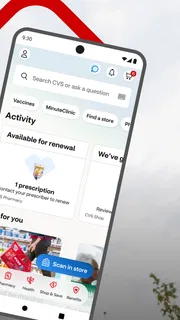
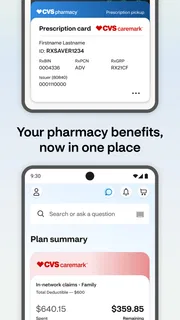
Getting prescriptions, arranging care, and keeping track of pharmacy savings can quickly become a jumble of separate errands. CVS Health brings several of those everyday tasks together in one mobile app, with a focus on getting prescriptions ready, scheduling health care, and shopping with ExtraCare savings. After spending time with it, I see its main appeal as practical rather than flashy: it gives regular CVS customers a place to handle recurring pharmacy and shopping routines without starting from scratch every time.
A useful starting point for everyday health errands
CVS Health is a free medical app from CVS Pharmacy. Its central promise is straightforward: manage prescription-related errands, schedule care, and browse savings in one place. That combination is especially handy when a pharmacy trip is already part of the week and you would rather check the details on your phone than rely on memory.
The app has a 4.5 average from around 507,000 ratings, and it has been installed over 10 million times. Those figures suggest a well-established product with plenty of repeat users, though what matters most in practice is whether its tools fit your routine. If you already shop at CVS or use its pharmacy, the app’s connected focus makes more sense than it would for someone who rarely visits the chain.
Getting oriented without overcomplicating things
My preferred way to approach a health-and-shopping app is to begin with the task I need to complete, not to explore every screen at once. With CVS Health, that means first deciding whether I’m checking a prescription, looking to schedule care, or opening the shopping side for ExtraCare savings. Keeping that simple mental map makes the app feel more manageable, particularly if I’m using it in a hurry.
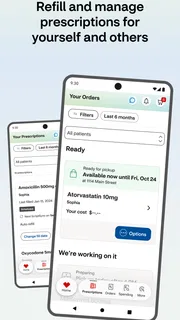
Prescription errands are often repetitive, so an app can be useful simply by giving those tasks a consistent starting point. Rather than treating each pharmacy visit as a separate project, I can make a habit of checking the app when I’m planning the next errand. That routine won’t replace careful attention to prescription details, but it can help me keep the pharmacy part of my to-do list visible.
The care-scheduling option adds another reason to open the app beyond refills and shopping. I like having that purpose alongside pharmacy tools because health errands rarely fit neatly into one category. The experience is most convenient when I use it as a hub for the CVS-related tasks it offers, while still taking time to review the information on screen before confirming any action.
Make the first visit count
On a first run, I’d take a few minutes to learn where the main tasks live and check that the app is set up in a way that suits my habits. I wouldn’t try to memorize every part of the interface. Instead, I’d locate prescription management, care scheduling, and ExtraCare shopping, then return to those areas as needed. A small amount of orientation can save repeated searching later.
More articles

Instagram Makes Everyday Moments Worth Sharing
A rare social app that can be a photo diary, a neighborhood window, and a lively conversation in the same session—though its best moments still require a little restraint.
It also helps to be clear about what you want the app to do for you. Someone who mainly needs prescription support may spend little time in the shopping area, while a frequent CVS shopper may care more about savings and product browsing. The app serves both kinds of visits, but having a main goal makes each session feel less scattered.
Settings and habits that make a difference
Settings are worth checking because even a well-designed app works best when its basic setup matches the person using it. I’d review the account and app options available on my device, make sure I can access the parts I care about, and keep any information I enter accurate. This is sensible housekeeping for a health-related app, not a shortcut to any special feature.
When an app offers several kinds of tasks, I find it useful to decide which ones deserve regular attention. For CVS Health, that might mean checking prescription needs before a planned pharmacy trip, looking into care scheduling when an appointment is needed, and visiting ExtraCare savings when I’m already considering a CVS purchase. Those are repeatable habits built around the app’s stated purposes, rather than a complicated system that requires constant upkeep.
Keep sessions focused
A focused session is often faster than browsing without a plan. I might open the app with one question in mind: do I need to handle a prescription, arrange care, or check savings? Once I’ve completed that task, I can close the app rather than drifting through unrelated sections. That approach is particularly useful on a busy day, when the goal is to finish an errand rather than spend time exploring.
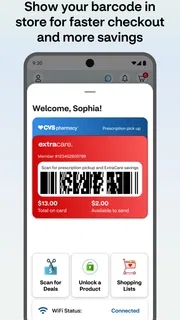
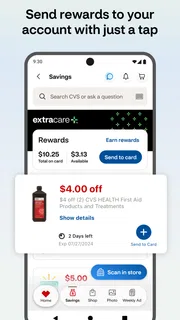
For shopping, I’d make a point of checking ExtraCare savings as part of the normal decision process instead of assuming I’ll remember at checkout. The app’s shopping role is most helpful when it becomes part of a repeatable routine: look at the relevant savings, decide what I actually need, and then shop accordingly. I prefer that to treating every offer as a reason to buy something.
Prescription tasks call for a different kind of attention. I’d slow down enough to review names and details shown in the app, especially when managing a recurring need. A phone can make the process more convenient, but convenience should not turn into tapping through important health information on autopilot. My best habit is to use the app to organize the errand, then read each relevant screen carefully.
Small shortcuts, not magic buttons
Experienced users tend to get faster by repeating a simple sequence, not by expecting an app to do everything automatically. I’d keep a mental order for the tasks I use most: open the app, go to the relevant area, review what’s needed, and finish the task before moving on. The less I improvise each time, the less likely I am to lose track of why I opened it.
It can also help to connect app use to an existing habit. For example, I might check prescription needs when planning the week’s errands, or review savings when making a shopping list. These familiar cues make the app easier to remember without requiring me to check it constantly. The best routine is one that fits naturally into the day rather than creating another chore.
The strongest practical benefit is having pharmacy, care scheduling, and ExtraCare shopping gathered around familiar CVS errands. That does not mean every user will need every part. I’d treat the app like a toolbox: open the section that matches the job, use it deliberately, and leave the rest alone when it isn’t relevant.
Where convenience has its limits
CVS Health is most compelling for people who already have a reason to interact with CVS. If you don’t use its pharmacy, don’t shop there, and have no need to schedule care through the app, its central features may not have much day-to-day value. That is less a flaw than a matter of fit: the app is built around a particular retail and pharmacy ecosystem.
It is also worth keeping expectations grounded. A mobile app can make common errands easier to organize, but it is not a substitute for professional medical advice or a careful conversation about health concerns. I would use it for the tasks it is designed to support and turn to an appropriate health professional when a question needs more than an app-based interaction.
There is a balance to strike between convenience and attention. It’s tempting to rush through any phone-based task, especially when handling something routine, but prescription information and appointment details deserve a second look. I’d rather spend a moment verifying what I’m doing than assume every tap went exactly as intended.
What regular users should keep in mind
People who use several parts of the app may find it helpful to establish a simple personal workflow, but there’s no need to turn it into a complex project. One routine for pharmacy needs, another for care scheduling, and a quick check of savings when shopping are enough to make the app feel purposeful. If a feature isn’t relevant to your life, skipping it is perfectly reasonable.
For new users, the learning curve is mainly about getting familiar with where the app places the tasks you care about. I’d give myself a calm first session rather than trying to navigate it while already in a rush. After that, returning to the same sections for repeated errands should feel more natural. A consistent approach tends to matter more than learning every detail at once.
The app is rated for Everyone, has been available since June 15, 2011, and its current version is 26.10.33. It requires iOS 11 or later, so it’s sensible to check that your device meets the requirement before relying on it for an upcoming errand. For most users, those basics are less important than whether CVS’s pharmacy, care, and shopping services fit their needs.
A practical verdict for CVS customers
CVS Health works best as a steady companion for people who already use CVS and want a convenient place to handle common pharmacy and shopping tasks. I appreciate the clear mix of prescription support, care scheduling, and ExtraCare savings. Its value comes from bringing those activities together, not from trying to become an all-purpose health platform.
My recommendation is to start with one task you genuinely need, learn that path, and then build a repeatable habit around it. Check prescription needs when planning an errand, look at care scheduling when arranging an appointment, and review savings when shopping. That straightforward rhythm makes the app easier to use without adding unnecessary steps to your day.
With around 160,000 reviews and a long-running presence in the app marketplace, CVS Health has clearly become a familiar option for many CVS customers. I’d consider it a useful, focused choice if the company’s pharmacy and retail services are already part of your routine. If they are, the app can make those familiar errands easier to organize; if not, its strongest benefits may simply be less relevant to you.
Pros
- Prescription refills can be requested through the app.
- Users can access digital ExtraCare coupons and rewards.
- A store locator helps find nearby CVS locations.
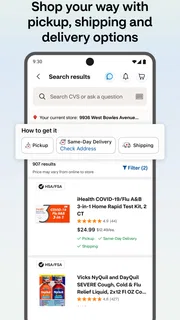
- The app supports prescription delivery for eligible orders.
- Health records and vaccination details are available in one place.
Cons
- Some features require a CVS account and sign-in.
- Prescription services may vary by location and insurance plan.
- Delivery is not available for every medication or address.
- App performance and reliability may vary between devices.
- Some users may find the range of features difficult to navigate.


