
Our review
 Analysis by Lookingapps
When I’m shopping for a used car, the hardest part is not finding listings; it’s deciding which ones deserve my time. CARFAX - New & Used Cars is useful because it puts vehicle-history context alongside the search process, rather than leaving me to make a shortlist from photos and seller descriptions alone. I see it as a practical screening tool, not a substitute for inspecting a car or having a mechanic check it.
A sensible first pass through a car search
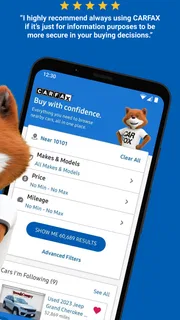
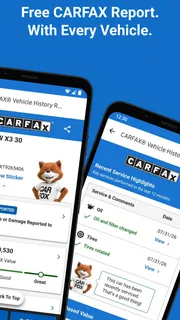
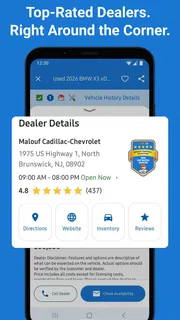
The app is an Auto & Vehicles app from CARFAX, Inc, built around looking for cars nearby, checking vehicle-history details, and keeping an eye on price alerts. In my experience, that combination is most valuable early in a search: it helps me compare candidates before I start arranging calls, test drives, or inspections.
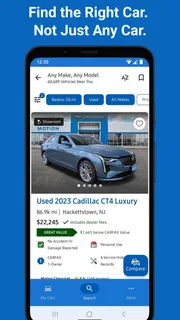
I’d begin by narrowing the search to cars I could realistically travel to and afford, then compare the listings that remain. A familiar model name can make several cars look interchangeable, but their individual histories may give me a reason to prioritize one and investigate another more carefully. That is a better use of a history report than treating it as a simple pass-or-fail badge.
For a realistic example, say I’m looking for a commuter car and find two promising listings nearby. I can use the app to review the available history details and decide which seller to contact first. If neither seems worth pursuing, I’ve avoided spending an afternoon on two test drives that were unlikely to lead anywhere. The app’s value is often in that saved effort, not in making the final decision for me.
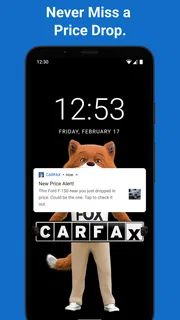
Price alerts suit a slower, more deliberate search. Rather than checking the same listings repeatedly, I can let an alert bring a change to my attention and then reassess the car against my budget and other options. An alert is a prompt to look again, not proof that a listing is a bargain: the vehicle’s condition, history, equipment, and asking price still need to make sense together.
Use history details to guide the next question
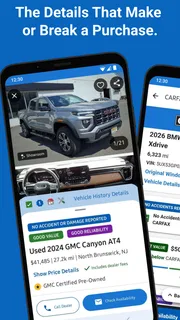
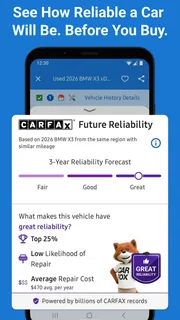
I get the most from vehicle-history information when I use it to shape a conversation with the seller. If a detail raises a question, I would ask for an explanation or supporting records before traveling to see the car. If the available history looks reassuring, I’d still check the vehicle in person. A report can help me decide what to investigate; it cannot reveal every current mechanical problem or replace a proper inspection.
This distinction matters because people often expect a history report to settle the whole question of whether a used car is safe to buy. I would not use it that way. Think of it as one source of evidence that helps sort a large pool of listings into “worth asking about,” “needs clarification,” and “not for me.” That keeps expectations realistic and makes the next step clearer.
More articles

Instagram Makes Everyday Moments Worth Sharing
A rare social app that can be a photo diary, a neighborhood window, and a lively conversation in the same session—though its best moments still require a little restraint.
Small habits that make the search more useful
One useful habit is to compare vehicles in a consistent order. I’d look at the listing, review its history details, consider whether the price fits my plan, and only then decide whether to contact the seller. Applying the same sequence to each candidate makes it harder for an attractive photo or a persuasive description to distract me from unanswered questions.
Another is to keep a short personal record of why a car made the shortlist. I can note what appealed to me and what I still need to verify, then revisit that note when an alert or a new listing prompts another look. This is especially helpful when several similar cars blur together after a week of browsing. It also prevents me from mistaking “I saw this one before” for “I checked everything that matters.”
When I’m shopping with another person, I’d agree on a few priorities before comparing listings: the kind of vehicle we need, the practical travel radius, and the questions that must be answered before a visit. The app can support that shared screening process, but it does not decide which trade-offs matter to a household. Setting those priorities first helps keep the search focused instead of turning into an endless scroll through cars that are appealing for different reasons.
I’d also treat an alert as an invitation to compare, rather than an instruction to act immediately. A changed price may be worth another look, but it does not tell me why the price changed or whether the car now fits my needs. Rechecking the vehicle’s context before contacting the seller is a calmer approach than reacting to every update.
Settings and expectations worth checking
Before relying on alerts, I’d check the app’s available settings and make sure they match how I’m actually shopping. The useful question is whether the choices I’ve made keep the search relevant: an alert that repeatedly surfaces cars outside my budget or practical area creates noise rather than saving effort. I prefer a smaller set of meaningful notifications to a stream that I eventually ignore.
I would also review the listing details carefully instead of assuming every candidate presents identical information. Vehicle-history coverage and the details visible for a particular car can vary, so I’d use what appears as a starting point for verification. If something important is unclear, I’d ask the seller directly and seek documents or an independent inspection where appropriate. The absence of a concern in the material I’ve reviewed is not the same as proof that no concern exists.
The app is free, and its age rating is Everyone. It has a 4.7 average from around 36,000 ratings, which suggests many users find it useful, but I would still judge it by whether its listings and history details help with my own search. It has been available since June 29, 2012, and version 6.52.1 is the current version. Those details provide context, but the practical test is whether I can move from browsing to sensible questions without treating the app as an all-in-one inspection service.
Where it beats ordinary browsing—and where it doesn’t
Compared with general classified browsing, the strongest distinction is the emphasis on connecting a car search with vehicle-history information and alerts. A broad marketplace may be better when I want the widest range of seller listings or a particular browsing style; CARFAX is more compelling when history context is central to how I screen used cars. I would not assume that any one app includes every listing I might find elsewhere, so a serious buyer may still compare across more than one source.
It is also different from arranging a pre-purchase inspection. The app helps me decide which vehicles merit attention, while a qualified mechanic can assess the condition of a specific car. Those steps answer different questions. I’d use the app to reduce the candidate list, then spend inspection money and travel time only after a listing and seller conversation seem promising.
That division of labor is important for buyers on a tight budget. A free search tool can make early research easier, but the purchase itself still calls for careful checks. I would not let a convenient history view persuade me to skip an in-person look, a test drive, or a professional inspection when one is appropriate. Conversely, I would not pay for or arrange inspections on every car I happen to see; screening first is where the app can help.
Limits that experienced shoppers should keep in mind
The app’s usefulness depends on the information available for the particular vehicle and on the quality of the listing. A report cannot tell me how a car feels on the road today, whether a noise is serious, or how carefully it has been maintained unless that information is reflected in the records I can review. Seller descriptions also deserve scrutiny. I treat the app as a way to focus my questions, not as a guarantee that a car is problem-free.
Price alerts have a similar boundary. They can help me notice a change, but they do not judge whether the asking price is fair against comparable cars or whether a seller’s timing makes sense. I still need to compare alternatives and consider condition and equipment. If I’m only casually browsing, alerts may add little; if I’m actively searching and want to revisit candidates, they are more useful.
Someone who wants a comprehensive marketplace experience, a mechanic’s diagnosis, or a single definitive answer about whether to buy may be better served by combining other tools and professional advice. Likewise, if I’m shopping for a vehicle type or area that produces few relevant results, a broader listing source may be a better starting point. The sensible choice is not loyalty to one app; it is using the right source for each part of the decision.
Who I’d recommend it to
I’d recommend CARFAX - New & Used Cars to people actively comparing used cars who want history details to be part of the shortlist process. It’s a particularly good fit for buyers who have a few non-negotiable needs, are willing to check each candidate carefully, and appreciate being alerted when a listing deserves another look. The app has more than 5 million installs, but broad adoption alone is not why I’d keep it in my shopping routine; the reason is that its focus matches a real early-stage buying task.
I’d be less enthusiastic about it for someone who expects a report to replace a mechanic, wants every car listing gathered in one place, or has not yet decided what kind of vehicle would suit them. In those cases, general research or a wider marketplace may be a better first step. Once the search becomes specific, the app’s combination of nearby-car discovery, history context, and alerts becomes easier to put to work.
My verdict is that it’s a helpful companion for a careful car search, provided I keep its role clear. I use it to find candidates, review the available history, and decide what to ask next; I don’t use it to certify a vehicle or make the purchase decision for me. That repeatable routine is what turns the app from another place to browse into a practical way to spend less time chasing unsuitable cars and more time checking the ones that might genuinely fit.
Pros
- Vehicle history reports help buyers check a car’s background.
- Search filters make it easier to narrow down listings.
- Listings include details such as price and mileage.
- Saved searches help you keep track of promising cars.
- Dealer and private-seller listings offer several buying options.
Cons
- Vehicle history reports may require payment.
- Some listings may be outdated or unavailable.
- A clean report cannot guarantee a car is mechanically sound.
- Listing availability and features can vary by location.
- The app may collect location and usage data.


