
Our review
 Analysis by Lookingapps
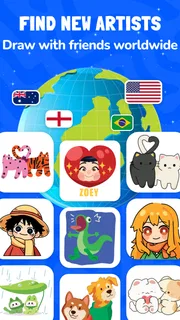
Artmate: Drawing Together makes most sense when the point is not to create a polished picture alone, but to enjoy drawing with other people and learn a little as you go. I would consider it for a relaxed session with a friend, a family activity, or a beginner who finds a blank canvas intimidating. If I wanted a full-featured digital art studio, I would look elsewhere; this app’s appeal is its social, approachable focus.
Choose it for company, not a professional canvas
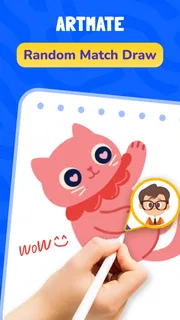
Before installing a drawing app, I ask what I want the drawing session to feel like. Some apps are built around individual illustration, with detailed controls for brushes, layers, and editing. Artmate: Drawing Together is an art and design app from Braly JSC that puts shared drawing and accessible lessons closer to the center. That distinction matters more than any feature checklist: it is for making the act of drawing easier to start and more enjoyable to share.
The app is free to download, with optional in-app purchases listed from $0.49 to $14.99 per item. That makes it easy to try before deciding whether paid extras are worthwhile. I would treat the free entry point as a low-risk way to see whether the collaborative format suits the people I plan to draw with, rather than assuming every part of the experience is included without payment.
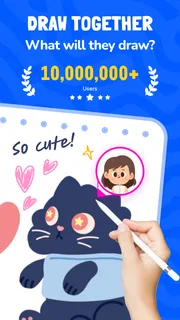
It has a 4.6 average from around 23,000 ratings and over 10 million installs. Those figures suggest that plenty of people have tried it, but they do not tell me whether a particular group will enjoy drawing together. The more useful test is practical: do you want a shared, low-pressure activity, or are you hoping to develop a solo art workflow with fine control?
The age rating is Everyone, which makes the app a reasonable candidate for a family drawing session. I would still set expectations for younger users: easy lessons can help make a first sketch feel manageable, but they are not a substitute for patient, hands-on guidance if a child needs it. For adults who feel they “can’t draw,” the same gentle starting point may be enough to get past the blank-page problem.
What the shared format is good at
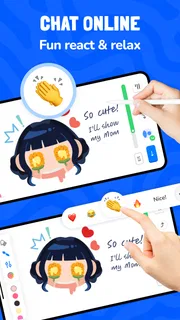
The strongest reason to choose this app is the way drawing can become a social activity rather than a solitary task. A casual session with a friend can be more inviting than sending each other finished images after the fact: you have a reason to sit down together, try an idea, and react to what the other person is making. That is a different kind of value from a large toolset.
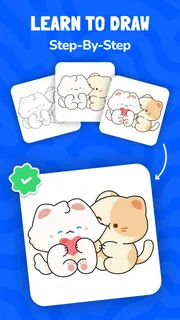
Easy lessons also give beginners a useful structure. Instead of needing to invent a subject and decide how to approach it, someone can use a guided starting point and focus on the act of drawing. I see that as especially helpful for people who enjoy creative activities but get stuck deciding what to make. A lesson can lower the initial barrier without requiring them to treat the session as a serious art class.
More articles

Instagram Makes Everyday Moments Worth Sharing
A rare social app that can be a photo diary, a neighborhood window, and a lively conversation in the same session—though its best moments still require a little restraint.
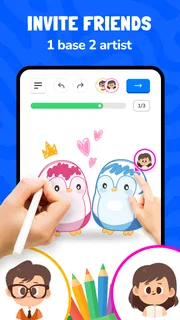
One practical tip is to decide on a simple shared goal before opening the app: sketch the same object, draw a character from memory, or take turns adding ideas to a theme. That keeps the session lively without needing elaborate preparation. It also lets a beginner participate on equal terms with a more confident friend; the goal is to make something together, not to compare technical skill.
Another useful approach is to use a lesson as a warm-up rather than the whole activity. A short guided exercise can help everyone get moving, after which you can choose your own subject. This is a good fit for a brief break or a low-key evening when nobody wants to commit to a long project. The trade-off is that anyone looking for a structured course with a clear progression should judge the lessons on their own merits rather than assume that the app provides a complete curriculum.
Everyday situations where it can click
Imagine a rainy afternoon when a parent and child want an activity that does not involve watching another video. A simple drawing session gives them something to do side by side, and a guided lesson can help the adult avoid having to invent instructions on the spot. The app’s Everyone rating supports considering it for a broad household audience, while the shared focus makes it more naturally suited to doing together than handing a child an isolated professional tool.
It can also suit friends who live apart and want a small, creative way to spend time together. Before making plans around that, I would check that both people can access the same app and are ready to use its multiplayer drawing experience. The app’s central idea is promising for that kind of meetup, but a drawing session still depends on both people wanting to participate; it is not the right pick for someone who would rather work quietly at their own pace.
A less obvious use is as a way to make a group activity feel less intimidating. In a classroom, club, or family gathering, people often hesitate when asked to draw because they think the result will be judged. A shared prompt or lesson can shift attention from producing an impressive image to taking part. I would use it for informal creativity, not as a replacement for a teacher’s feedback or a dedicated art lesson.
When another kind of app is the better choice
If my main aim were detailed illustration, I would compare Artmate with solo drawing apps that emphasize precision and a more extensive set of editing tools. Those alternatives are better suited to someone who wants to refine one image over multiple sessions, control every mark, or build a personal portfolio. Artmate’s social emphasis is a strength for a group, but it is not, by itself, a reason to choose it for intricate solo work.
For someone who mainly wants instruction, a dedicated learning resource may be a better fit. A drawing app can make practice feel approachable, but a person seeking a carefully sequenced course, detailed explanations, or critique should look for those qualities specifically. Conversely, someone who only wants quick entertainment may prefer a lightweight drawing or guessing game; the lesson angle may be more than they need.
The central trade-off is focus. A collaborative app can make it easier to begin and keep the activity social, while a specialist art tool usually gives more room to work independently. I would choose based on the session I actually want to have, not on which category sounds more advanced. If my friends are enthusiastic but inexperienced, easy entry and shared enjoyment matter more than professional controls. If I am drawing alone with a specific artistic goal, depth of control matters more.
What to consider before committing
Trying the app has little upfront cost because it is free, but optional purchases still deserve a moment’s thought. I would first use the available experience with the people I expect to draw with and see whether the core routine becomes something we repeat. Only then would I consider paying for an item. The listed purchase range is broad enough that it is sensible to check what a particular purchase offers in the app before spending, rather than assuming every paid item serves the same purpose.
Switching from a familiar solo drawing app may involve more than learning a different interface: it changes the activity from personal practice to a shared session. That can be a welcome change when motivation is the problem, but a distraction if I am trying to concentrate. I would not replace a trusted illustration tool with this app; I would add it for occasions when I want company, a guided starting point, or a more playful reason to draw.
The current version is 1.1.42, and the minimum operating-system requirement is version 7.0. Those are useful compatibility checks before inviting someone else to join. If you are organizing a session, it is worth checking that each participant’s device can run the app in advance; a shared activity is much less appealing when someone discovers a compatibility problem after everyone has set aside time.
One small but important decision is whether the group wants to make a finished image or simply enjoy the process. Artmate is easier to recommend for the second goal. If everyone expects a polished result, differences in experience may become frustrating; if the purpose is to experiment, laugh, and follow a prompt, those differences can be part of the fun. Setting that expectation upfront is a simple way to get more from the app.
My recommendation
I would recommend Artmate: Drawing Together to beginners, families, and friends who want drawing to feel social and easy to start. Its combination of multiplayer drawing and accessible lessons gives it a clear role among creative apps: it can turn a blank screen into an activity people share, rather than asking each person to arrive with a plan and established skills.
I would skip it if I wanted a serious solo illustration workspace, a clearly defined long-form course, or a drawing experience that does not depend on other people. In those cases, a specialist drawing tool or a dedicated learning option is a more sensible match. For everyone else, I think the best way to judge it is to try one short session with a friend and see whether the shared format makes you want to draw again.
Overall, Artmate: Drawing Together is a focused choice rather than an all-purpose art studio. Braly JSC has aimed it at making drawing approachable and social, and the app’s popularity makes it an easy one to consider, though popularity alone cannot guarantee a fit. I would start with the free experience, keep expectations relaxed, and pay for anything only if the app has already earned a regular place in your creative routine.
Pros
- Shared canvases make drawing with friends feel collaborative.
- Simple controls are approachable for beginners.
- The format encourages creative group activities.
- Quick drawing sessions suit short breaks.
- Works well as a casual social game.
Cons
- The experience depends on having others available to join.
- Drawing tools may feel limited to experienced artists.
- Small screens can make detailed sketches difficult.
- Group sessions may be less enjoyable with uneven skill levels.
- A stable internet connection is needed for online play.


