

Our review
 Analysis by Lookingapps
I find Wordscapes Search most appealing when I want a word puzzle that feels calm rather than competitive. It pairs word finding with scenic backgrounds, so the experience has a gentler mood than a timed quiz or a crowded multiplayer game. The basic idea is easy to grasp: look for words in a letter grid, make progress at your own pace, and enjoy the setting along the way. That simplicity makes it approachable, though it does not automatically make every screen or interaction comfortable for every player.
Reading the board and finding your way around
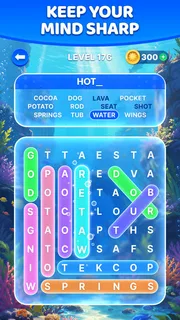
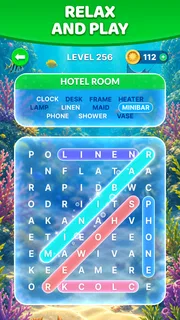
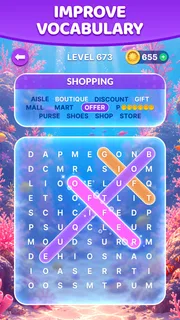
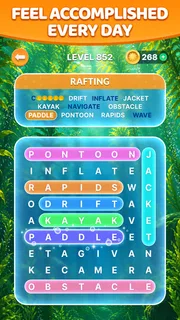
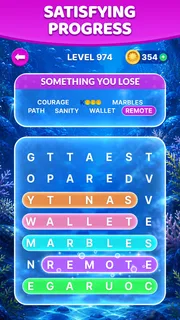
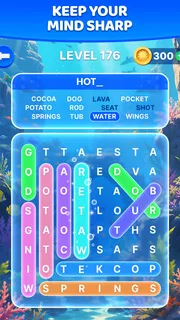
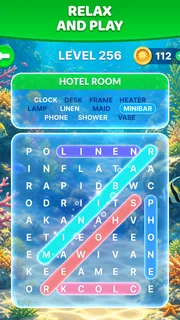
As a word-search game from PeopleFun, it puts visual scanning at the heart of play. You study a cluster of letters, spot a word, and trace it across the board. The pleasure comes from noticing patterns that were easy to miss at first: a likely starting letter, a short word tucked beside a longer one, or a route that changes direction. I like that this is a focused task rather than a stream of unrelated prompts.
The format is familiar enough that most players can understand what to do without learning a complicated rule set. That helps when introducing it to a relative who enjoys word puzzles but does not want to spend time mastering a new game. It is also useful for short sessions: you can open it, orient yourself around the current puzzle, and start looking rather than first navigating a deep collection of modes.
There is a trade-off in that clean premise. A word-search grid asks your eyes to compare many similar letters, and the board itself is the main source of information. If you have trouble distinguishing small or closely spaced characters, even a relaxed puzzle can become tiring. The scenic presentation adds atmosphere, but it cannot replace clear letter visibility. I would try a puzzle in the lighting and screen setup you expect to use, rather than assuming that a pleasant background guarantees comfortable reading.
For a more deliberate approach, I recommend scanning in passes instead of searching randomly. First look for unusual letters or distinctive combinations, then trace possible words from those anchors. If a word seems to disappear, pause and check the surrounding letters rather than repeatedly sweeping the whole board. This reduces visual fatigue and makes the puzzle feel more like a manageable search than a test of patience. It is a small technique, but it matters in a game where the board is the work surface.
The app’s broad audience is reflected in its Everyone content rating, and its free entry point makes it easy to try before deciding whether it suits you. It has a 4.7 average from around 234,000 ratings, alongside roughly 50,000 written reviews. Those figures suggest that many players enjoy the format, but they cannot tell you whether the letter presentation works for your own eyesight, so a hands-on trial is still the sensible test.
Small-screen reading and visual comfort
On a phone, the board is convenient because it stays close at hand, but compact screens can make letter-by-letter scanning more demanding. I would use a comfortable brightness level and avoid playing with distracting reflections; these simple adjustments can matter more than the scenery. If you usually enlarge text elsewhere on your device, consider whether the game’s board remains comfortable at its normal presentation. I would not choose it on the assumption that every element can be resized to personal preference.
More articles

Instagram Makes Everyday Moments Worth Sharing
A rare social app that can be a photo diary, a neighborhood window, and a lively conversation in the same session—though its best moments still require a little restraint.
The background art is part of the game’s identity, yet visual decoration and visual clarity are not the same thing. When I am tired, I prefer to treat the scenery as a backdrop and keep my attention on the letter paths. If the contrast between letters and background feels insufficient in a particular setting, changing the room lighting or moving to a less reflective spot may help. A player who needs strong customization of contrast, text size, or screen layout should check the actual experience before committing to long sessions.
Touch, pace, and sensory load
Tracing words asks for controlled movement across the screen. For someone with limited dexterity, tremor, or pain from repeated touch gestures, that interaction may be more demanding than the puzzle’s mental difficulty suggests. Short sessions are a practical way to test comfort: play one board, notice whether the tracing feels accurate and relaxed, and stop if your hand begins to tire. I would not describe a touch-based word search as automatically accessible simply because it has no fast action sequences.
Its unhurried puzzle style can be a welcome alternative to games built around rapid reactions, loud effects, or constant competition. That makes it a reasonable choice for a quiet break, provided the screen itself is comfortable and the player enjoys visual search. If sound or visual stimulation is a concern, the safest approach is to check the game’s actual presentation and device controls rather than assume a particular setting is available. The game’s calm theme is a mood, not a guarantee that every sensory preference is covered.
A useful everyday scenario is a few minutes of waiting before an appointment. I can focus on one word at a time, put the phone away when my name is called, and return later without needing to coordinate with another player. That flexibility suits people who prefer self-paced activities. It is less suitable when you need a puzzle that works without sustained visual attention, such as while walking, talking with someone, or keeping watch over a task.
Where it fits among word games
Compared with a crossword, this is more about spotting and tracing than recalling definitions or filling intersecting answers. Compared with a word-building game, it puts less emphasis on constructing words from a movable set of tiles and more on finding paths already present in the grid. That distinction helps you choose: pick this when you enjoy visual pattern hunting; choose a crossword if clues and vocabulary recall are the draw, or a word-building game if you want to experiment with combinations.
Against a conventional paper word search, the phone version is more portable and pairs the puzzles with a scenic presentation. Paper may still be the better option for someone who wants to enlarge or mark up a page freely, avoid screen time, or use a pencil instead of tracing with a finger. The app makes the activity handy, not universally more comfortable. I see its strongest use as a casual digital alternative rather than a replacement for every kind of word puzzle.
Practical fit, costs, and expectations
The game is free to install, with in-app purchases listed from $0.99 to $99.99 per item. That range is worth keeping in mind if you are deciding whether to let a child play or if you prefer to avoid optional spending. The free starting point lowers the barrier to trying it, but I would check purchase controls on the device before handing it to a younger player. The Everyone age rating describes the content audience; it does not answer questions about a household’s spending preferences.
Wordscapes Search has passed 10 million installs and was released on November 22, 2019. Version 1.56.0 is the current version, and the listed minimum operating-system requirement is 7.0. Those details make it easier to judge whether the app is a candidate for an older device, though compatibility still depends on the device and store availability. I would confirm that it installs properly before planning to use it on a phone reserved for travel or family use.
PeopleFun’s word-search format is best for someone who wants a straightforward solo puzzle with an attractive, relaxed presentation. It is not my first recommendation for a player who needs extensive control over letter size or contrast, who finds repeated touch tracing uncomfortable, or who wants social competition and fast rounds. In those cases, a paper puzzle, a clue-led word game, or a title with interaction options that match the player’s needs may be a better fit.
A thoughtful choice, with personal checks
My overall view is positive but qualified. The game gives word-search fans a pleasant, portable way to pass a quiet moment, and its familiar rules make it easy to approach. Its most useful strength is that it asks for attention without demanding quick reactions; its main limitation is that both seeing the board and tracing paths are central to the experience. Those mechanics will suit some players naturally and exclude or tire others.
If you are curious, try it in a realistic setting: the same phone, lighting, grip, and session length you expect to use day to day. Notice whether the letters remain comfortable to inspect and whether tracing feels easy rather than fussy. That brief check tells you more than the scenic theme or popularity figures can. I would recommend it to friends who enjoy visual word puzzles and want a calm solo option, while encouraging anyone with specific vision, motor, or sensory needs to test the interaction before making it part of a routine.
Ultimately, Wordscapes Search is most inclusive when its straightforward pace matches the player’s abilities and environment. It offers an inviting entry into digital word searches, but accessibility is personal: readable letters, manageable touch movement, and a comfortable setting all matter. If those pieces come together for you, it can be a satisfying little puzzle to return to; if they do not, choosing a format with more suitable controls is a sensible decision, not a failure to enjoy word games.
Pros
- Short rounds make it easy to play during brief breaks.
- Hints help when a word search puzzle gets challenging.
- The simple controls are easy to learn.
- A large range of puzzles offers plenty of play time.
- Offline play is useful when an internet connection is unavailable.
Cons
- Some puzzles may feel repetitive over time.
- Hints are limited unless you earn or purchase more.
- Small letters can be difficult to read on compact screens.
- Ads may interrupt play between puzzles.
- Later levels can become noticeably more challenging.


