
Our review
 Analysis by Lookingapps
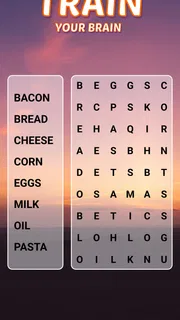
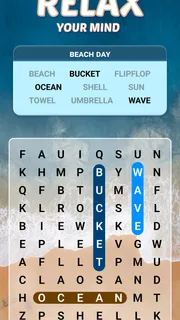
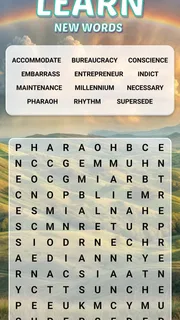
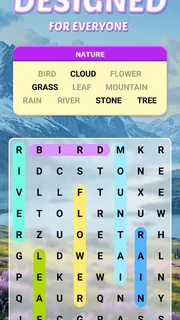
Word search games are at their best when the simple act of spotting a word feels relaxing rather than like a race. Word Search Explorer leans into that easygoing appeal, presenting itself as a visually pleasing word game specially designed for seniors. I find that focus gives the game a clear identity: it is built around a familiar puzzle format, with readability and a comfortable pace at the heart of the experience.
A word search designed to feel approachable
The central appeal of Word Search Explorer is right there in its name: find words hidden among a grid of letters. That basic idea needs little explanation, which makes it easy to pick up whether you play word puzzles every day or only reach for one now and then. Rather than asking players to learn a complicated set of rules, it lets the familiar search do the work.
The emphasis on a visually pleasing presentation is especially meaningful in a game where the letters are the main event. A word search can become tiring if its grid feels cramped or difficult to follow, so a design aimed at making the experience more accessible is a sensible choice. The point is not to make the puzzle less satisfying; it is to keep attention on scanning, recognizing words, and enjoying the small moment of finding one.
That senior-friendly focus also makes the game easy to recommend beyond a single age group. Clear, uncomplicated play can suit anyone who wants a calm word search game without a steep learning curve. I appreciate that the concept is straightforward: open the game, focus on the puzzle, and work through the search at your own pace.
Why presentation matters in a letter grid
In a word search, presentation is part of the challenge. Players repeatedly move their attention across rows of similar-looking letters, so comfort and legibility affect how enjoyable the puzzle feels. A visually pleasing approach can help keep the activity inviting, particularly for longer play sessions or for someone who prefers a gentler style of mobile game.
This design direction is also a good match for casual play. The puzzle does not depend on a long tutorial or a complex story to make sense. It gives players a recognizable task and lets them settle into it. If you enjoy taking a short break with a casual puzzle game, that simplicity is a real strength.
How the puzzle fits into everyday play
In practice, a word search asks you to scan the letters, recognize a word, and locate it in the grid. The enjoyment comes from switching between broad searching and focused checking: you may sweep across the letters until a word catches your eye, then trace its position more carefully. It is a quiet kind of concentration, with enough mental engagement to feel rewarding without demanding constant rapid decisions.
More articles

Instagram Makes Everyday Moments Worth Sharing
A rare social app that can be a photo diary, a neighborhood window, and a lively conversation in the same session—though its best moments still require a little restraint.
That makes the game easy to fit around other activities. I can imagine opening it during a relaxed break, playing while winding down, or using it as a small change of pace from more demanding games. Because the format is so familiar, there is little friction between starting the game and getting into the puzzle. The appeal is in the task itself rather than in mastering a complicated control scheme.
The gentle style can be particularly welcome for players who dislike games that pressure them to react quickly. Word searching is naturally based on observation, and the design’s accessible aim supports that reflective mood. It leaves room to concentrate, look again, and enjoy finding a word without turning every moment into a test of speed.
A good fit for short, focused sessions
Word searches work well in small pockets of free time because the activity is easy to understand and does not require a major commitment to get started. You can give the grid your attention for a while, pause when you need to, and return to the general idea without having to relearn a set of intricate rules. That makes Word Search Explorer a natural option for casual puzzle fans who want something familiar on a phone.
It can also suit a quieter shared routine. One person might enjoy searching independently, while another may like looking over the puzzle and spotting words together. The simple format makes it easy to explain to someone new, so it can be a friendly introduction to mobile word games. The main draw remains the same in either case: a clear visual puzzle and the satisfaction of recognizing what is hidden in the letters.
What to expect from its focused approach
A clear focus is helpful, but it also means the game’s appeal depends on whether you like word searches in the first place. If you are looking for a narrative adventure, a competitive multiplayer match, or a puzzle built around elaborate mechanics, this is not the kind of experience its central concept promises. It is a word game centered on visual searching, and that is where its value lies.
The accessible presentation is a positive for players who want an approachable grid, though people who prefer a dense or visually demanding challenge may want a different style of puzzle. Likewise, the familiar rules are convenient for newcomers but may feel understated to players who want every session to introduce a new kind of task. I see that as a matter of taste rather than a flaw: the game is most appealing when calm repetition is part of the pleasure.
There are also optional in-app purchases, with individual items listed from $0.99 to $49.99. The game itself is free to download, so players can approach it as a no-cost starting point and decide for themselves whether any optional items matter to their experience. That distinction is useful to keep in mind, especially if you prefer to enjoy mobile games without making additional purchases.
Who is most likely to enjoy it?
The strongest match is someone who already likes word puzzles and wants a comfortable way to play on a mobile device. The senior-friendly design aim is particularly relevant for players who value a visually pleasing, approachable presentation, but the familiar word-search format can appeal to adults and casual players of many ages. Its content rating is Everyone, which reflects a broad, all-ages positioning.
It is also a sensible pick for anyone easing into mobile gaming. You do not need a background in strategy games or a willingness to study instructions before beginning. If you can enjoy looking for words in a grid, the premise is immediately understandable. That low barrier makes it easier to share the game with relatives or friends who want a simple activity rather than a fast-paced challenge.
Word puzzle fans who like a steady rhythm may find the most lasting appeal here. The search itself gives each session a clear purpose, while the presentation aims to keep that purpose comfortable to follow. Players who expect a wide range of unrelated gameplay styles should set their expectations accordingly: this is a focused letter-search puzzle, not a collection of different genres.
Popularity and practical details
The game has reached over 100 million installs, and its average rating is 4.9 from around 1.3 million ratings. Those figures suggest that its straightforward word-search format has found a broad audience. It is developed by PlaySimple Games, is free to play, and was released on November 19, 2021.
The current version is 1.290.0, and it requires Android 8.0 or later. These details are useful when checking whether the game fits your device, while the Everyone age rating makes its general audience clear. For players browsing the app store for a free word game, the combination of a familiar puzzle and an accessible visual focus makes it an easy title to consider.
Its broad reach does not change the most important question: do you enjoy searching for hidden words? If you do, the appeal is easy to understand. The game takes a familiar activity and gives it a presentation intended to feel inviting, particularly for seniors and anyone who prefers an uncomplicated puzzle. I would approach it for its calm, focused play rather than expecting a dramatic or mechanically complex experience.
My take on the experience
Word Search Explorer makes its clearest impression through its commitment to an approachable word-search format. That focus helps the game feel easy to enter and comfortable to revisit, with the letter grid remaining the center of attention. The senior-friendly design aim is more than a broad audience label: it points toward the kind of play the game wants to offer—visual, familiar, and relaxed.
For me, that is the right reason to try it. It can work well as a peaceful break, a simple daily puzzle, or an accessible introduction to word games on mobile. Its main tradeoff is equally clear: players who do not enjoy word searches may find the focused premise too narrow. But for anyone who likes the small satisfaction of spotting a hidden word, this is a friendly option that keeps the experience uncomplicated and welcoming.
Pros
- Easy-to-learn rules make it approachable for casual players.
- Short puzzles fit well into brief breaks.
- Finding words can help reinforce spelling and vocabulary.
- The straightforward interface keeps the focus on each puzzle.
- Progressive challenges can provide a satisfying sense of achievement.
Cons
- Some word lists may feel repetitive over time.
- Small screens can make certain letters harder to distinguish.
- Later puzzles may be frustrating without hints.
- The game may offer limited variety beyond its core word-search format.
- Frequent interruptions can disrupt concentration if ads appear during play.


